What the sweep tells the maintainers
The summary of the morning sweep, on the page of its run in the Actions tab, says what waits on whom, and once a month how well the assistant did. A sweep started by hand has both. If you want it in the Issues tab as well, the sweep keeps it in one issue:
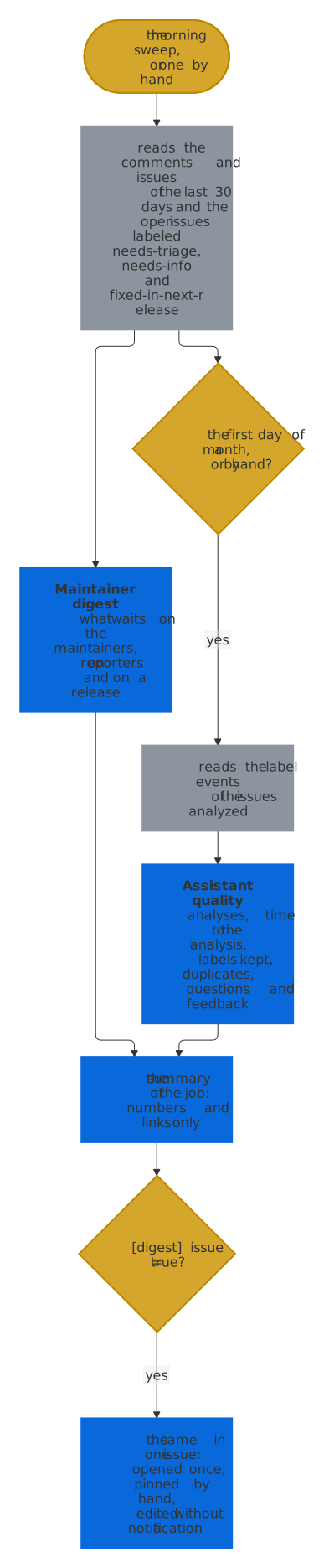
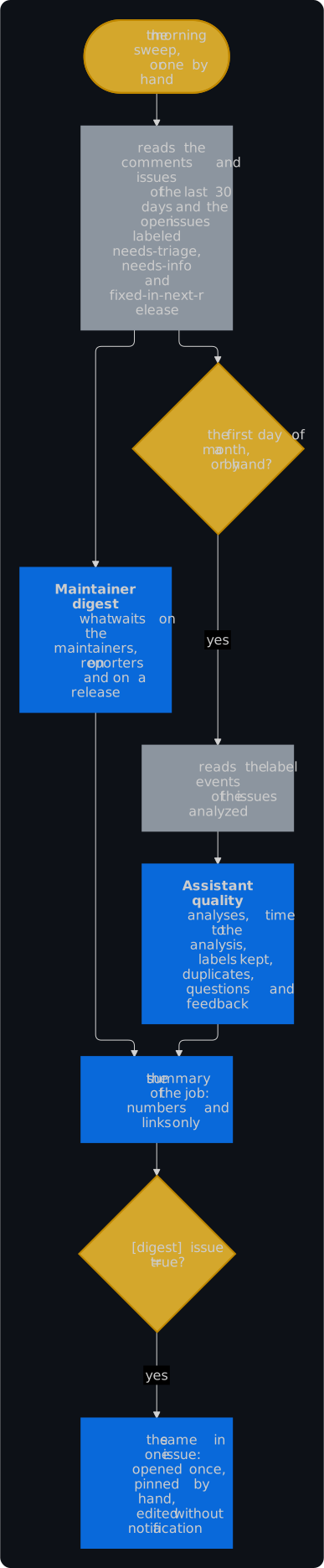
- The maintainer digest, every morning, lists the open issues in three parts, each the longest waiting first and, among those of a day, the one with the most 👍 first, up to 20 a part:
- Waiting on the maintainers: an issue of someone else that needs triage for more than 3 days, one whose reporter answered a maintainer in the last 30 days with no word of a maintainer since, and one where someone objected in a comment to the duplicate notice and no maintainer answered. A fixed issue waits for its release alone.
- Waiting on reporters: every issue labeled
needs-info, with the day of its reminder, or of its closing once reminded, or why it is exempt. - Fixed, waiting for a release: every issue labeled
fixed-in-next-release, with the pull request that fixed it. - The assistant's quality, on the first day of a month, has the numbers of the 30 days before:
| Number | What it counts |
|---|---|
| Analyses posted | the analyses, and the issues they were on |
| Median time from a new issue to its analysis | for the issues opened in the 30 days |
| Labels of the AI kept for 14 days | the kinds, areas, topics and priorities that an analysis or follow-up added and no maintainer removed within 14 days, without the labels that the area field of the form chose; one of the last 14 days counts as kept until someone removes it |
| Labels that maintainers added within 7 days | kinds, areas, topics and priorities that a maintainer added in the week after the first analysis, which the AI missed |
| Duplicate notices | closed as a duplicate, by the sweep or a maintainer; objected to in a comment; kept open otherwise; and still waiting for the closing |
| Questions to reporters | the issues whose analysis or follow-up asked: answered by the reporter in a comment, closed without an answer, settled otherwise, as by a maintainer, and still waiting |
| Feedback on the analyses | the 👍 and 👎 on them |
- Numbers and links only. Anyone who can read the repository can open the run, so the summary names issues by their number and never shows a title or a text.
- It costs few requests. The digest lists the comments and issues of the 30 days and the open issues of three labels, and reads the comments and events of each issue that waits for its reporter, which the sweep has read for its reminders already, so it reads them once. The quality reads the events of the issues analyzed in the 30 days, at most of the 100 analyzed last. A sweep after a merge or a release has neither, and GitHub failing them is a warning in the log, never a failed sweep.
The digest as an issue
Maintainers learn about their work from the Issues tab and their notifications, not from the page of a run. [digest] issue = true in .github/issue-assistant/config.toml keeps the same lists and numbers in one issue as well, which you pin to the top of the Issues tab. It is off by default, so no issue appears unasked:
[digest]
issue = true
title = "Triage digest"   # the default
- One issue, never a second. The first morning sweep, or one started by hand, opens the issue, labeled
assistant-mutedandpinned, and creates those labels where they are missing. Each later sweep finds it by a hidden marker, which counts only in an issue of the assistant's own account, and edits it. A sweep after a merge or a release leaves it as it is. - An edit notifies nobody. The sweep writes the text anew every morning, so a change of yours there doesn't last, and with no new day and no new numbers it writes nothing.
- Pin it by hand. Open the issue and choose Pin issue in its sidebar; the summary of the sweep links the issue. A repository can pin three issues.
- It holds what the summary holds. The lists, the line of the feedback and the day of the sweep: numbers, links and days, never a title or a text of an issue. The numbers of the quality stay, with the day they were counted, until a first day of a month or a sweep by hand counts them anew. The links are relative, because GitHub shows a link with the whole address as a mention on the issue that it leads to, and the reporters would see the digest on theirs.
- Nothing happens there. A comment or an
/assistantcommand on it starts nothing, whoever writes it, and the AI never reads it: not as an issue to analyze, and not among the other issues of an analysis, where it could turn up as a related issue. An issue of someone else with the same marker stays an ordinary issue. - It stays as you leave it. A closed one stays closed and stays current, and the summary says so; reopen it to see it in the list again. After you delete it, the next sweep opens a new one. To stop, set
issue = falseand close it, as the sweep then no longer touches it. - GitHub failing it is a warning in the log and a line in the summary, never a failed sweep; when the lists themselves failed, the issue keeps those of the day before.