Get started
What a repository needs for the issue assistant, how to set it up there, and how to see it work before the first reporter does.
Requirements
- A repository on GitHub.com with issues turned on, public or private. Issue forms are optional; their answers choose labels when the repository has them.
- GitHub-hosted runners. The jobs without AI run on
ubuntu-24.04, the AI onubuntu-24.04-firewall, the runner with GitHub's native egress firewall. That runner is a technical preview: it exists for Linux only, and GitHub expects a workflow on it to take roughly 15 to 20 % longer. The analysis runs only on this runner, so that the AI reaches no host but those of.github/egress-firewall.yaml. - An engine and its secret. For Claude, the default engine: a token of a Claude subscription, which
claude setup-tokencreates, asCLAUDE_CODE_OAUTH_TOKEN, or an API key asANTHROPIC_API_KEY, in the environmentissue-assistant. Without the secret, everything that needs the AI pauses: the first analysis, the follow-ups, and deciding whether a comment waits for the reporter or says that a fix didn't help. Labels from the forms, reminders, closing and the closing of fixed issues with the release keep working, and each run notes that no credentials are configured. - For the set-up: Python 3.12 or newer with PyYAML (
pip install pyyaml) oryq, git and the GitHub CLI on your computer, and the right to manage environments and secrets of the repository.
Set up a repository
A set-up has three parts: what install writes, what you edit, and what you set on GitHub:
flowchart TB
  accTitle: What install writes, what you edit and what you set on GitHub
  accDescr: install of a release, run in the root of the repository, writes the four workflows, the firewall policy .github/egress-firewall.yaml and an entry in .gitignore; adds the notice to reporters to SUPPORT.md and the runner of the AI to actionlint's settings where they are missing; and writes starters of project.md, config.toml, labels.toml, findings.toml and a bug report form when they are missing. With --setup, it also creates the environment issue-assistant on GitHub, limited to the default branch, and asks for the engine's secret. Then you describe the project in project.md, adapt the starters, and turn off the auto-close of issues by merged pull requests. Then check passes, and a run by hand shows the first analysis as a dry run.
  install(["`**install --setup** of a release,<br>in the root of the repository`"]) --> written
  subgraph written ["install writes"]
    direction TB
    workflows["the four workflows,<br>the firewall policy,<br>a line in .gitignore"]
    notices["where missing: the notice<br>to reporters in SUPPORT.md,<br>the runner for actionlint"]
    starters["starters, when missing:<br>project.md, config.toml,<br>labels.toml, findings.toml,<br>a bug report form"]
  end
  written -- "with --setup" --> github
  subgraph github ["install sets up on GitHub"]
    direction TB
    environment["the environment<br>issue-assistant, for the<br>default branch only"]
    secret["the engine's secret,<br>which gh asks for"]
    environment ~~~ secret
  end
  github -- "then" --> edited
  subgraph edited ["you edit and set"]
    direction TB
    describe["project.md: what the<br>project is; the starters:<br>labels, forms, settings"]
    autoclose["on GitHub: no auto-close<br>of issues by merged<br>pull requests"]
    describe ~~~ autoclose
  end
  edited --> check(["`**check** passes, and a run<br>by hand shows the first<br>analysis as a dry run`"])
  classDef trigger fill:#d4a72c33,stroke:#bf8700,stroke-width:2px
  classDef job fill:#8c959f1f,stroke:#8c959f,stroke-width:2px
  classDef person fill:#0969da26,stroke:#0969da,stroke-width:2px
  classDef safe fill:#1a7f3726,stroke:#1a7f37,stroke-width:2px
  class install trigger
  class workflows,notices,starters,environment,secret job
  class describe,autoclose person
  class check safe
-
Install the latest release in the root of your repository, with Python 3.12 or newer, PyYAML (
pip install pyyaml) oryqto read YAML, git and the GitHub CLI:tag="$(gh release view --repo Dennis-Otto/issue-assistant --json tagName --jq .tagName)" dir="$(mktemp -d)" git clone --quiet --depth 1 --branch "$tag" https://github.com/Dennis-Otto/issue-assistant "$dir" && python3 "$dir/issue_assistant.py" install --setupinstallpins the workflows to the commit and the tag of its checkout, and writes the settings and the starters that the repository lacks.--setupcreates the environmentissue-assistant, which only the default branch may use, and asks for the engine's secret. For Claude,claude setup-tokencreates the token of a Claude subscription,CLAUDE_CODE_OAUTH_TOKEN; an API key goes intoANTHROPIC_API_KEYinstead. Each step looks first, so running it again changes nothing but the workflows. -
Describe the project in
.github/issue-assistant/project.md: what it does, where the code, documentation, troubleshooting guide and changelog are, which versions and logs matter in a bug report, and how to address reporters if not as the catalogs of the languages do, such as with Sie in German. The AI reads it before every task. Then adapt the starters to the project, its labels and its issue forms, until the check passes:python3 "$dir/issue_assistant.py" check -
Let the release close fixed issues: under Settings → General → Issues, clear Auto-close issues with merged linked pull requests, so that a fixed issue stays open until the release that ships the fix. GitHub has no API for this setting. A repository without releases sets
close_with_release = falseinconfig.tomlinstead. -
Try it: commit the set-up, push it to the default branch, and under Actions → Issue assistant → Run workflow, enter the number of an existing issue. A run by hand starts as a dry run, which writes nothing; the summary of its
applyjob shows the labels and the comment that it would post: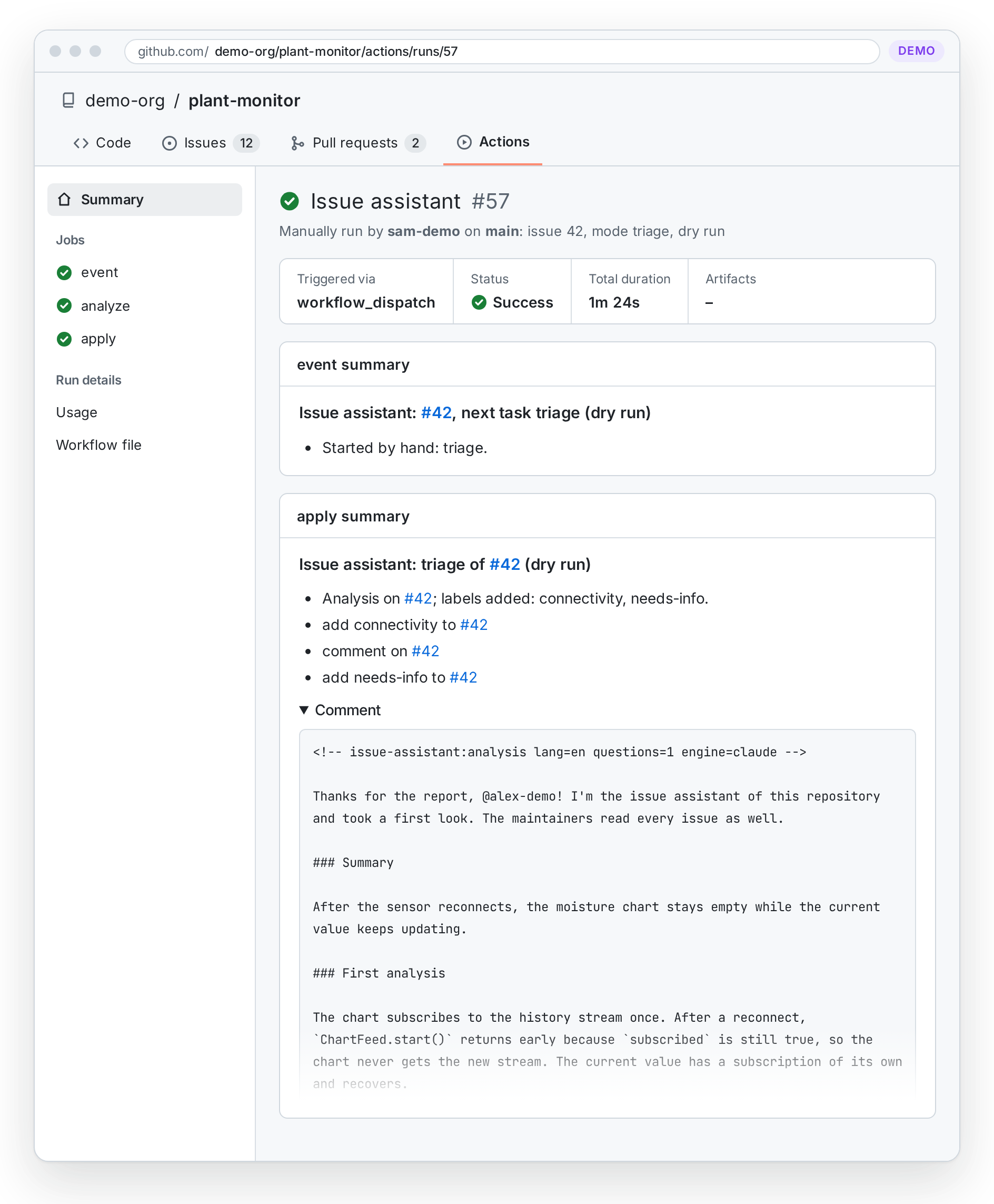
On Windows, run the commands in Git Bash; Python's launcher py takes the place of python3, which there usually opens the Microsoft Store.
What install writes
| File | When | What you do |
|---|---|---|
.github/workflows/issue-assistant.yml, issue-lifecycle.yml, labels.yml, findings.yml |
always, with the pin of the release | nothing: the check makes sure that they equal the templates |
.github/egress-firewall.yaml |
when missing | add the hosts that the engine needs besides those of the template, if any |
.github/issue-assistant/project.md |
when missing | describe the project, as step 2 says |
.github/labels.toml |
when missing | define the labels: the seven lifecycle labels are required; kinds, areas and topics are what the AI chooses from |
.github/issue-assistant/config.toml |
when missing | choose the engine, the hosts that links may lead to, the field of the issue forms that chooses an area, and the files that tell reporters which AI reads their issue |
.github/findings.toml |
when missing | accept findings of code scanning that can't or shouldn't be fixed, each with its reason |
.github/ISSUE_TEMPLATE/bug_report.yml |
together with the starter labels.toml, when the repository has no issue forms or templates |
adapt the answers of the field Area, whose form_options in labels.toml choose an area label |
SUPPORT.md, or the files of [transparency] |
when they don't name the engine | the section What happens with your issue, which the footer of every analysis and follow-up links, tells reporters which AI reads their issue, in German for a file such as SUPPORT.de.md |
.github/actionlint.yaml |
when it exists | nothing: it lists the runner ubuntu-24.04-firewall and ignores the queue of issue-assistant.yml, which actionlint 1.7.12 doesn't know yet |
.gitignore |
when the entry is missing | nothing: /.issue-assistant/ keeps the context of the AI out of commits |
GitHub ignores the case of label names, so the Labels workflow renames a label that the repository has in another case, such as Bug for bug, instead of creating a second one. A YAML file that install can't edit without changing the rest, such as a list in braces, it leaves as it is and names what to add.
Keep it checked
Add the check to the CI of the repository, so that a change of the labels, the forms or the settings can't break the assistant unnoticed:
- uses: actions/checkout@<commit-hash> # vX
  with:
    persist-credentials: false
- name: Check the issue assistant's set-up
  uses: Dennis-Otto/issue-assistant@<commit-hash> # vX.Y.Z
  with:
    command: check
The check runs on Linux, macOS or Windows, with Python 3.12 or newer, and reads YAML with PyYAML or yq. When a workflow differs from its template, it names the commands that write the templates of its release anew.
Without --setup
install alone writes only files. Create the environment and the secret on GitHub yourself, under Settings → Environments, or with the GitHub CLI:
gh api -X PUT repos/OWNER/REPO/environments/issue-assistant -F "deployment_branch_policy[protected_branches]=false" -F "deployment_branch_policy[custom_branch_policies]=true"
gh api -X POST repos/OWNER/REPO/environments/issue-assistant/deployment-branch-policies -f name=main -f type=branch
gh secret set CLAUDE_CODE_OAUTH_TOKEN --env issue-assistant --repo OWNER/REPO
install runs from a git checkout of a release, whose commit and tag it pins. A checkout of another commit needs --ref with that commit and a --version that names no other one; a folder without git, such as an unpacked package of a release, needs both.
Without the secret, labels, reminders, closing and reopening keep working. The repository variable ISSUE_ASSISTANT_AI set to off switches the AI off.
Updates arrive as Dependabot pull requests that move the commit hash of the action in the workflows. When a new release changes the templates, its release notes say so; run the commands of step 1 again.
Check that it works
- The check passes on your computer and in the CI of the repository, as Keep it checked above adds it. It names every problem of the labels, the issue forms, the workflows, the firewall policy and the settings, every key that it doesn't know, and a
project.mdthat still holds the starter's first line or says less than 80 characters. Troubleshooting has the fix for each. - The labels exist once the set-up is merged into the default branch: the Labels workflow creates those of
.github/labels.toml, and Issues → Labels lists them. - A dry run shows the comment, as the last step of the set-up tries it: the summary of the
applyjob of a run by hand shows the labels and the comment that it would post, and writes nothing. - A new issue gets its analysis within a few minutes. Open it from an account that is not a maintainer's: issues of the owner, members and collaborators get the labels of their form, but no analysis.
When no comment comes, troubleshooting has the usual causes, each with its fix. What reporters see shows every comment that the assistant posts.