Granboard over Bluetooth
A Granboard is a soft-tip dartboard with Bluetooth. Home Assistant receives its darts over its own Bluetooth, through an adapter of the Home Assistant machine or an ESPHome Bluetooth proxy anywhere in the house, and plays every game, the training and the statistics with them, as on a dartboard without Autodarts. Nobody has to enter a dart, and no phone, browser or Windows app has to stay connected to the board.
Experimental. The integration reads the frames of the Granboard as open-source Granboard apps read them, and its tests replay them, but it has not met a real board yet. If a bed counts wrong, check every bed and report it; the label goes once a real board has passed.
On this page: What you need · Set up · Play · The connection · Check every bed · Troubleshooting · Where the frames come from
What you need
- A Granboard with Bluetooth. The frames are those of the Granboard 3s; another model that sends other frames shows them in the diagnostics.
- Home Assistant's Bluetooth: an adapter of the machine Home Assistant runs on, or an ESPHome Bluetooth proxy within reach of the board, with active connections, which is what the ready-made proxies have. Home Assistant 2026.8 or newer, as for the whole integration.
- The board free: a Granboard takes one connection at a time, so close the Granboard app or a browser that is connected to it.
Set up

- Switch the board on. Home Assistant finds it on its own and offers it under Settings → Devices & services → Discovered; select Add. If you dismissed that offer, select the button above, or open Settings → Devices & services → Add integration → Autodarts, choose Granboard over Bluetooth (experimental) and the board.
- Give the board a name, such as Granboard or Pub, and select Submit. The integration creates a device with this name, the model Granboard, and the entities of the games, the training and the statistics, plus the diagnostic entity Granboard connection.
- Create the dashboard: Settings → Dashboards → Add dashboard → Autodarts. Its Live and Scoreboard views show the darts as they hit the board.
Play
Start a game on the scoreboard, as on any board, and throw:
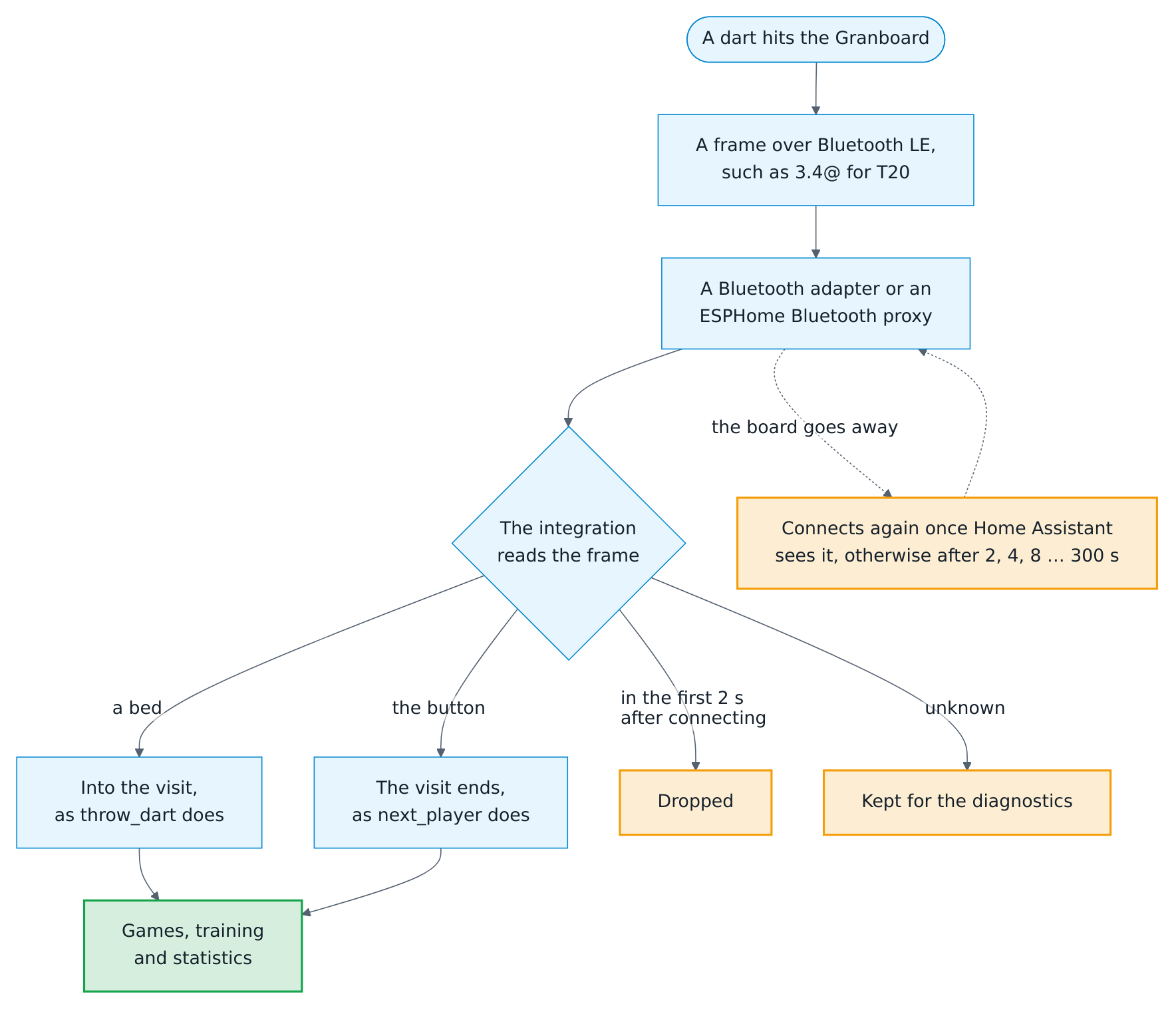
- Every hit is a dart of the player at the board, in its bed: single, double, treble, the outer bull or the bullseye. The inner and the outer single of a number count alike.
- The button beside the board ends the visit, as Next player does. Without a dart, it passes, where the game allows a pass.
- A dart that misses the board is one the board does not see: tap Miss on the keypad, or end the visit with the button.
- A dart in the wrong bed, for a bounce or a stuck tip: tap it on the scoreboard and put it into another bed, as on every dartboard without Autodarts. The keypad, the actions and the voice blueprint keep working beside the board.
- A fourth dart of a visit does not count, and neither do the darts while the bot throws; press the button first.
The board events, such as visit_completed or leg_won, come with manual: true and the source manual, as for every dart entered in Home Assistant, so the blueprints work as they are. The board does not report where in a bed a dart landed, so its darts do not count for the dart positions and their grouping; the heatmap of the beds counts them.
The connection

- Granboard connection, a diagnostic entity of the board, is Connected while the board is.
- A board that goes away, because it sleeps, is switched off or out of reach, connects again as soon as Home Assistant sees it once more. A connection that fails is tried again after 2, 4, 8 and up to 300 seconds.
- The first two seconds after the board connects, its frames are dropped, because a board may report its last hit again as the connection starts.
- Without Home Assistant's Bluetooth, the log says so and the darts are entered on the keypad, until Bluetooth is set up and the integration reloaded.
Check every bed
Help to take the experimental label off with your board:
- Open Settings → Devices & services → Autodarts, the menu (⋮) → Enable debug logging.
- Press each bed with a dart or a finger. The log, under Settings → System → Logs, names every frame and its bed, such as
Granboard frame '3.4': T20. - A frame that the integration does not know reads
unknown. The diagnostics of the board, Download diagnostics in the same menu, list the last ten underconnection → granboard → unknown_frames, with counts of the connections, frames, darts and presses of the button. - Report a bed that counts wrong or a frame that is unknown in an issue, with the frame and the bed you hit. The diagnostics leave out the Bluetooth address of the board.
Troubleshooting
| Symptom | What to do |
|---|---|
| No board found | Switch the board on, bring it within reach of an adapter or a proxy, and close any app that is connected to it. Settings → Bluetooth lists what Home Assistant sees. |
| Granboard connection stays off | A proxy connects to a few devices at a time; free one, or add a proxy near the board. The debug log names the reason of every failed attempt. |
| A hit does not count | A fourth dart, the bot's turn and the first two seconds after connecting do not count. Otherwise check the bed. |
| A bed counts wrong | Check every bed and report it. Correct the dart on the scoreboard meanwhile. |
Where the frames come from
The board sends a few ASCII characters per hit, the line and the pin of the switch under the bed, such as 3.4@, and BTN@ for the button. The integration knows them as the MIT-licensed apps gran-app by sobassy and granboard-app by bastiennoel93 read them; the tests of custom_components/autodarts/granboard.py replay recorded frames against a stand-in for Bleak and Home Assistant's Bluetooth. The lights of the board's ring stay off for now: no app documents how to set them reliably. Decision 0024 explains the choices.