Entities and events
Every board is one device with the entities below. Its name is the one the board has in Autodarts when the board search or the cloud found it, otherwise Autodarts Board. The entity names follow your Home Assistant language and do not repeat the device name. Entity IDs are derived from both when an entity is created, for example sensor.autodarts_board_training_3_dart_average, and stay as they are when a later version renames an entity.
Legend:
| Column or mark | Meaning |
|---|---|
| BM | The Board Manager generation that provides the entity: 1, 2 or both |
| Disabled | Created disabled; enable it in the entity settings if you need it |
| Diagnostic, Configuration | The entity category; these entities are grouped separately on the device page |
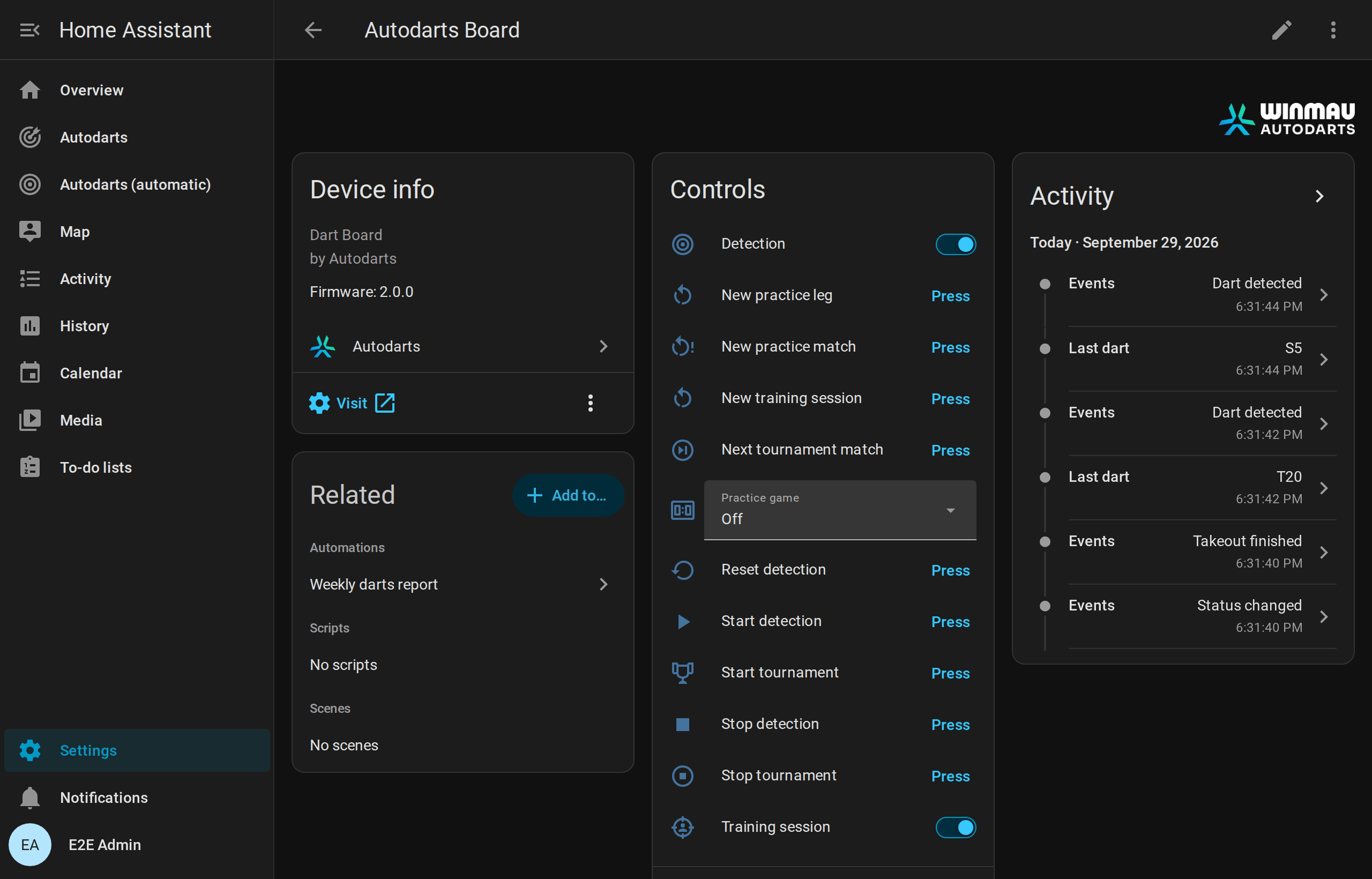
Live visit
| Entity | Type | Description |
|---|---|---|
| Detection status | Sensor (enum) | offline, starting, stopping, stopped, throw (ready), takeout, takeout_in_progress, calibrating, error. Unknown statuses of future Board Manager versions read as unknown. |
| Last dart | Sensor | Segment of the last dart, for example T20, D16, S5, 25, Bull. |
| Last dart score | Sensor, points | Score of the last dart. |

| Darts in visit | Sensor, darts | Darts currently detected on the board (0–3). |
| Detected visit score | Sensor, points | Sum of the detected darts. The throws attribute lists each dart with segment, number, multiplier, score, bed and the normalized position x/y. A detected dart keeps its position while the camera sees it move by less than about 1.7 mm, so it stands still on the card; a dart that moved farther, or that was placed in Home Assistant, shows where it is now. A bed the board sends in an unknown form is empty. Darts corrected or entered in Home Assistant and the darts of the bot belong to the visit, marked corrected, manual or bot; dart numbers the darts of the current visit (1–3), as autodarts.correct_dart counts them. The recent_visits attribute lists the last ten completed visits, newest first, with time, score, darts, segments and manual for a visit with darts entered or corrected by hand. The recorder stores neither attribute. |
| Last event | Sensor, Diagnostic, Disabled | The Board Manager's latest event text, such as Throw detected or Takeout started, in English as the board writes it; Detection status shows the same translated. It changes with every dart, so it starts disabled. |
The visit score is the plain sum of the darts, without game rules such as busts. The last dart, its score and the visit score follow corrections, darts entered by hand and the bot's darts; Darts in visit counts the darts the board itself sees.
Board events
The Events entity (for example event.autodarts_board_events in a Home Assistant set to English, event.autodarts_board_ereignisse in German, or event.autodarts_board_board_events for a board set up with an earlier version) fires native Home Assistant events. Its event_type attribute tells what happened, and further attributes carry the details. Every event also has source: websocket for realtime events, poll when it was noticed during a reconciliation read, training for session events and the start of a tournament, schedule for the weekly report, manual for corrections, darts entered by hand and what follows from them, bot for the darts of the bot, or online for the moments of online matches, which the optional online bridge receives from the browser extension Tools for Autodarts. The entity stays available while the board is away, so events of Home Assistant itself, such as session_ended or personal_best, always arrive.
event_type |
When | Attributes |
|---|---|---|
dart_detected |
A new dart lands, is entered by hand or thrown by the bot | dart_index (1–3), segment (for example T20, S5, Bull, 25 or M for a miss), score, game, name; manual for a dart entered by hand, bot for a dart of the bot |
dart_corrected |
The board, or autodarts.correct_dart, corrects a dart |
dart_index, segment, score, previous (the segment before), game, name; manual when the dart was corrected in Home Assistant |
takeout_started |
You start pulling the darts | none |
takeout_finished |
The board is clear again | none |
visit_thrown |
The third dart of a visit lands, while the darts are still in the board; once per visit | score, darts (3), segments (for example ["T20", "T20", "S20"]), game, name; manual when a dart of the visit was entered or corrected by hand, bot for a visit of the bot |
visit_completed |
A visit ends: on takeout, when new darts follow a missed takeout, when detection stops, or with autodarts.next_player |
score, darts, segments, game, name, thrown (true when visit_thrown already announced the visit); manual and bot as with visit_thrown |
visit_undone |
autodarts.undo_visit takes the last visit back |
score, darts, segments (the darts that are the current visit again), game, name |
status_changed |
The detection status changes | status |
session_started |
A training session starts: with the Training session switch, the New training session button, or the first dart when Start sessions automatically is on | started and reason (manual, new_session or first_dart) |
session_ended |
A training session ends: with the switch, the button, or after the pause set in Session idle timeout | reason (manual, new_session or idle), started, ended, duration_minutes, darts, points, average, visits, highest_visit and the other training totals |
bust |
A dart of the practice game goes below zero, leaves 1 with double out, or reaches 0 without a double | game, player, name, players, remaining (the score at the start of the visit, which stays) |
leg_won |
A dart finishes the practice leg | game, player, name, players, darts and average of the leg, checkout (the score checked out), start (the score the leg started from), double_out and double_in (the rules of the leg, true for the out or in mode double), out_mode, in_mode and bull_mode, legs of the winner in the set including this leg and sets afterwards, match (true when the leg decides the match); when the round limit decides the leg, it comes as the visit of the last round is booked, with rounds, the remaining score of the winner and no checkout, and so does its match_won; in the Cricket games points and mpr instead of average, checkout, start and the rules, in party games points; in a team match also team and team_name, and darts, average and mpr of the team |
match_won |
A dart decides a practice match of several players | game, player, name, players, legs (of the winner in the deciding set) and sets, scores with player, name, legs and sets of everybody, for example 3 : 2, and the average of the match; mpr in Cricket; in a team match also team and team_name, a team for everybody in scores, and the team's average; summary with every player's numbers of the match summary, as they are once the deciding visit is booked |
turn_changed |
In a practice game, the darts were pulled and the next visit is up: the next player in a match, the same player when playing alone | game, player, name, players, remaining, checkout (the route for three darts, or none), setup (in X01 without a checkout, the setup with route and leave, or none); in Cricket points, in party games points and target of the next player; during a bull-off bull_off; in a team match team and team_name |
drill_finished |
A training game ends: Around the Clock, the doubles training, Catch 40, the JDC Challenge or the singles training reach the end, or Bob's 27 ends | drill, darts, hits, hit_rate (percent); Bob's 27 adds score and completed; Catch 40 has score, checkouts and darts, the JDC Challenge score, parts (the points of its three parts) and darts, the singles training score as well |
checkout_attempt |
An attempt of the checkout training or the 121 checkout ends | drill, target, success, darts, attempts, successes, rate (percent); the 121 checkout adds next, the next target |
bull_off_won |
The bull-off decides who starts the match | game, player, name, players, hit (the bed of the winning dart: BULL, 25 or for example S20), distance (millimeters from the center, or none without a position from the board) |
tournament_started |
A tournament starts | format (round_robin or knockout), game, matches (the number of matches to play), players (in the order of the draw), start_scores (in the same order), legs_to_win, sets_to_win, seed (of a random draw, otherwise none) |
tournament_match_finished |
A match of the tournament counts: the darts of its winning visit are pulled | format, game, matches, match (its number in the order of play), round, stage (round_1 to round_7, quarter_final, semi_final, third_place or final), players, winner, loser, legs and sets of both players, next (the players of the next match, none after the last one) |
tournament_finished |
The last match of the tournament counts | format, game, matches, winner, runner_up, third (none in a knockout without the match for third place), players |
personal_best |
A value beats your personal best | record, value, previous, name (the player, if known) |
daily_goal_reached |
Today's darts reach the daily goal, once per day | goal, darts, streak |
weekly_report |
The report week ends, by default on Monday at midnight | week_start, week_end, darts, visits, sessions, training_minutes, average, average_change, highest_visit, scores_180, checkout_rate, darts_at_double, checkouts, legs, matches, streak, daily_goals, personal_bests |
achievement_unlocked |
A named player reaches a new tier of an achievement | player (the seat 1–4 of the player at the board, or none), name, achievement (for example maximum), tier (1–4), tiers (how many the achievement has) and threshold (the value of the tier, for example 10 for ten 180s) |
online_game_on |
Online match: a turn starts, or a moment without an effect of its own | trigger, name |
online_visit |
Online match: a visit | trigger, score; for three darts also darts and segments; for a range score_min and score_max instead of score |
online_dart |
Online match: a dart | trigger, segment (T20, D16, S5, 25, BULL or MISS), score |
online_busted |
Online match: a bust | trigger, name |
online_game_shot |
Online match: a won leg | trigger, segment of the winning dart and name, if the trigger names them |
online_match_shot |
Online match: a won match | trigger, segment, name as with online_game_shot |
online_bull_off |
Online match: the bull-off begins | trigger |
online_tournament_ready |
A tournament match of yours is ready | trigger |
online_match_left |
You left the online match | trigger |
game is the practice game being played while the dart lands, such as 501, cricket or shanghai, and empty without one and in training games. name is the name of the player at the board in that game, also during a bull-off; empty without a game or a name. A visit of three darts is announced twice: with visit_thrown the moment its third dart lands, for 180 celebrations and callers, and with visit_completed when it ends, with the final score after corrections. To react to every visit exactly once and as early as possible, use visit_thrown and visit_completed whose thrown is false; the blueprints do that.
Events of the bot's seat carry bot: true and no name, from its darts to a leg or match it wins. Events are never replayed after a restart or reconnection. See automations for examples.
Training session
The integration counts your darts in training sessions, in Home Assistant and independent of Autodarts games. Sessions survive restarts.
- Start and end: the Training session switch starts a session from zero and ends it. New training session ends the running session and starts the next one.
- Automatically: with Start sessions automatically on, the first dart starts a session when none runs. Session idle timeout ends a session that many minutes after its last dart;
0keeps it running. - Without a session, darts and visits are still announced as board events, for example for a 180 celebration during an online game, but they are not counted.
- By hand and the bot: darts entered by hand count like detected ones, and a corrected dart counts as corrected; the bot's darts count for no session.
- History: a finished session keeps its totals until the next one starts. Last session average keeps the 3-dart average of every finished session with darts, so its history shows your progress.
The defaults, automatic start on and no pause limit, count every dart as version 1.0 did.
| Entity | Type | Description |
|---|---|---|
| Training darts | Sensor, total | Darts in the session. The hits attribute counts the hits per bed, for example {"T20": 12, "S20": 30, "BULL": 2, "MISS": 3}; the heatmap uses it. The recorder does not store hits. |
| Training points | Sensor, total | Sum of all dart scores. |
| Training 3-dart average | Sensor | Points per three darts, the usual darts average. Unknown before the first dart. |
| Training visits | Sensor, total | Visits with at least one counted dart. |
| Training highest visit | Sensor | Highest visit score of the session. |
| Training 100+ visits | Sensor, total | Visits with 100–139 points. |
| Training 140+ visits | Sensor, total | Visits with 140–179 points. |
| Training 180s | Sensor, total | Visits with three triple 20s. |
| Training triples | Sensor, total | Darts in a triple bed. |
| Training doubles | Sensor, total | Darts in a double bed (bull excluded). |
| Training bull hits | Sensor, total | Darts in the bull or outer bull. |
| Training misses | Sensor, total | Darts outside the scoring area. |
| Training session start | Sensor, timestamp | When the session started. |
| Training session | Switch | On while a session runs. Turning it on starts a session from zero; turning it off ends it. |
| New training session | Button | Ends the running session and starts the next one. The board itself is not touched. |
| Start sessions automatically | Switch, Configuration | The first dart starts a session when none runs. On by default. |
| Session idle timeout | Number, Configuration | Minutes without darts, 0–240, after which a session ends by itself. 0, the default, keeps it running. |
| Last session average | Sensor, points | 3-dart average of the last finished session. Attributes: started, ended, duration_minutes, the totals, manual_darts (darts entered by hand), total_darts (darts of visits entered as their score), and sessions with the last 20 sessions, which the recorder does not store. |
Totals use the state class total, with the start of the session as last_reset: Home Assistant's statistics sum them per session, and a correction or an undone visit may lower them. The 100+, 140+ and 180 visits count once a visit is complete, when its darts are pulled. How the counting works.
Personal bests, streak and daily goal
Home Assistant keeps your best values, the days you trained and your darts per day. Every detected dart counts for the day, in a session or not. The first value of each record sets it quietly; beating it fires personal_best, and equal values do not count. The records of a leg count when the leg is booked, as its darts are pulled, so a win that a correction takes back sets none. An undone visit takes back the records it set; its darts still count for the day, the streak and the daily goal.
| Record | Best value | From |
|---|---|---|
highest_visit |
highest | a visit of up to three darts |
highest_checkout |
highest | a won X01 leg with double out |
fewest_darts_101 to fewest_darts_1001 |
fewest | a won X01 leg with double out that started from 101, 301, 501, 701, 901 or 1001, played alone, not as a team |
best_cricket_mpr |
highest | the marks per round of a won Cricket leg, played alone |
around_the_clock, doubles |
fewest | darts of a finished training game |
bobs_27 |
highest | the score of a completed Bob's 27 |
checkout_121 |
highest | the highest score checked out in the 121 checkout |
catch_40, jdc_challenge, singles |
highest | the score of a finished game of Catch 40, the JDC Challenge or the singles training |
best_session_average |
highest | a finished training session of at least 30 darts |
| Entity | Type | Description |
|---|---|---|
| Last personal best | Sensor, timestamp | When the last personal best fell; unknown before the first. Attributes: record, value, previous and name of that best, and the best value of every record under its key, for example highest_checkout. |
| Darts today | Sensor, darts, total | Darts detected today; starts from 0 at midnight. Attributes: goal, goal_reached, progress (percent of the goal). |
| Training streak | Sensor, duration in days | Days in a row with at least one dart. It stays until a whole day passes without darts. Attributes: best_streak, trained_today, last_day. |
| Daily goal | Number, darts, Configuration | Darts to throw every day, 0–2000 in steps of 10; 0, the default, sets no goal. When today's darts reach it, daily_goal_reached fires once. A higher goal set after that is reached anew, with the event again. |
Weekly report
Home Assistant sums up your training week. Every detected dart counts, in a session or not, like the darts of the day. When the week ends, by default on Monday at midnight in Home Assistant's time zone, the event weekly_report announces the week, and the next week starts from zero. The weekly report blueprint sends it to your phone.
| Value | Meaning |
|---|---|
darts |
Darts detected in the week |
visits, average |
Completed visits and their 3-dart average |
average_change |
The average minus the average of the week before; null unless both weeks have one |
highest_visit, scores_180 |
The highest visit of up to three darts, and the visits of three triple 20s |
sessions |
Training sessions with darts that ended in the week |
training_minutes |
Time at the board: the time from dart to dart, without pauses of more than five minutes |
checkout_rate, darts_at_double, checkouts |
X01 practice legs: legs checked out per dart thrown at a double, like Practice checkout rate |
legs, matches |
Practice legs finished and practice matches of several players decided, as booked when the darts are pulled |
streak, daily_goals |
The training streak when the week ends, and the days that reached the daily goal |
personal_bests |
The personal bests of the week with record, value and name, the latest first, at most 10 |
week_start, week_end |
Start and end of the week, in UTC |
| Entity | Type | Description |
|---|---|---|
| Weekly report | Sensor, darts, total | Darts of the running week; every week starts from 0, with its start as last_reset. Attributes: the values above for the week so far, average_change against the last report, and last_week with the last report. The recorder stores neither last_week nor personal_bests. |
| Weekly report day | Select, Configuration | The day that ends the week, monday to sunday; monday by default. |
| Weekly report time | Time, Configuration | The time of that day, to the minute; midnight by default. |
A new day or time ends the running week at its next occurrence. A report that fell due while Home Assistant was stopped follows at the next start; the weeks in between had no darts and are skipped. How the week is counted.
Training calendar
The Training calendar (calendar.*_training_calendar) shows your finished training sessions and practice matches in Home Assistant's calendar, for example Training · 312 Darts · Ø 54.2 or 501 · Alex 3:2 Sam. It is read-only. Its titles follow Home Assistant's language in German, Dutch, French and Spanish, with the decimal comma, for example Training · 312 Darts · Ø 54,2; other languages read as in English.
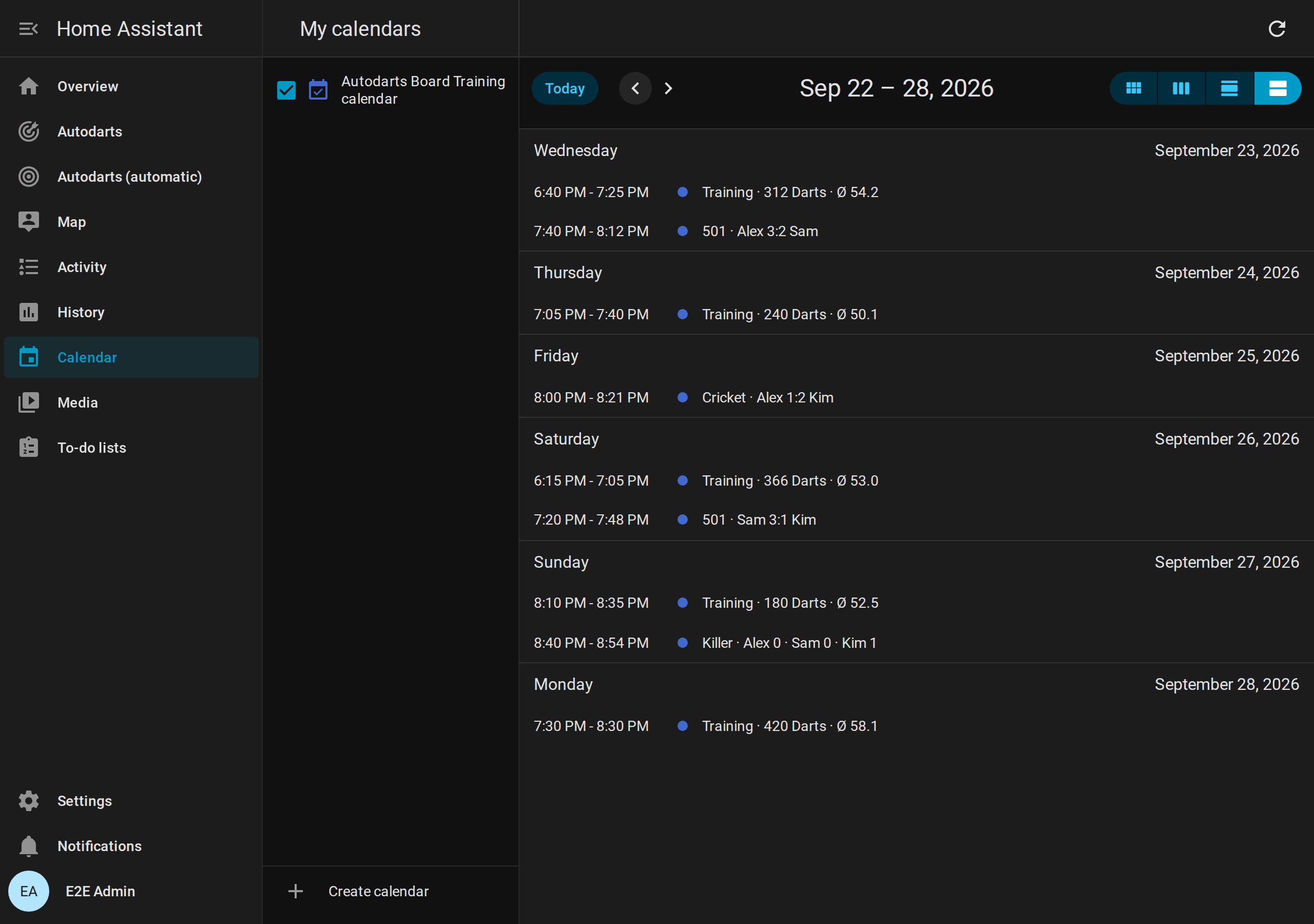
- Sessions run from their start to their end. The description lists the 180s, 140+ and 100+ visits and the highest visit (Max).
- Matches of several players, of every game, run from their first dart to the deciding dart. The title shows the sets won, or the legs when one set decides the match; players without a name appear as
#1to#4and the bot as Bot, and a team match names both teams, for example 501 · Alex & Kim 1:0 Sam & Lea. The description lists each player's average, marks per round or points. Matches played before version 1.6 have no first dart and appear as one minute. - A year of history. The calendar keeps the sessions and matches of the last 365 days, at most 3,000 of each. After the update, it takes over the last 20 sessions and matches already stored.
- State: the calendar is off, because nothing lies ahead. Its attributes show the session or match that ended last.
Calendar triggers and the action calendar.get_events work as with any calendar, for example to count the sessions of a month in a template.
Practice game
Play X01, Cricket or a party game on the local board without an Autodarts game. Home Assistant counts down, recognizes busts and shows the checkout route. The game needs no cloud and survives restarts. The games guide explains how to start a game and the rules of every game; this section is the reference of its entities.

- Start: choose 101, 301, 501, 701, 901 or 1001 in Practice game. Darts already on the board do not count. New practice leg starts the leg again from the full score.
- Start scores and teams: every player can start from a score of their own, and four players can play as two teams; see Teams and start scores.
- In and out modes: Practice in mode and Practice out mode are
straight,doubleormaster, as on play.autodarts.io. With double or master in, a player's score starts with the first double or bullseye of the leg, with master also a triple; darts before it score nothing, and a bust takes the opening back. The card asks for it and outlines the double ring. With master out, a triple finishes too. Practice double in and Practice double out stay for automations: on is the mode double, off straight. - Bull mode and round limit: Practice bull mode
50_50scores the outer bull 50, as the bullseye; Practice max rounds ends a leg after that many rounds with the lowest score as the winner. The rules. - Bull-off: with Practice bull-off and two or more players, a match starts with one dart per player at the bull. As in the official rules, the bullseye beats the outer bull, which beats every other bed; two darts in the same bull bed throw again, in reverse order. Outside the bull, and inside it with Practice bull-off by distance, the dart closest to the center wins, measured from the dart positions the board reports; a dart without a position never beats a measured one. The bull-off rules.
- Visits: a visit ends when you pull the darts. After a bust, the score of the visit start stays. Darts after a bust or after the winning dart do not count.
- Checkout: the route for the darts left in the visit, for example
T20 T20 BULLfor 170. How the route is chosen. - Matches: set Practice players to 2, 3 or 4. After a visit, the next player throws; a bust passes the turn too. The first player to win Practice legs per set legs wins the set, and the first to win Practice sets to win sets wins the match. The first throw passes every leg within a set, and every set starts with the next player. The result, with the legs of the deciding set, stays on the card until the next dart, which starts a new match. With one player, legs count up; there are no sets and no match. The match rules.
- Match summary: a finished match of several players is summed up for every player: legs, sets and darts; in X01 the 3-dart and first-9 average, the checkout rate, the highest checkout, 100+, 140+ and 180 visits, the best leg and the darts at a double; in Cricket the marks per round and the marks. The scoreboard shows it after an X01 or Cricket match,
match_wonannounces it, and Practice remaining score keeps it insummaryuntil the next match ends. How the numbers are counted. - Sessions: the practice game and training sessions are independent. A dart counts in both.
- Corrections and darts entered by hand: a dart the board read wrong is corrected with an action or a tap on the scoreboard, missed darts are entered by hand, and the last visit can be taken back; see Corrections and darts entered by hand.
- Bot: X01 and the Cricket games can be played against the computer at a level you choose; see Bot.
- Setup: where the darts left cannot check out, the game suggests where to aim instead; see Setup hints.
- More games: Practice game also offers the Cricket games, six party games and eight training games.
| Entity | Type | Description |
|---|---|---|
| Practice game | Select | off, 101, 301, 501, 701, 901, 1001, a Cricket game (cricket, cut_throat, tactics, wild_mouse), a party game (shanghai, halve_it, killer, golf, baseball, count_up) or a training game: around_the_clock, doubles, checkout, bobs_27, checkout_121, catch_40, jdc_challenge, singles. Choosing starts a new match or game. |
| Practice remaining score | Sensor | Remaining score of the player at the board; unknown without a game. Attributes: game, double_out, double_in, in_mode, out_mode, bull_mode, max_rounds, round (the round of the X01 leg, from 1), opened (the player at the board has opened with double in, or plays without it), player and name of the player at the board, checkout, bust, won, visit (the segments of the current visit), darts and average of the leg, players, legs_to_win, sets_to_win, winner (the player who won the match, until the next dart), start (the start score of the player at the board), teams in a team match (team, name and players of both teams, otherwise none), scores with player, name, remaining, opened, start, legs (in the current set, or the deciding set of a finished match), sets, match_legs (legs of the whole match), the match average and in a team match the team of every player, bull_off during a bull-off (the player at the board, rethrow, by_distance and throws with player, name, hit and distance), and legs with the last 10 legs (game, player, name, darts, average, checkout, ended, and rounds for a leg the round limit decided), and summary with the last finished match of several players: game, ended, winner, legs_to_win, sets_to_win, double_out and players with player, name, legs (won in the whole match), sets and darts of everybody; X01 adds average, first_9_average, checkouts, darts_at_double, checkout_rate, highest_checkout, scores_100, scores_140, scores_180 and best_leg (fewest darts of a won leg), Cricket mpr, marks and best_leg. double_out is the rule of the leg in progress. With the bot, bot names its player and level (otherwise none), and its entries in scores, the bull-off's throws and the summary's players carry bot: true. setup holds the setup hint where no checkout exists, and undo is true while autodarts.undo_visit can take the last visit back. The recorder stores neither visit, scores, legs nor summary. |
| Practice checkout | Sensor | The checkout route, for example T20 25 D18; unknown when no route exists. |
| Practice target | Sensor | The target of the training game, for example 7, D16, BULL or the checkout score 81, or the next open number in Cricket, for example T19, in Wild Mouse also D or T for any double or triple; unknown without a target. Attributes: drill, finished, visit, progress and targets, darts, hits, hit_rate, the best result as best, and results with the last 10 results, which the recorder does not store. Bob's 27 adds score; the checkout training and the 121 checkout add remaining, checkout, bust, won, attempt_visit, attempt_visits, attempts, successes and rate; Catch 40 adds score, checkouts and the same values of the number being checked out; the JDC Challenge adds part, score and parts, the singles training score. |
| New practice leg | Button | Starts the leg again from the full score; legs and sets stay. After a finished match, it starts the next match. |
| New practice match | Button | Starts the match again from zero legs and sets. |
| Practice first 9 average | Sensor, points | 3-dart average of the first nine darts of each leg, over the last 10 legs of everybody at the board. |
| Practice checkout rate | Sensor, % | Legs won per dart thrown at a double, over the last 10 legs. A dart counts at a double when one double could finish the score: 2 to 40 when even, or 50. Only with double out. |
| Practice doubles rate | Sensor, % | The same darts at a double together with the last 10 results of the doubles training and Bob's 27. |
| Practice legs played | Sensor, total | Legs finished in X01, the Cricket games and the party games; its long-term statistics show the legs per day. An undone visit that won a leg takes the leg back. |
| Practice players | Number, Configuration | 1–4 players, in a party game and before a game is chosen 1–8; with the bot, 1–3 besides it. Choosing X01, a Cricket or a training game leaves the first four. A change starts a new match. |
| Practice legs per set | Number, Configuration | 1–11 legs win a set. A change starts a new match. |
| Practice sets to win | Number, Configuration | 1–7 sets win the match. A change starts a new match. |
| Practice player N | Text, Configuration | Name of player 1–8, at most 20 characters, for the scoreboard and the events. Without a name, the card shows Player N. A name that another player in the game already has, in any case, is refused; a player slot outside the game, beyond Practice players or on the bot's seat, gives such a name up. |
| Practice in mode | Select, Configuration | How X01 legs open: straight with any dart, the default, double with a double or the bullseye, master with a double, a triple or the bullseye. A change starts a new match. |
| Practice out mode | Select, Configuration | How X01 legs end: straight on any dart, double on a double or the bullseye, the default, or master on a double, a triple or the bullseye. Before the first dart of a leg a change applies at once; during a leg it applies from the next leg, so the leg in progress keeps its rules. |
| Practice bull mode | Select, Configuration | 25_50, the default: the outer bull scores 25 and the bullseye 50; 50_50: both score 50, and only the bullseye is a double. A change starts a new match. |
| Practice max rounds | Number, Configuration | 1–50 rounds after which the lowest score wins an X01 leg, ties playing on round by round; 0, the default, plays without a limit. A change starts a new match. |
| Practice double out | Switch, Configuration | On while the out mode is double; on sets it to double, off to straight. For automations from before the out mode. |
| Practice double in | Switch, Configuration | On while the in mode is double; on sets it to double, off to straight, and a change starts a new match. For automations from before the in mode. |
| Practice bull-off | Switch, Configuration | A bull-off decides who starts a match of several players. Off by default; a change starts a new match. |
| Practice bull-off by distance | Switch, Configuration | Two darts in the same bull bed are decided by the distance the board measured instead of a rethrow. Off by default, as the official rules want; applies at once. |
| Practice teams | Switch, Configuration | Four players of X01 or a Cricket game play as two teams. Off by default; a change starts a new match. |
| Practice Wild Mouse three in a bed | Switch, Configuration | Wild Mouse with 3 in a bed, as its rules have it. On by default; a change starts a game of Wild Mouse anew. |
| Practice start score player N | Number, Configuration | The X01 start score of player 1–4 for a handicap, 2–1001; 0, the default, plays the game's start score. A change starts a new match. |
| Practice Golf holes | Select, Configuration | 9 or 18 holes of Golf; 9 by default. A change starts a game of Golf anew. |
| Practice Count-Up rounds | Number, Configuration | 1–20 rounds of Count-Up; 8 by default. A change starts a game of Count-Up anew. |
| Practice manual entry | Switch, Configuration | Darts can be entered by hand, with autodarts.throw_dart or the scoreboard's keypad. Off by default. |
| Practice bot level | Number, Configuration | The 3-dart average the bot plays, 20–120; 0, the default, plays without the bot. A change starts a new match. |
| Practice bot delay | Number, Configuration | Seconds before each of the bot's darts and before its visit ends, 0–10 in steps of 0.5; 2 by default. |
Teams and start scores
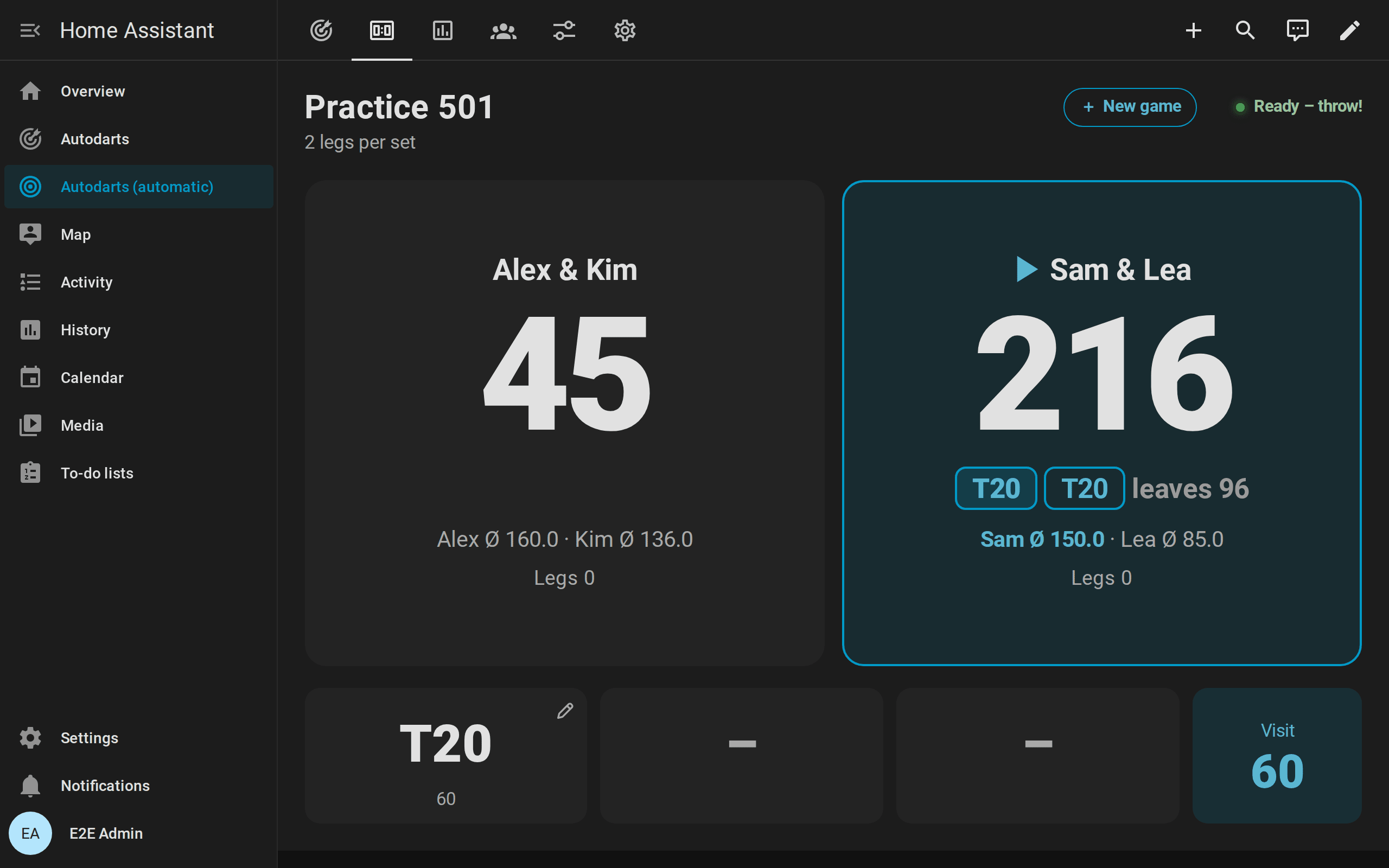
- Teams: switch on Practice teams and set Practice players to 4. Players 1 and 3 play against players 2 and 4 in X01 and the Cricket games; they throw in seat order, so the teams alternate. Partners share one score: the remaining score in X01, the marks and points in Cricket. The scoreboard shows two team tiles, Alex & Kim against Sam & Lea, with the partner at the board in bold. Both partners win the leg and the match; the events add
teamandteam_name. - Statistics: the averages, the first nine and the checkout rate stay per person, and the player profiles count the leg and the match for both partners. Head-to-head records count only between opponents. A team leg sets no fewest-darts and no marks-per-round personal best, neither in the records nor in the profiles or the weekly progress; its checkout counts for the partner who threw it.
- Start scores: for a handicap, set Practice start score player N, for example 301 for a beginner against 501.
0plays the game's start score. The scoreboard shows every start score beside the names, andleg_wonnames it instart. A team plays from the start score of its first player. A leg counts for the fewest-darts record of the score it started from: from 301 forfewest_darts_301, from 401 for none. - Party and training games are always played alone; with fewer or more than four players, Practice teams does nothing.
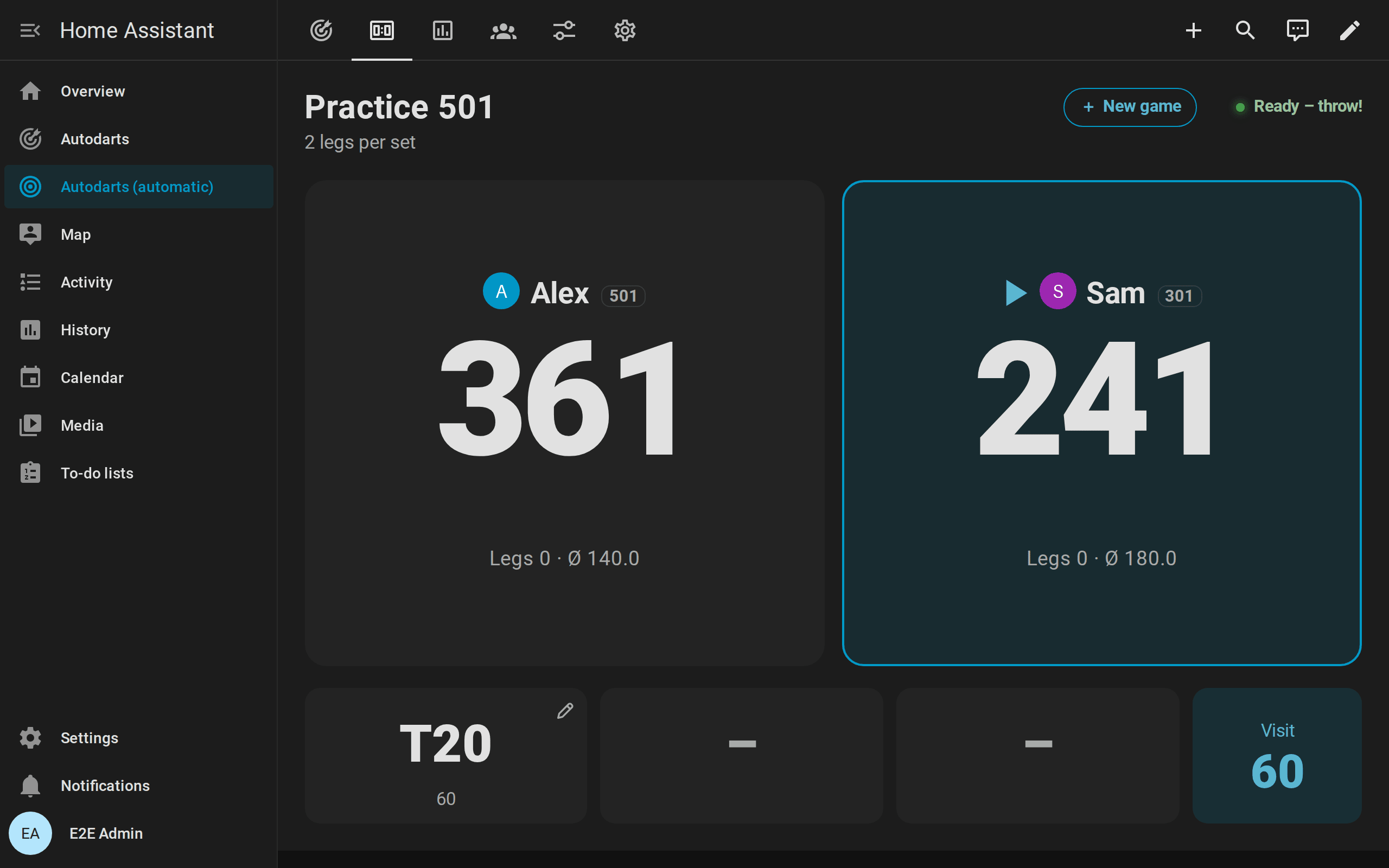
The rules of teams and start scores.
Corrections and darts entered by hand

- Correct a dart: when the board reads a dart wrong,
autodarts.correct_dartor a tap on the dart on the scoreboard puts it into the right bed. The practice game and the training session count the corrected dart at once: the remaining score, a bust or a win, the marks and the statistics follow. The board keeps its own reading; the correction holds until the darts are pulled or until the board corrects the dart itself.dart_correctedannounces it withpreviousandmanual. A dart corrected into another bed has no position, because the board misread the spot as well, unless the correction says where it is: the Board view of the scoreboard's pad, orxandyof the action. - Enter a dart: with Practice manual entry on,
autodarts.throw_dartor the scoreboard's keypad adds a dart the board missed, or the darts of a player without cameras, as if the board had detected it, markedmanual. The detection need not run: while it is stopped, the darts entered make the visit on their own. A dartboard without Autodarts has no switch for it, because all its darts are entered. - Next player:
autodarts.next_playerends the visit without pulling the darts. The darts in the board belong to no visit until they are pulled, and new darts count for the next player. Without darts, the player at the board passes in X01, the Cricket and the party games; a pass that ends the last round of a party game books the leg and the match like a visit with darts. - Undo a visit: when the darts were pulled before a wrong reading was noticed,
autodarts.undo_visittakes the last visit back: the game returns to where it was before it, also after a won leg, and the visit's darts leave the training totals and become the current visit again, to correct them and end the visit with Next player. The personal bests, the players' progress, the weekly report and the training calendar return with it, so the visit counts once when it ends again. Visits of the bot after it are taken back with it.visit_undoneannounces it.
The rules of corrections and darts entered by hand.
Bot

- Play against the computer in X01 and the Cricket games: set Practice bot level to the 3-dart average it plays, from 20 to 120, or start a game with
bot_level, or seat it on the scoreboard's new game screen.0plays without it. - Its seat: the bot sits after the players, so one player plays against the bot with Practice players at 1; with the bot, up to three players play. Party games, training games and tournaments are played without it.
- Its turn: the bot throws Practice bot delay seconds after the darts of the player before were pulled, dart by dart, and ends its visit after the same pause. Its darts show on the cards like detected ones, with their positions, and fire the usual events with
bot: true. If a player throws while the bot is still at the board, the bot throws the rest of its visit at once, and the new darts count for the player. - How it aims: like a player, at the treble 20 to score, along the checkout route, and at the setup where no route exists; in Cricket it closes the numbers and scores while behind. Its darts scatter around the aim point so that its average matches its level. How the bot plays.
- Its darts count for nobody: not for the training session, the statistics, the personal bests, the player profiles, the achievements, the weekly report or the correction rate, and they never start a training session. The result of a match against the bot counts in the players' profiles.
Setup hints
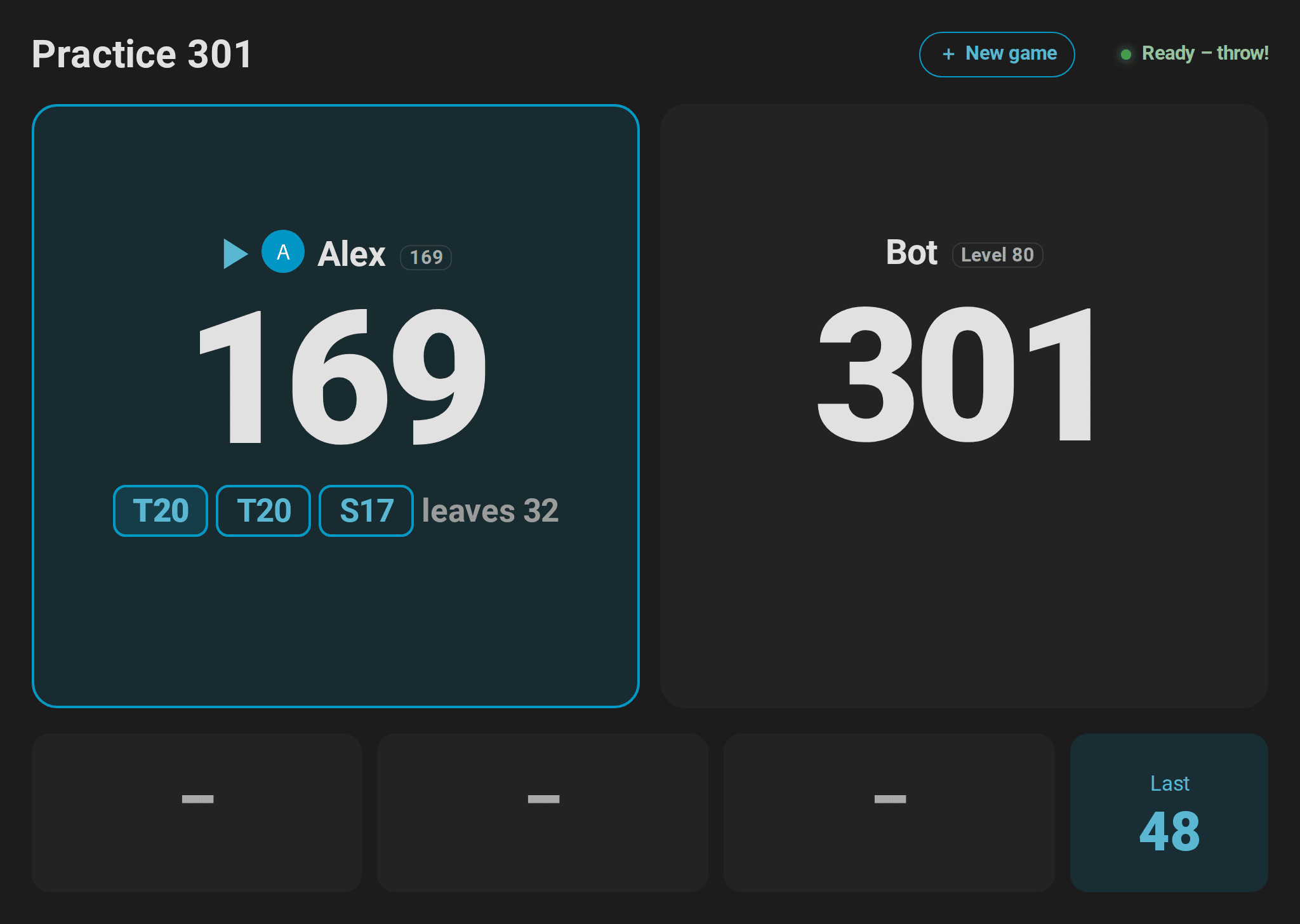
When the darts left in a visit cannot check out, at 169, above 170 or at 100 with one dart, Practice remaining score names a setup in setup: its darts in route, for example T20 T20 S17, and the score they leave for the next visit in leave, for example 32. The scoreboard and the live card show it where the checkout would be and outline its first dart; turn_changed carries it, and the scoreboard's caller says Leave yourself 32. Above 170 with three darts, only a double is worth setting up; below, a finish of two darts as well. With Practice personal checkout routes, the player's strongest doubles come first. How the setup is chosen.
Cricket
Choose cricket in Practice game, alone or as a match of up to four players with legs and sets, like X01.
- Marks: only 20 to 15 and the bull count. A single is one mark, a double two, a triple three; the outer bull is one mark, the bullseye two. Three marks close a number.
- Points: marks on a closed number score its value (25 for the bull) as long as another player still has it open.
- Win: close every number with at least as many points as everybody else. Alone, closing every number wins the leg.
- Target: Practice target shows the next open number from 20 down to the bull, for example
T19orBULL, and the card outlines it on the board. - Marks per round (MPR): marks that counted per three darts, the usual Cricket statistic. Marks on a number nobody needs any more do not count.
Three variants play by the same marks:
| Game | Rules |
|---|---|
Cut-Throat Cricket (cut_throat) |
Marks on a closed number give its value to every other player who still has it open. Close every number with the fewest points to win. |
Tactics (tactics) |
Cricket on 20 to 10 and the bull, twelve numbers in all. |
Wild Mouse (wild_mouse) |
Cricket plus Doubles, Triples and 3 in a bed: a dart marks its number while it is open, otherwise doubles or triples; three darts in one bed close 3 in a bed at once. Rules |
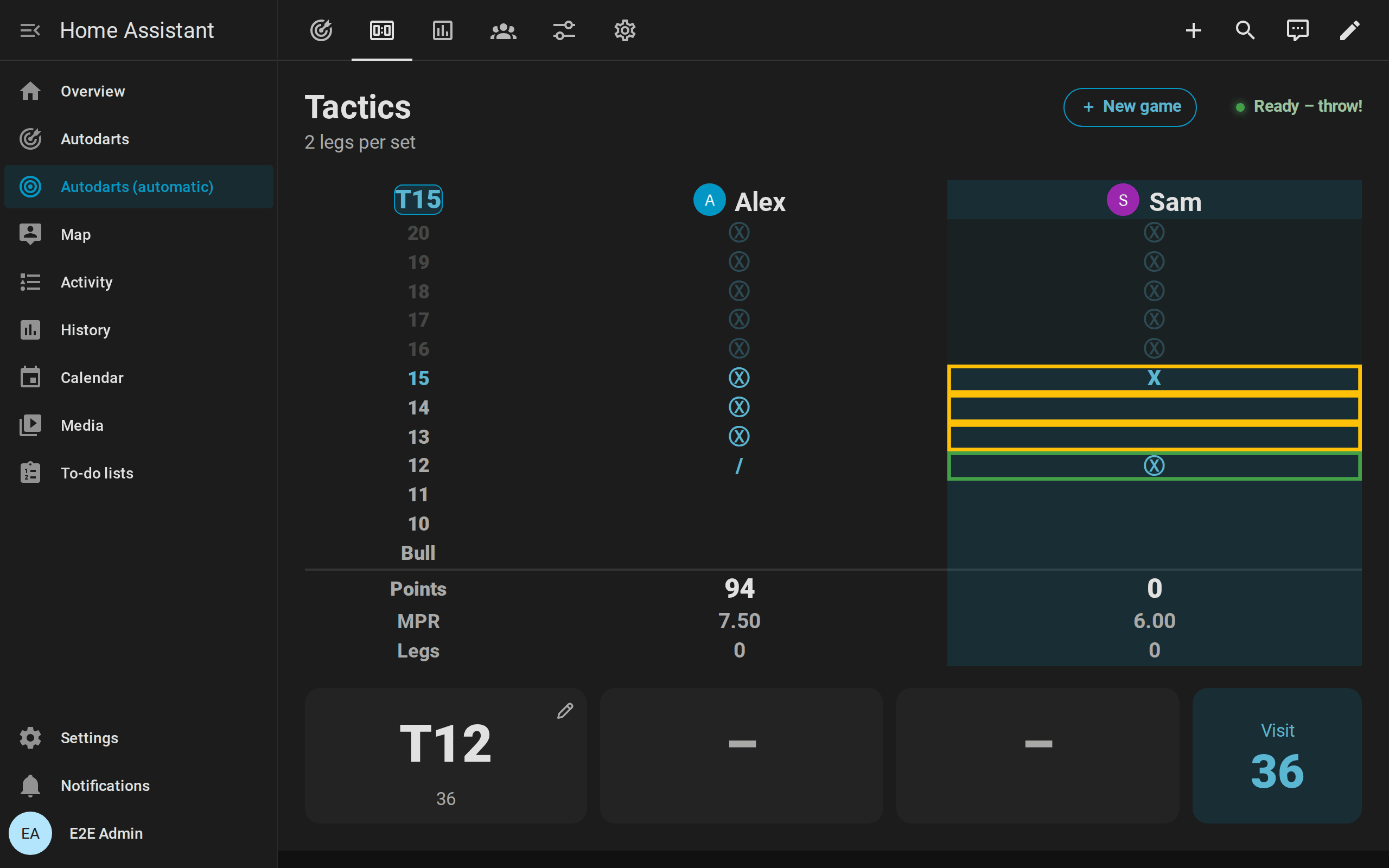
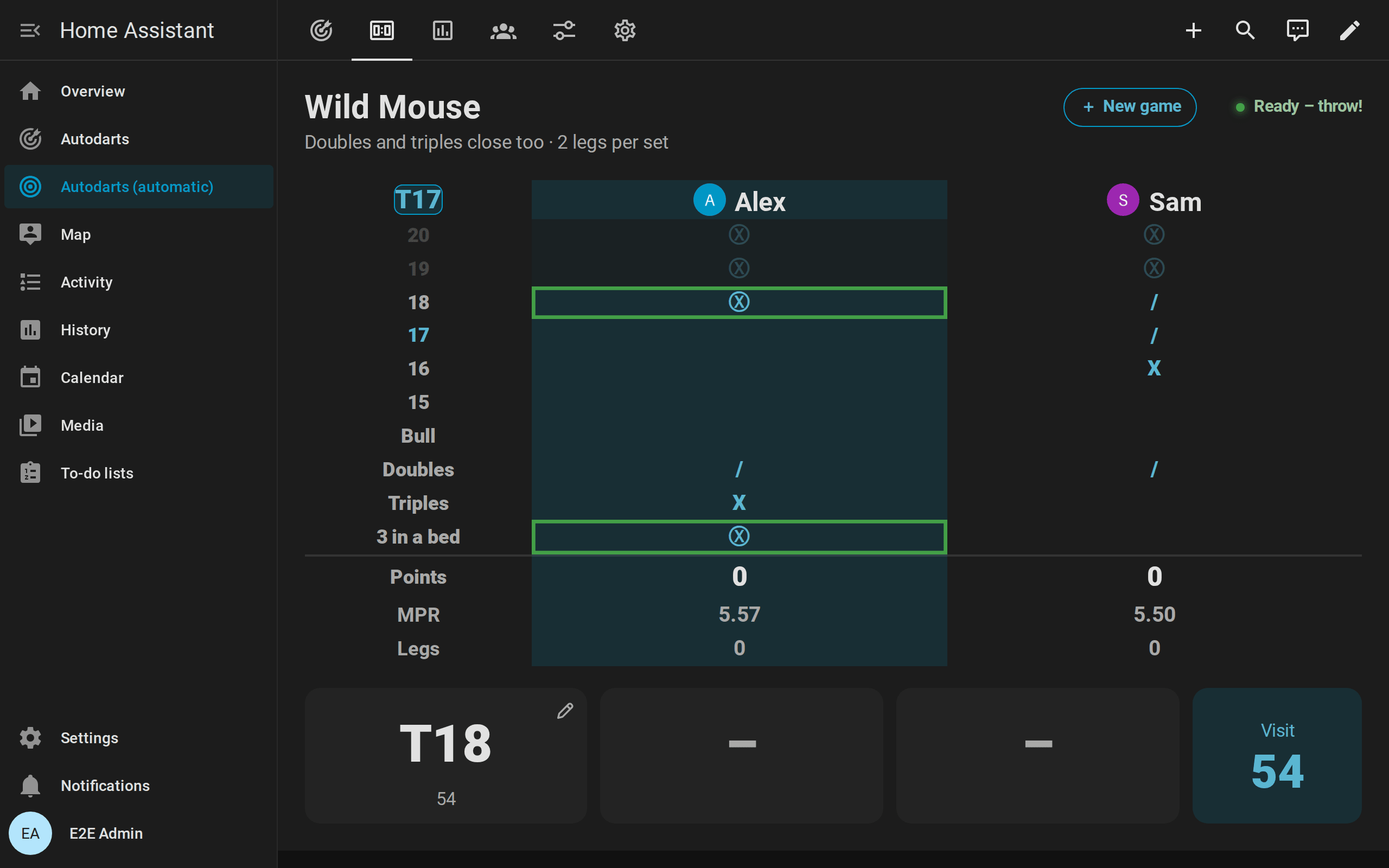
The card shows a chalkboard with the marks of every player (/, X, Ⓧ), the points and the MPR, and the numbers of the game. Practice remaining score stays unknown in the Cricket games; its attributes carry the game: game is cricket, cut_throat, tactics or wild_mouse, plus points, mpr, target, numbers (20 to 15 and 25, in Tactics 20 to 10 and 25) and scores with marks, points, legs, sets and mpr of every player; counted says what every dart of the visit counted for, its number or null for nothing. Wild Mouse adds targets, the targets after the numbers (doubles, triples and, with three in a bed, bed), whose marks follow those of the numbers in marks; target_row, the row of the target; doubles and triples in counted; and bed, whether the visit was a bed that counted. Cricket legs do not count for the X01 statistics; the MPR of the player profiles and best_cricket_mpr come from Cricket only.
Player profiles
Every named player of a practice game gets a profile with lifetime numbers. Names are the same player regardless of upper and lower case; players without a name count for nobody. Every leg of X01, the Cricket games and the party games counts; X01 legs add the averages and the checkout rate, Cricket legs the marks per round. In a team match, both partners win the leg and the match.
| Entity | Type | Description |
|---|---|---|
| Player profiles | Sensor, players | The number of profiles. Attribute players with, for every player: name, legs_played, legs_won, matches_played, matches_won, average, first_9_average, checkout_rate, mpr, highest_visit, highest_checkout, best_mpr, fewest_darts (start score → fewest darts for a won leg), last_played and person (the linked person, or none), and the player's progress: darts_thrown, maximums, streak, best_streak, hits, spread, best_aim, expected_ppd and trend. highest_visit is the highest X01 score of the player; highest_checkout and fewest_darts come from legs with double out only. The recorder does not store the list. |
| Last match | Sensor, timestamp | When the last match of several players ended. Attributes: game and winner of that match, matches with the last 20 matches (ended, game, legs_to_win, sets_to_win, winner, in a team match winners with both winners, and every player's name, legs and sets at the end, match_legs and average, mpr or points, and team in a team match), and head_to_head with the wins of every pair of named opponents. The recorder stores neither list. |
The players card shows all of it. To remove a profile, for example after a typo in a name, use autodarts.delete_player.
Players and persons: link a player to a person of Home Assistant with autodarts.link_player. The scoreboard, the players card and the new game screen then show the person's picture, and the new game screen lists the players who are at home first. The link is saved with the profile and survives restarts.
Player progress
Besides the lifetime numbers, every named player's entry in Player profiles carries their progress. It counts what the player throws in practice and training games; training games count for Practice player 1. How progress is counted.
| Attribute | Content |
|---|---|
darts_thrown |
Darts thrown in practice and training games |
maximums |
X01 visits that scored 180 |
streak, best_streak |
Days in a row with darts in a practice or training game, now and at best; streak stays until a whole day passes without darts |
hits |
Hits per bed, like the hits of Training darts, for the player's heatmap |
spread |
The grouping at up to six beds aimed at, most darts first: target, darts, offset_x and offset_y (millimeters from the center of the bed, right and up), r50 and r80 (radii holding 50 and 80 % of the darts) and change (the radius of the newer half of the darts minus the older half; negative is tighter) |
best_aim, expected_ppd |
Where the player scores the most points per dart with their own spread, from 30 darts aimed at a treble: the bed of the best aim point, such as T19, and its points per dart, to a tenth; empty with fewer darts. The aim map |
trend |
The last 12 weeks, oldest first: weeks with the Monday of each week, and one list per sum with a value for every week: darts, x01_darts, x01_points, first9_points, first9_darts, at_double, checkouts, double_attempts, double_hits, cricket_darts, cricket_marks, legs, legs_won, maximums, and the week's highest_checkout, best_501 (fewest darts of a 501 leg) and best_mpr, which are empty without such a leg |
The sums let you compute any average over any weeks, for example the 3-dart average of the last four weeks as three times the sum of x01_points divided by the sum of x01_darts.
Achievements
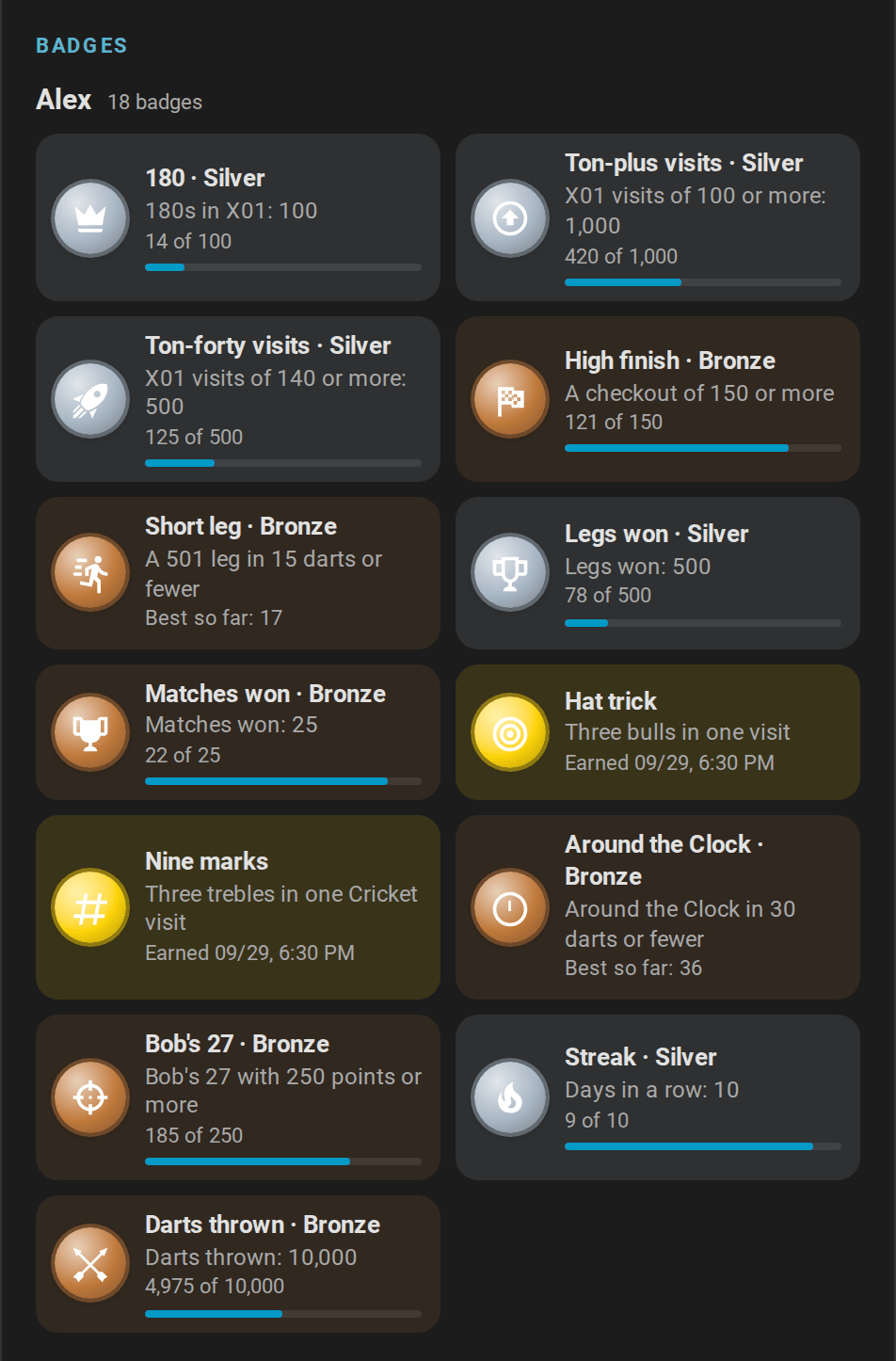
Named players unlock achievements, most of them in tiers: bronze, silver, gold and, for the streak, platinum. They come from what the player throws in practice and training games; a player without a name unlocks nothing. Each new tier fires achievement_unlocked, and the players card shows the badges.
| Achievement | achievement |
Tiers | Measured by |
|---|---|---|---|
| 180 | maximum |
1, 10, 100 | X01 visits that scored 180 |
| Ton-plus visits | ton_plus |
10, 100, 1000 | X01 visits that scored 100 or more; a bust scores nothing |
| Ton-forty visits | ton_forty |
10, 100, 500 | X01 visits that scored 140 or more |
| High finish | high_finish |
100, 150, 170 | The highest checkout of a won X01 leg with double out, or a finish of the checkout training in one visit |
| Short leg | short_leg |
18, 15, 12 darts | The fewest darts of a won 501 leg with double out |
| Nine-darter | nine_darter |
9 darts | The same, in nine darts |
| Legs won | legs_won |
1, 50, 500 | Legs won in X01, Cricket and the party games |
| Matches won | matches_won |
1, 25, 250 | Matches of several players won |
| Hat trick | hat_trick |
1 | Three darts in the outer bull or the bullseye in one visit of any game |
| Every double | all_doubles |
21 | Every double from D1 to D20 and the bullseye hit at least once |
| Nine marks | cricket_nine |
1 | A visit of three trebles on the numbers of Cricket or its variants: 15 to 20, in Tactics 10 to 20 |
| Shanghai | shanghai |
1 | Shanghai won with a single, double and treble of the round's number |
| Around the Clock | around_the_clock |
40, 30, 21 darts | The fewest darts of a finished Around the Clock; 21 is perfect |
| Bob's 27 | bobs_27 |
100, 250, 500 points | The best completed Bob's 27 |
| Streak | streak |
3, 7, 10, 30 days | The longest run of days with darts in practice or training games |
| Darts thrown | darts_thrown |
1,000, 10,000, 100,000 | Darts thrown in practice and training games |
- Quiet. An achievement only fires the event. Nothing speaks, plays or flashes unless an automation does.
- Earned before. On the first start after the update, every achievement the player profiles already prove unlocks quietly, dated that day: legs and matches won, the highest checkout, the fewest darts of a 501 leg, the doubles hit and the darts of X01 and Cricket legs. Counts the profiles never kept, such as 180s, start from zero.
- Several tiers at once, such as a first 501 leg in 12 darts, fire one event with the highest tier.
- Training games count for Practice player 1.
| Entity | Type | Description |
|---|---|---|
| Achievements | Sensor, badges | The tiers unlocked by all players together. Attributes: latest with name, achievement, tier and date of the last unlock; catalogue with the id, the tiers and lower (true when fewer is better) of every achievement; players with every player's name, unlocked (tiers), badges (achievement → tier and the dates its tiers were unlocked) and progress (achievement → the value that measures it). The recorder does not store the catalogue and the players. |
| Unlock achievements | Switch, Configuration | Unlock achievements and fire achievement_unlocked. On by default. While it is off, nothing unlocks and nothing is announced, but progress keeps counting; turned on again, what was reached meanwhile unlocks quietly. |
Doubles analysis
Home Assistant counts every dart thrown at a double and whether it hit: in X01 when one double could finish the remaining score (2 to 40 when even, or 50 for the bullseye), in the doubles training at the current double, in Bob's 27 at the double of the round, and in the doubles part of the JDC Challenge at the double of each dart. It keeps the numbers for everybody and, in the player profiles, for every named player.
| Entity | Type | Description |
|---|---|---|
| Favorite double | Sensor | The double with the best hit rate among those with at least 10 darts, for example D16; unknown before. Attributes: attempts, hits, rate (percent), doubles with double, attempts, hits and rate of every double thrown at, and landed with how often every double was hit by any dart, such as {"D16": 12}. The recorder stores neither. |
| Practice personal checkout routes | Switch, Configuration | Checkout routes prefer the strongest doubles of the player at the board (their profile, otherwise everybody's darts): a route with the same number of darts to a double with a better hit rate wins, without a double to set up; only doubles with at least 10 darts count. Off by default. |
The doubles card draws the hit rate of every double on the board.
Party games

Six pub classics for one to eight players, chosen in Practice game. They follow the darts like X01, book a visit when you pull the darts, and win legs and sets like any match. The live card and the scoreboard show the round, the target, every player's points or lives, and outline the beds to aim at; in Golf and Baseball, the scoreboard keeps a scorecard of every hole and inning.
| Game | Rules |
|---|---|
Shanghai (shanghai) |
Seven rounds at the numbers 1 to 7. Every dart in a bed of the round's number scores its value; a miss next to it does not. A single, double and triple of that number in one visit (a Shanghai) wins the leg at once; otherwise the most points after seven rounds win. |
Halve-It (halve_it) |
Everybody starts with 40 points. The rounds aim at 15, 16, any double (the bullseye included), 17, 18, any triple, 19, 20 and the bull (25: the outer bull scores 25, the bullseye 50); hits add their score. A visit without a hit on the target halves the points, rounded down. The most points after nine rounds win. |
Killer (killer) |
Two to four players. Each first throws one dart for a number of their own (any bed of a number nobody has yet; after a miss, the bull or a taken number, throw again). Then only doubles count: hitting the double of your own number makes you a killer for the rest of the leg. Killers take a life with every hit on another player's double, and lose one when they hit their own. Everybody has 3 lives; a player without lives is out, and the rest of their visit does nothing. The last one with a life left wins. |
Golf (golf) |
Nine or 18 holes (Practice Golf holes), hole n on the number n. The last dart of a visit counts, so pull your darts to stop after a good one: a double is 1 stroke, a triple 2, an inner single 3, an outer single 4, anything else 5. The fewest strokes win. |
Baseball (baseball) |
Nine innings, inning n on the number n. Every dart in a bed of the number scores runs: a single 1, a double 2, a triple 3. The most runs win. |
Count-Up (count_up) |
Every dart scores its value for 1 to 20 rounds (Practice Count-Up rounds, 8 by default). The most points win. |

In Shanghai and Halve-It, a tie in points goes to the player with more hits; if that is equal too, the leg is played again. In Golf, Baseball and Count-Up, a tie at the top plays extra rounds among the tied players until one of them leads after a round. Shanghai and Killer are won by a single dart; later darts of the visit do not count. All rules. Practice remaining score stays unknown; its attributes carry game, round, rounds, target (D and T mean any double and any triple), phase (choose or play in Killer), playoff (the players of the extra rounds after a tie, otherwise none), points and scores with points, legs, sets and, in Killer, number, lives and killer, in Golf and Baseball the scorecard with the score of every round, of every player. Practice target shows the target, in Killer the own double until you are a killer. Party games do not count for the X01 statistics.
Training games

Eight classic drills, chosen in Practice game. Each follows the darts of the current visit and books the visit when you pull the darts. Darts already on the board when a game starts do not count. A finished game stays on the card until the next dart starts it again; New practice leg starts it again at once. Every game keeps its last 10 results.
| Game | Goal |
|---|---|
Around the Clock (around_the_clock) |
Hit 1, 2, … 20 and then the bull, in order, with any bed of the number. The bull target is 25: the outer bull and the bullseye both count. Fewer darts are better. |
Doubles training (doubles) |
The same with the doubles only: D1 to D20, then the bullseye (BULL). |
Checkout training (checkout) |
A random score from 2 to 170 that three darts can finish, checked out on a double within three visits. A bust voids only its visit, as in X01; the route shows only while the attempt goes on. The checkout rate counts successful attempts. |
Bob's 27 (bobs_27) |
Start with 27 points and throw one visit at each double from D1 to D20 and then at the bullseye. Every hit adds the value of the double; a visit without a hit subtracts it. The game is lost as soon as the score reaches zero or less, and completed after the bullseye. |
121 checkout (checkout_121) |
Check out 121 within nine darts. A finish raises the target to the next score up to 170, a miss lowers it by one, never below 121; a bust voids only its visit. The highest score checked out is the personal best. |
Catch 40 (catch_40) |
Check out 61 to 100 in turn, with two visits each: 3 points for a checkout in two darts (at 99 in three), 2 in three darts, 1 in four to six darts; a bust voids only its visit. At most 120 points. |
JDC Challenge (jdc_challenge) |
The 57-dart routine of the Junior Darts Corporation: Shanghai visits at 10 to 15, one dart at every double and the bullseye, Shanghai visits at 15 to 20. At most 3,380 points. |
Singles training (singles) |
One visit at each number from 1 to 20 and the bull; a single scores 1 point, a double 2, a triple 3. At most 186 points. |

All rules of the training games.
Training games are for one player; Practice players applies to X01, the Cricket games and the party games.
Tournaments
A tournament for three to eight named players at one board: a round robin, in which everyone plays everyone once and a table ranks the players, or a knockout, in which the winners go on through a bracket until the final. Every match is a practice match between two players, with the legs, sets and rules of the tournament: X01, where every player can start from a score of their own as a handicap, or Cricket, Cut-Throat Cricket or Tactics. The results go into the player profiles, the match history and the head-to-head records like every match. The rules and the tie-breakers.

- Start: on the new game screen of the scoreboard, tap Tournament and choose the players, the format and the game; or set up the Tournament entities below and press Start tournament; or call the action
autodarts.start_tournament:
action: autodarts.start_tournament
data:
  players: [Dennis, Lea, Max, Kim]
  format: knockout
  game: "501"
  legs: 2
  third_place: true
- Matches: the tournament sets the practice game up for every match: the game, the two players with their start scores, the legs and sets, double out, double in and the bull-off. Its matches play straight or double in and out, the bull 25/50 and no round limit. The first named player throws first, unless a bull-off decides; the schedule gives every player the first throw about equally often.
- Between matches: the result counts when the darts of the winning visit are pulled. First the summary of the match shows for Tournament summary duration, 8 seconds by default; then Tournament pause begins, 10 seconds by default, in which the scoreboard shows the table or the bracket with the next match. So the next match starts 18 seconds after the end of the last one, but never while darts are on the board: then it starts as soon as they are pulled. With a pause of 0, it waits for Next tournament match. Darts thrown during the pause count for no match; the training session counts them as always.
- Other games: a game chosen during a tournament is played as usual and does not count for the tournament. After the pause, the next match waits until that game is decided or ended; Next tournament match starts it at once, and during a match of the tournament sets that match up again. Stop tournament ends the tournament; the match being played goes on as a practice match.
- Restarts: the tournament, its results and its pause survive a restart of Home Assistant. When the pause ended meanwhile, the next match starts right away.
| Entity | Type | Description |
|---|---|---|
| Tournament | Sensor (enum) | The stage being played, or during a pause the next one: no_tournament, round_1 to round_7, quarter_final, semi_final, third_place, final or finished. The attributes are below. |
| Tournament format | Select, Configuration | round_robin (the default) or knockout. |
| Tournament game | Select, Configuration | 101 to 1001, cricket, cut_throat, tactics or wild_mouse; 501 by default. |
| Tournament players | Text, Configuration | Three to eight names, separated by commas, for example Dennis, Lea, Max. |
| Tournament pause | Number, seconds, Configuration | 0–600 seconds between two matches after the summary, 10 by default; 0 waits for Next tournament match. A change applies at once. |
| Tournament summary duration | Number, seconds, Configuration | 0–60 seconds the summary of a match shows before the pause begins, 8 by default. A change applies at once. |
| Tournament third-place match | Switch, Configuration | In a knockout of four players or more, the losers of the semi-finals play for third place. Off by default. |
| Tournament random draw | Switch, Configuration | Draws the order of the players at random instead of taking the order of the names. Off by default. |
| Start tournament | Button | Starts a tournament with these settings and the legs per set, sets to win and rules of the practice game. |
| Next tournament match | Button | Starts the next match without waiting for the pause to end. |
| Stop tournament | Button | Ends the tournament. |
Tournament has the attributes status (playing, waiting or finished), format, game, legs_to_win, sets_to_win, double_out, double_in, bull_off, bull_off_distance, third_place, seed, players (in the order of the draw), start_scores (of the players in the same order; 0 plays the game's), round and rounds, matches_played and matches_total, current (the match at the board), next (the match after it), last_result, pause, summary, next_at (when the next match starts: the end of the last match, the summary and the pause), winner, started, ended and fixtures (every match in the order of play). A round robin adds standings, a knockout bracket: its rounds with their matches, byes included, and the match for third place.
- A match has
match(its number in the order of play; none for a bye),round,stage,players,winner,bye,legs(of the whole match) andsetsof both players,endedand, once played, theaverage(X01) ormpr(Cricket) of both players. - A row of standings has
position,name,played,won,lost,legs_for,legs_against,leg_difference,pointsandaverageormpr.
The recorder stores neither fixtures, standings, bracket, current, next nor last_result. The scoreboard shows the round during a match and the table or the bracket between the matches.
Controls
| Entity | Type | Description |
|---|---|---|
| Detection | Switch | Starts or stops the dart detection. |
| Start detection, Stop detection | Buttons | The same actions as buttons, for scripts and dashboards. |
| Reset detection | Button | Discards the darts detected on the board. |
| Free a stuck takeout | Switch, Configuration | Resets the board when it keeps a takeout on the empty board, see below. On by default. |
| Start automatic calibration | Button, Configuration | Calibrates all cameras. |
| Calibrate camera N | Button, Configuration | Calibrates one camera. |
| Restart Board Manager | Button, Configuration | Restarts the Board Manager service. |
| Start camera streams, Stop camera streams | Buttons, Configuration, Disabled | Controls the camera streams of the Board Manager. |
| Cloud link | Switch, BM 1 | Connects or disconnects the board's own connection to Autodarts. |
| Connect cloud link, Disconnect cloud link | Buttons, BM 1, Disabled | The same as buttons. |
Every action is sent once. If the board rejects it or does not answer, Home Assistant shows an error message instead of retrying, so an action is never executed twice.
A takeout the board never finishes
Board Manager 2.0.2 sometimes starts a takeout again right after a takeout and keeps it on the empty board, as a player reported: the status stays Takeout in progress, darts thrown then are not counted, and takeout_finished never comes, so automations that wait for it wait as well. A reset frees the board, and while Free a stuck takeout is on, the integration sends it by itself, the only command it ever sends without being asked:
- When: the detection runs, the board shows a takeout without darts, and the board reports no hand in front of it, for ten seconds from the first state that shows it. A real takeout lasts a few seconds at most. Any other state, a hand at the board, a read that fails or turning the switch off ends the wait.
- Then: the board waits for darts again, and
takeout_finishedfollows with its empty state. - A board that stays stuck is reset again ten seconds later, three times in a row at most. After a dart on the board, the next stuck takeout gets three resets again.

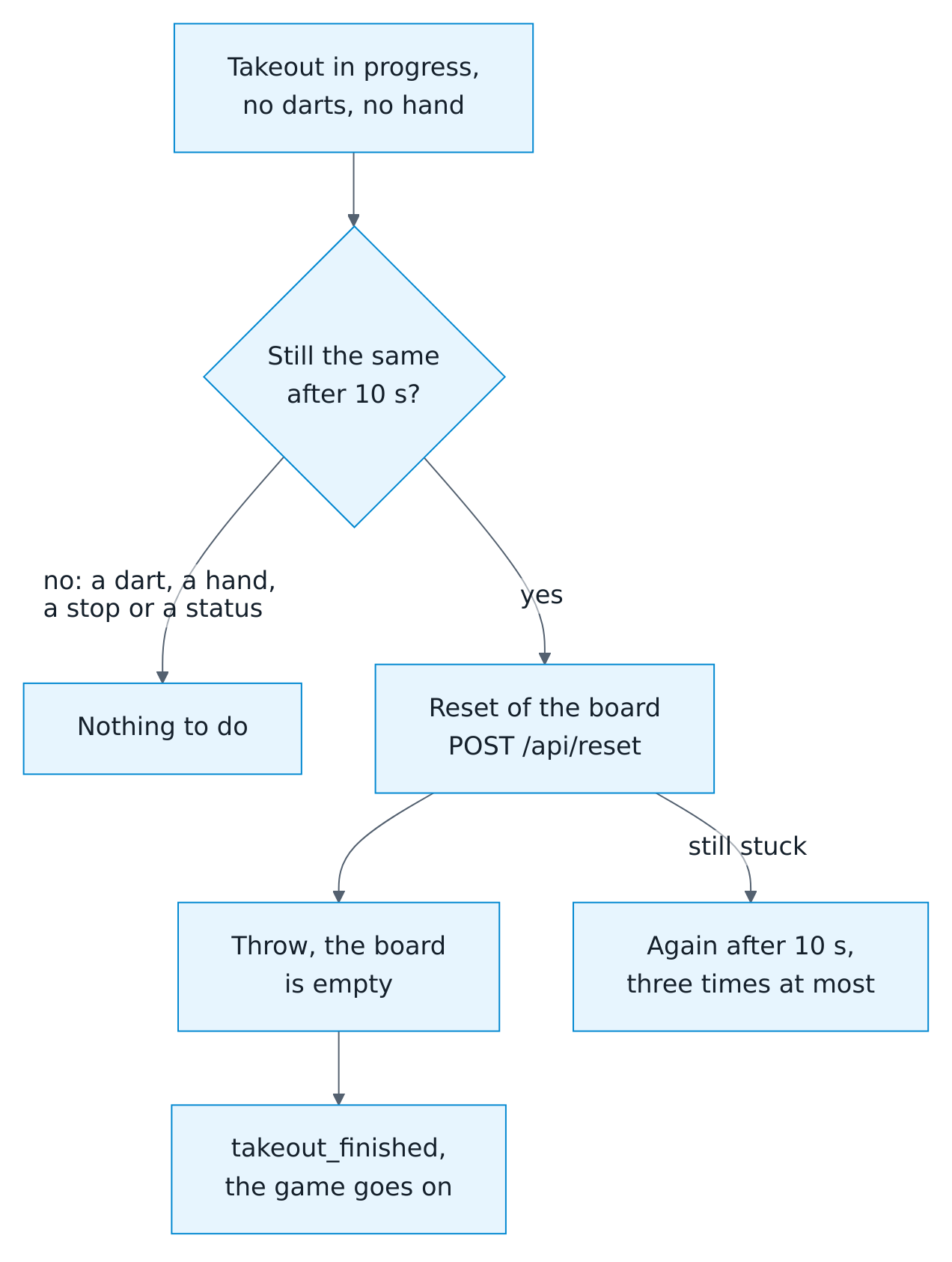
Each reset is logged at info level, and the diagnostics count them. Turn the switch off to leave the board alone, for example while you look into the fault with Autodarts.
Board settings
| Entity | Type | Description |
|---|---|---|
| Calibrate on start | Switch, Configuration | Calibrates when the detection starts. |
| Automatic recalibration | Switch, Configuration | Lets the Board Manager recalibrate by itself. |
| Distortion correction | Switch, Configuration | Corrects lens distortion during calibration. |
| Camera standby | Select, Configuration | Puts the cameras on standby after 5, 10, 15, 30 or 60 idle minutes. |
A change is written to the Board Manager configuration; only the changed setting is sent.
Health and connections
| Entity | Type | Description |
|---|---|---|
| Local connection | Binary sensor, Diagnostic | Home Assistant reaches the Board Manager. One or two missed reads, a few seconds, keep it on. |
| Realtime connection | Binary sensor, Diagnostic | The connection for realtime events is open. Until events arrive over it, the integration reads every 2 seconds. |
| Cloud link | Binary sensor, BM 2, Diagnostic | The board's connection to Autodarts. |
| Cameras active | Binary sensor | The cameras are running. |
| Calibration in progress | Binary sensor | A calibration is running. |
| Camera problem | Binary sensor, Diagnostic | On when any camera delivers no frames for 15 seconds during active detection. Normal stops, calibration and standby are ignored. |
| Camera N problem | Binary sensor, Diagnostic | The same for one camera. |
| Detection frame rate | Sensor, fps, Diagnostic, Disabled | Frames per second of the detection. |
| Detection correction rate | Sensor, %, Diagnostic | Share of the last 100 detected darts that were corrected afterwards: by the board, on the scoreboard or with autodarts.correct_dart. From 20 % over at least 50 darts, a repair suggests to recalibrate. Attributes: darts, corrected. |
| Camera N frame rate | Sensor, fps, Diagnostic, Disabled | Frames per second of one camera. |
| CPU usage | Sensor, %, BM 2, Diagnostic, Disabled | CPU load of the board PC. |
| Memory usage | Sensor, BM 2, Diagnostic, Disabled | Memory use as reported by Board Manager 2. |
| Operating system | Sensor, BM 2, Diagnostic | Distribution and version of the board PC, for example Debian 13. Attributes: kernel, architecture. |
| Processor | Sensor, BM 2, Diagnostic | Processor model of the board PC. Attribute: cores. |
| Detection software version | Sensor, BM 2, Diagnostic | Version of the Autodarts detection software. Attribute: opencv_version. |
| Software | Update, BM 2 | Installed and latest Board Manager version. Install updates on the board PC. |
| Online bridge last event | Sensor, timestamp, Diagnostic | When the last moment of an online match arrived; unknown before the first. Only while the online bridge is on. Attributes: trigger, event_type. |
Per-camera entities carry a camera attribute with the camera number, which the status card uses.
Motion
| Entity | Type | Description |
|---|---|---|
| Hand detected | Binary sensor, Diagnostic | A hand is in front of the board. |
| Image stable | Binary sensor, Diagnostic, Disabled | The camera image is steady. |
| Darts partially removed | Binary sensor, Diagnostic | Some darts are removed. |
| Darts fully removed | Binary sensor, Diagnostic, Disabled | All darts are removed. |
These sensors are off while the detection is stopped, starting, stopping or calibrating. They change with nearly every dart and takeout, and each change is recorded. The live card shows a hand at the board and a takeout from the first and third, so these two are enabled; the other two start disabled. Boards set up with an earlier version keep all four enabled; disable those you do not need in the entity settings.
Cameras
| Entity | Type | Description |
|---|---|---|
| Camera N | Camera, Disabled | One board camera, for example in a picture card or the camera dialog. With BM 2, the live view relays the board's camera stream through Home Assistant; when the stream is not running, and with BM 1, it shows snapshots. To show a camera, the integration never starts or stops the detection or the streams. |
Cloud match data (optional)
These entities exist only with a linked Autodarts account and are read every 5 seconds during a match, otherwise once a minute.
| Entity | Type | Description |
|---|---|---|
| Cloud status | Sensor (enum), Diagnostic | connected or disconnected in the Autodarts cloud. |
| Game mode | Sensor | Variant of the current match, such as X01 or Cricket. |
| Match state | Sensor (enum) | no_match, active or finished. |
| Round | Sensor | Current round. |
| Visit score | Sensor, points | Score of the current visit in the match. |
| Darts thrown | Sensor, darts | Darts thrown in the match. |
Without a local board, Last event, Last dart and Darts in visit come from the cloud as well.
Actions
Every logged-in user can play with the actions. autodarts.delete_player, autodarts.link_player, autodarts.unlink_player, autodarts.export and autodarts.save_highlight change or write out the players' data or write files and are for administrators: a user who is no administrator, such as the user of a wall tablet, gets an error. Automations run them, and so do scripts that an administrator or an automation starts.
Start a practice game: autodarts.start_game
Sets up and starts a game in one call, for automations, scripts, dashboard buttons and voice control. Values you leave out stay as they are.
| Field | Values | Description |
|---|---|---|
game |
101, 301, 501, 701, 901, 1001, cricket, cut_throat, tactics, wild_mouse, shanghai, halve_it, killer, golf, baseball, count_up, around_the_clock, doubles, checkout, bobs_27, checkout_121, catch_40, jdc_challenge, singles, or a game's name |
The game; required. A name as the game list shows it, in any language of the integration, works too, without regard to case, spaces and punctuation: Around the Clock, Bobs 27, Doppeltraining. The beginning of a name is enough where it fits one game alone, such as Cut Throat |
players |
1–4 names, 1–8 in a party game, each up to 20 characters | Players in throwing order; the number of names sets the number of players, and no names keep the players as they are. A name a player's profile already has keeps the profile's spelling, so alex plays as Alex |
legs |
1–11 | Legs that win a set |
sets |
1–7 | Sets that win the match |
in_mode |
straight, double, master |
How X01 legs open: with any dart, a double or the bullseye, or also a triple |
out_mode |
straight, double, master |
How X01 legs end: on any dart, a double or the bullseye, or also a triple |
bull_mode |
25_50, 50_50 |
The outer bull scores 25, or 50 like the bullseye |
max_rounds |
0–50 | Rounds after which the lowest score wins an X01 leg; 0 plays without a limit |
double_out |
true, false |
The out mode from before the modes: true is double, false straight. A call sets out_mode or double_out, not both |
double_in |
true, false |
The in mode from before the modes: true is double, false straight. A call sets in_mode or double_in, not both |
bull_off |
true, false |
A bull-off decides who starts a match of several players |
bull_off_distance |
true, false |
Two darts in the same bull bed are decided by the measured distance instead of a rethrow |
teams |
true, false |
Four players of X01 or a Cricket game play as two teams: players 1 and 3 against 2 and 4 |
three_in_a_bed |
true, false |
Wild Mouse with 3 in a bed |
start_scores |
up to 4 numbers, 0 or 2–1001 |
X01 start scores in throwing order, for a handicap: one per player, and one for the bot's seat after them. Teams play from the start scores of players 1 and 2, so give at most two. 0 or a missing score plays the game's start score. With double or master in and double or master out, unless both are master, a start score of 3 cannot be won and is refused. |
holes |
9, 18 |
Holes of Golf |
rounds |
1–20 | Rounds of Count-Up |
bot_level |
0 or 20–120 |
Play against the bot in X01 and the Cricket games, at this 3-dart average; 0 plays without it |
config_entry_id |
Autodarts entry | Only needed with more than one board |
action: autodarts.start_game
data:
  game: "501"
  players: [Dennis, Lea]
  legs: 3
Against the bot at a 3-dart average of 60:
action: autodarts.start_game
data:
  game: "501"
  players: [Dennis]
  bot_level: 60
A team match of four:
action: autodarts.start_game
data:
  game: "501"
  players: [Alex, Sam, Kim, Lea]
  teams: true
A handicap, Mia starting from 301:
action: autodarts.start_game
data:
  game: "501"
  players: [Dennis, Mia]
  start_scores: [501, 301]
The action fails with a clear message when no board is loaded, when several boards are set up and none is chosen, when the chosen entry is unknown, belongs to another integration or is not loaded, when the game is unknown, when there are more players than the game takes, when a name appears twice among the players, is longer than 20 characters or contains curly brackets, a percent sign, a number sign or control characters, when Killer would have fewer than two players, when teams asks for teams without four players or in a game other than X01 and the Cricket games, when four players leave no seat for the bot, when a start score is not 0 or 2–1001, when there are more start scores than seats or, for teams, more than two, when a start score of 3 meets in and out modes that cannot win it, or when the bot level is 1–19 or above 120. Values beyond the limits above are rejected before anything changes.
Response: with response_variable, the action answers instead of failing, so a voice assistant can say what happened. started is true with the game as its key, the named players, bot and the message "Game on: 501 with Alex and Sam."; or started is false and message says what was wrong, in the language of Home Assistant, also when Home Assistant itself refuses the call, such as for an entry it does not know. The blueprint Start a game by voice says the message.
action: autodarts.start_game
data:
  game: Around the Clock
  players: [alex, sam]
response_variable: result
Correct a dart: autodarts.correct_dart
Puts a dart of the current visit into another bed, for the practice game and the training session, as if the board had detected it there. The board keeps its own reading. Where the board misread the bed, it misread the spot too: the corrected dart leaves the board's position behind and stays out of the dart positions, unless x and y say where it is. Corrections.
| Field | Values | Description |
|---|---|---|
dart |
1–3 | The dart of the current visit; required |
segment |
S1–S20, D1–D20, T1–T20, 25 (outer bull, also S25, SB or OB), BULL (bullseye, also D25, DB or 50), MISS |
The bed, in any upper and lower case; required without x and y |
x, y |
-3 to 3 | Where the dart is, as the board reports positions: 0 is the center, 1 the outer edge of the double ring, and y points to the 20. The bed follows from the position; a segment given as well must be that bed |
config_entry_id |
Autodarts entry | Only needed with more than one board |
action: autodarts.correct_dart
data:
  dart: 2
  segment: T20
With the spot where the dart is, the bed follows from it:
action: autodarts.correct_dart
data:
  dart: 2
  x: 0.02
  y: 0.61
The action fails with a clear message, which names the accepted beds, when the bed is unknown, when neither a bed nor a position is given, when only x or y is given or a value lies outside -3 to 3, when the bed is not the bed at the position, and when the visit has no such dart or the dart is the bot's.
Enter a dart: autodarts.throw_dart
Adds a dart to the current visit as if the board had detected it, marked manual: a dart the board missed, or the darts of a player without cameras. Needs Practice manual entry.
| Field | Values | Description |
|---|---|---|
segment |
S1–S20, D1–D20, T1–T20, 25, BULL, MISS and the other names of the bulls, as for autodarts.correct_dart |
The bed; required without x and y |
x, y |
-3 to 3 | Where the dart is, as for autodarts.correct_dart; the bed follows from it, and the dart is logged in the dart positions |
player |
Name | The player the dart is for, as a voice assistant hears it, in any upper and lower case; the action refuses the dart while another player is at the board |
config_entry_id |
Autodarts entry | Only needed with more than one board |
action: autodarts.throw_dart
data:
  segment: D16
The action fails with a clear message when the bed is unknown, when neither a bed nor a whole position between -3 and 3 is given, when the bed is not the bed at the position, when manual entry is off, when the visit already has three darts, while the bot is at the board, or when player is not at the board.
Response: with response_variable, the action answers instead of failing, so a voice assistant can say what happened: entered is true and message names the bed, in X01 with what is left, a bust or the game shot, such as "Triple 20, 441 left." or "Double 20. Game shot!"; or entered is false and message says why, in the language of Home Assistant. The blueprint Enter darts by voice says the message.
Enter a visit's score: autodarts.enter_visit
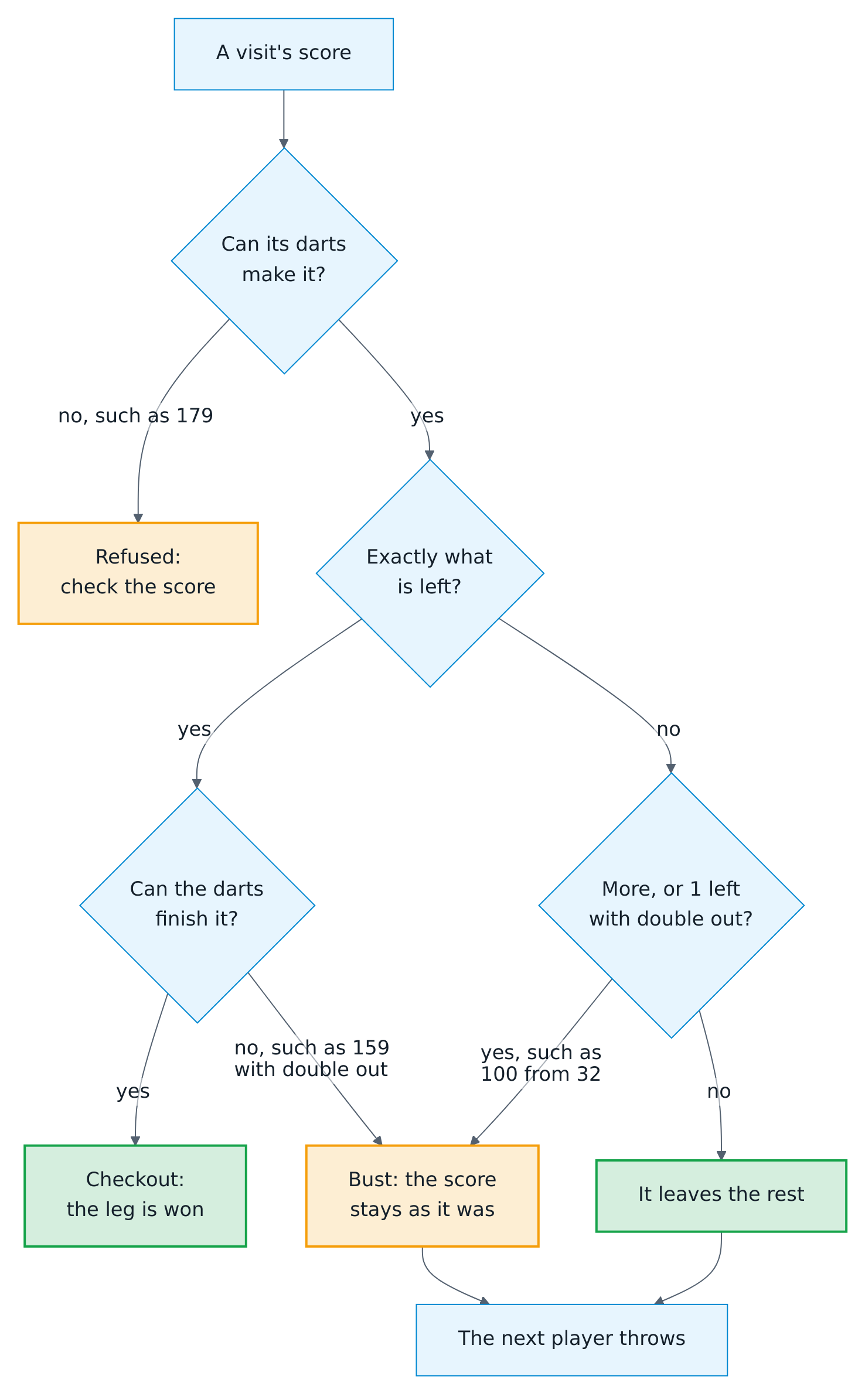
Enters an X01 visit by its score instead of its darts, as the keypad's Score does, and passes the turn: the next player throws. Needs Practice manual entry. Darts already entered by hand in the visit give way to it; darts on the board refuse it. The visit has darts of its own, marked total, whose beds are made up and stay unknown: they count for the score, the averages, the 180s, the checkouts and the records, but for no bed, so not for the heatmap, the doubles, the triples or the bulls. A score of what the player has left checks out, or busts where no visit of these darts can finish it, such as 159 with double out. A score of more busts, and so does one that leaves 1 with double out, also where no visit throws all of it before the bust, such as 100 from 32: the darts after the dart that busts do not count.

| Field | Values | Description |
|---|---|---|
score |
0–180 | The points of the visit; required without checkout |
checkout |
true |
The visit checks out what the player has left, instead of a score; a score given as well must be that |
darts |
1–3 | The darts it took, fewer than 3 only for a checkout; default 3 |
darts_at_double |
0–3 | How many of them were thrown at a double, for the checkout rate; default 1 for a checkout with double out, otherwise 0. Without double out, none counts, and in a bust only those up to the dart that busts |
player |
Name | The player the visit is for, as for autodarts.throw_dart; the action refuses the visit while another player is at the board |
config_entry_id |
Autodarts entry | Only needed with more than one board |
action: autodarts.enter_visit
data:
  score: 40
  darts: 2
  darts_at_double: 2
The visit is announced with visit_thrown and visit_completed, both with total and empty segments, but its darts are not: an automation that calls every dart, such as the dart caller, stays silent and calls the visit. The action fails with a clear message outside an X01 leg being played and in the bull-off, when no visit of these darts can score this from what the player has left (such as 179, which no three darts make, 180 from 60 without double out, whose first treble 20 checks out, or 180 before the opening double with double in), when checkout is given but no visit of these darts can finish what is left (such as 159 with double out), when more darts were at a double than the visit had or none for a checkout, while a dart of the visit is on the board, when manual entry is off, while the bot is at the board, when neither score nor checkout is given, when a score with checkout is not what the player has left, or when player is not at the board.
A checkout of what is left, with two darts, for the player at the board:
action: autodarts.enter_visit
data:
  checkout: true
  darts: 2
Response: with response_variable, the action answers instead of failing: entered is true and message says, in the words of the scoreboard's caller, what the visit scored and left and who throws next, such as "140 for Alex, 361 left. Sam, you require 501.", a bust, "No score: Alex stays at 40.", or the leg or the match, "Game shot, and the match, Alex!"; or entered is false and message says why, in the language of Home Assistant.
Pass the turn: autodarts.next_player
Ends the current visit without pulling the darts, so the next player throws; the darts in the board count for nobody until they are pulled. Without darts, the player at the board passes in X01, the Cricket and the party games; in a party game the pass counts as a visit of three misses, and a pass that ends the last round books the leg and the match. In a training game, a bull-off and Killer while the numbers are chosen, the action then fails with a clear message.
action: autodarts.next_player
Takes config_entry_id when there is more than one board. Response: with response_variable, passed and a message say who throws now, in X01 what they require, such as "Sam, you require 501.", and after a game shot the leg or the match.
Undo a visit: autodarts.undo_visit
Takes the last completed visit back: the game returns to where it was before it, and its darts become the current visit again, to correct them and end the visit with autodarts.next_player. Visits of the bot after it are taken back, too. One visit can be undone, while no dart is in the board and the game and the training session have not changed since; a restart forgets it. The action fails with a clear message otherwise; undo of Practice remaining score tells whether it can.
action: autodarts.undo_visit
Takes config_entry_id when there is more than one board. Response: with response_variable, undone and a message say whose visit and how many points were taken back, such as "Taken back: 140 of Alex."
Delete a player profile: autodarts.delete_player
Forgets a player's statistics, personal bests, head-to-head records, progress and badges, and the link to a person. The name also disappears from the board's personal bests, whose values stay, and from the practice player names, so the next leg does not create the profile again. The match history keeps the name. For administrators.
| Field | Values | Description |
|---|---|---|
name |
text | The player name, in any upper and lower case; required |
config_entry_id |
Autodarts entry | Only needed with more than one board |
The action fails with a clear message when there is no profile by that name, and while the player plays in the tournament being played: stop the tournament first. The player also leaves the players of the next tournament.
Export training data: autodarts.export
Writes your training sessions, practice matches or player profiles to a file and returns where it is, for spreadsheets, backups or your own analysis. For administrators; automations can use it, too.
| Field | Values | Description |
|---|---|---|
format |
csv (default), json |
CSV for spreadsheets, in UTF-8 with a byte order mark; with what: all, a ZIP file with sessions.csv, matches.csv and profiles.csv. JSON is one file with a list per table. |
what |
sessions, matches, profiles, all (default) |
The sessions and matches of the last 365 days (those of the training calendar), the player profiles, or everything |
folder |
folder | A folder where Home Assistant allows writing: www, a media folder or a folder of allowlist_external_dirs, relative to the configuration folder or as an absolute path. Without it, autodarts/exports in the media folder, /media/autodarts/exports on Home Assistant OS. Hidden folders such as .storage, control characters and folders that .. or a symbolic link lead elsewhere are refused. |
config_entry_id |
Autodarts entry | Only needed with more than one board |
action: autodarts.export
data:
  format: json
  what: matches
response_variable: export
The response has path (the file), url (its /local/ address when the folder is inside www, otherwise null), download (an address below /api/ from which administrators download the file until Home Assistant restarts), format, what and rows with the rows of every table. Every export is a new file, named like autodarts-all-20260927-201500-<random>.zip. Home Assistant serves www at /local/ only if the folder existed when Home Assistant started: after the first export into a new www folder, url works after the next restart, download at once. At most 20 exports are written in an hour.
| Table | Columns |
|---|---|
| Sessions | started, ended, duration_minutes, average, darts, points, visits, highest_visit, scores_100, scores_140, scores_180, triples, doubles, bulls, misses |
| Matches | started (the first dart, if known), ended, game, legs_to_win, sets_to_win, winner (player number), winner_name and every player's name, legs (won in the deciding set), sets, match_legs (won in the whole match; empty for matches before version 1.6) and average, mpr or points; in CSV as player_1_name to player_8_points |
| Profiles | The values of Player profiles; in CSV every plain value is a column, and the fewest darts per start score are fewest_darts_101 to fewest_darts_1001 |
Privacy: exports contain player names. The media folder, where they go by default, needs a login. Files in
wwware served at/local/without a login to anyone who can reach Home Assistant and knows the file name; the random part of the name keeps it from being guessed. Export towwwonly on purpose, and delete exports there that you no longer need.
The action fails with a clear message when the folder is not allowed, when 20 exports were written in the last hour, or when the file cannot be written.
Save a highlight photo: autodarts.save_highlight
Saves what a camera sees as a photo for the highlight gallery, named by the moment, the player and what it shows, and answers with the file and its address only once the file is written. The highlight photo blueprint saves its photos with it; your own automations can, too, for example for a photo of the first leg of the evening. For administrators; automations can use it, too.
| Field | Values | Description |
|---|---|---|
camera |
camera entity | The camera that takes the photo, such as a board camera; required. The cameras of a board are disabled until you enable them on the page of the board. Any other camera works, too. |
folder |
folder | A folder where Home Assistant allows writing, as for autodarts.export. Empty or left out: the gallery, autodarts/highlights in the media folder, /media/autodarts/highlights on Home Assistant OS and in a container. |
player |
text | The player in the photo, for its name and its title in the gallery |
label |
text | What the photo shows, at the end of its name, such as 180 or checkout-121; the gallery shows a number as the score and checkout-121 as a checkout |
action: autodarts.save_highlight
data:
  camera: camera.autodarts_board_camera_1
  player: Alex
  label: 180
response_variable: highlight
The photo is named like 2026-09-26_21-05-33_Alex_180.jpg, in the time of Home Assistant. The player and the label lose what a file name or an address cannot have, such as /, :, _, ~, .., {, % and #, and are cut to 20 and 24 characters, without a dot at the end. A second photo of the same second with the same name is named 2026-09-26_21-05-33_Alex_180 (2).jpg, a third one gets (3), and so on; nothing is written over. The picture keeps the kind the camera sends: .jpg, or .png or .webp.
Response: with response_variable, photo is the saved file, and photo_url its address in the media browser, such as /media/local/autodarts/highlights/2026-09-26_21-05-33_Alex_180.jpg, which the Home Assistant app loads in a notification; outside the media folder, photo_url is empty.
The action fails with a clear message, and writes nothing, when the camera entity does not exist or is disabled, when the camera is unavailable or gives no picture, when the folder is not allowed, or when the file cannot be written. With continue_on_error: true, an automation goes on without the photo, as the blueprint does. Unlike camera.snapshot, which passes over a disabled or unavailable camera and a missing picture without an error, it never reports a photo that is not on disk.
Link a player to a person: autodarts.link_player
Makes a player a person of Home Assistant. The scoreboard, the players card and the new game screen show the person's picture, and the new game screen lists the players who are at home first. A player without a profile gets one. A person is one player: linking the person to another player moves the link. For administrators.
| Field | Values | Description |
|---|---|---|
player |
text | The player name, in any upper and lower case; required |
person |
person entity | For example person.dennis; required |
config_entry_id |
Autodarts entry | Only needed with more than one board |
action: autodarts.link_player
data:
  player: Dennis
  person: person.dennis
The action fails with a clear message when Home Assistant has no such person, or when the player name contains curly brackets, a percent sign, a number sign or control characters.
Unlink a player: autodarts.unlink_player
Forgets which person a player is. The player's statistics stay. For administrators.
| Field | Values | Description |
|---|---|---|
player |
text | The player name, in any upper and lower case; required |
config_entry_id |
Autodarts entry | Only needed with more than one board |
The action fails with a clear message when there is no profile by that name.
Start a tournament: autodarts.start_tournament
Draws a tournament and starts its first match. Values you leave out come from the Tournament entities, and the legs, sets and rules from the practice game; the values you give are kept in the Tournament entities for the next tournament.
| Field | Values | Description |
|---|---|---|
players |
3–8 names | The players, in the order of the draw |
format |
round_robin, knockout |
Everyone against everyone, or a bracket up to the final |
start_scores |
0 or 2–1001 per player | X01 start scores of the players in the order of players, for a handicap, at most one per player; 0 or a missing score plays the game's start score. With double in and double out, a start score of 3 cannot be won and is refused. |
game |
101, 301, 501, 701, 901, 1001, cricket, cut_throat, tactics, wild_mouse |
The game of every match |
legs |
1–11 | Legs that win a set |
sets |
1–7 | Sets that win a match |
double_out |
true, false |
Finish X01 legs on a double or the bullseye |
double_in |
true, false |
Start X01 legs with a double or the bullseye |
bull_off |
true, false |
A bull-off decides who starts every match |
bull_off_distance |
true, false |
Two darts in the same bull bed are decided by the measured distance instead of a rethrow |
third_place |
true, false |
In a knockout of four players or more, the losers of the semi-finals play for third place |
random_draw |
true, false |
Draw the order of the players at random |
seed |
1–999999 | A number for a random draw: the same number draws the same order |
pause |
0–600 | Seconds between two matches, after the summary; 0 waits for Next tournament match |
summary |
0–60 | Seconds the summary of a match shows before the pause begins |
config_entry_id |
Autodarts entry | Only needed with more than one board |
action: autodarts.start_tournament
data:
  players: [Dennis, Lea, Max, Kim, Sam]
  format: round_robin
  game: cricket
  legs: 3
  pause: 30
A tournament being played has to be stopped before the next one starts; a finished one is replaced. The action fails with a clear message while a tournament is being played, when fewer than three or more than eight players are named, when a name appears twice or contains curly brackets, a percent sign, a number sign or control characters, or when the start scores are wrong as above.
Start the next tournament match: autodarts.next_tournament_match
Starts the next match of the tournament during the pause, or sets the tournament's match up again when another game was chosen meanwhile. It fails with a clear message while the match of the tournament is being played, and when no tournament is running.
action: autodarts.next_tournament_match
Stop a tournament: autodarts.stop_tournament
Ends the tournament; the match being played goes on as a practice match. It fails with a clear message when there is no tournament.
Both actions take config_entry_id when there is more than one board.
Availability
- Local entities become unavailable when the Board Manager does not answer and recover on their own.
- Training entities stay available, because the session is stored in Home Assistant.
- If the configured address answers as a different board, the entities stay unavailable and Home Assistant shows a repair notice.
- When the board is updated from Board Manager 1 to 2, the integration reloads by itself and adds or removes the generation-specific entities.
- A dartboard without Autodarts has the entities of the games, the training and the statistics, Detection status with the state Entered by hand (
manual), Last dart, Last dart score and Detected visit score. Everything that needs a Board Manager is left out: detection, connection, motion, cameras, the board settings, the board PC, Practice manual entry and the share of corrected darts. Its entities are always available.