Play without Autodarts

No Autodarts at your board? The integration works for any steel dartboard: you enter every dart yourself on a keypad, on a tablet next to the board or on your phone, and you get every game, the training sessions and all statistics, just as with automatic scoring.
On this page: Who it is for · Set up · Enter your darts · What works · What is different · Several boards · Autodarts later
Who it is for
- A dartboard without cameras. Play X01 with a scoreboard and a checkout route, Cricket on a chalkboard, party games for up to eight and tournaments, and follow your averages, without buying automatic scoring.
- A second board, for example in the garage or at a friend's, next to an Autodarts board in the living room. Each board keeps statistics of its own.
- Trying it out before an Autodarts system arrives. Nothing of it needs an account or the internet.
Set up
Install the integration first: steps 1 to 3 of From zero to the scoreboard show how, with Home Assistant and HACS.

- Select the button above, or open Settings → Devices & services → Add integration → Autodarts.
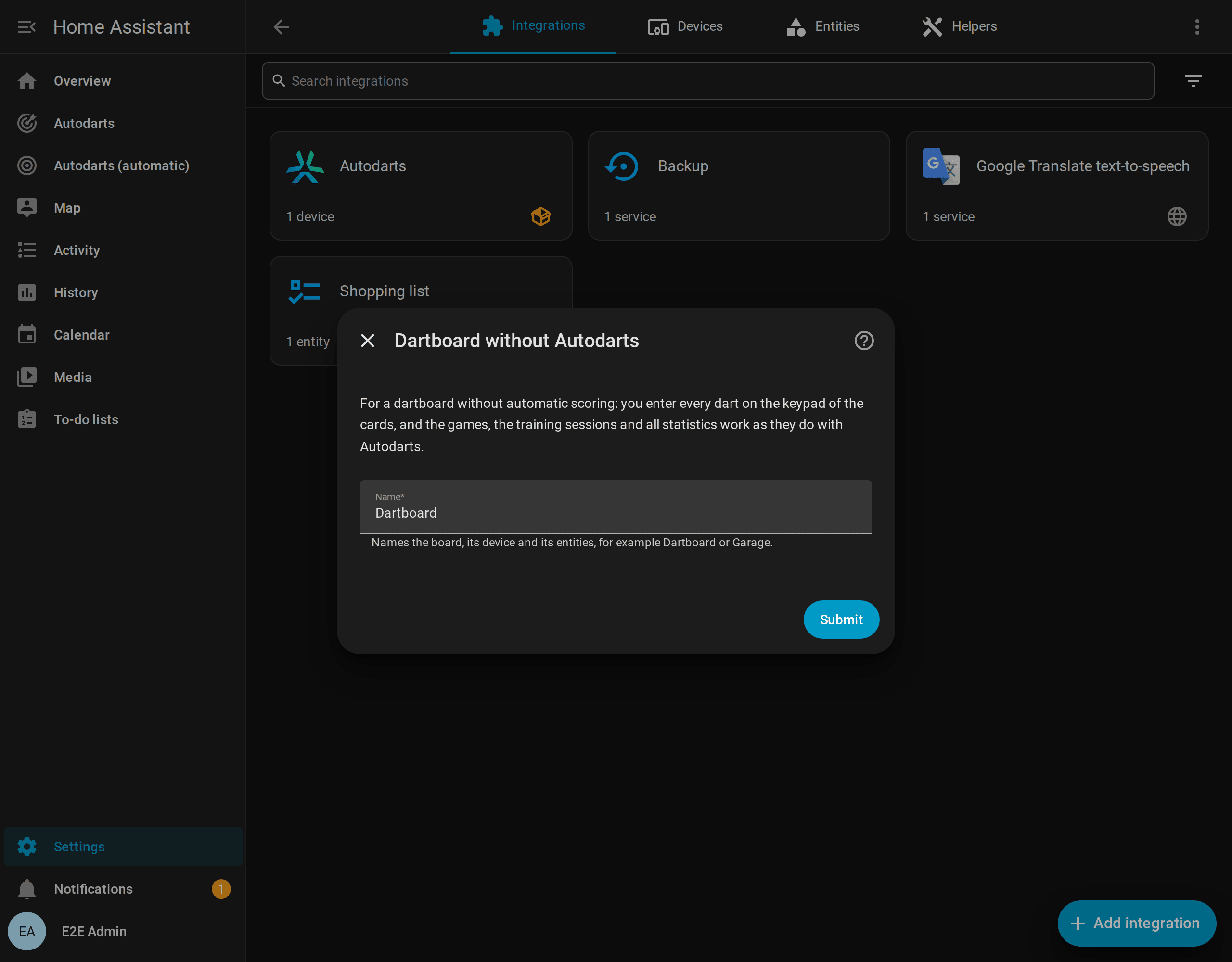
- Choose Dartboard without Autodarts: enter every dart yourself.
- Give the board a name, such as Garage, and select Submit. The integration creates a device with this name and the entities of the games, the training and the statistics.
- Create the dashboard: Settings → Dashboards → Add dashboard → Autodarts. Its Live and Scoreboard views have the keypad.
Enter your darts

On a dartboard without Autodarts, the live card and the scoreboard show the keypad below the visit, without any option to switch on:
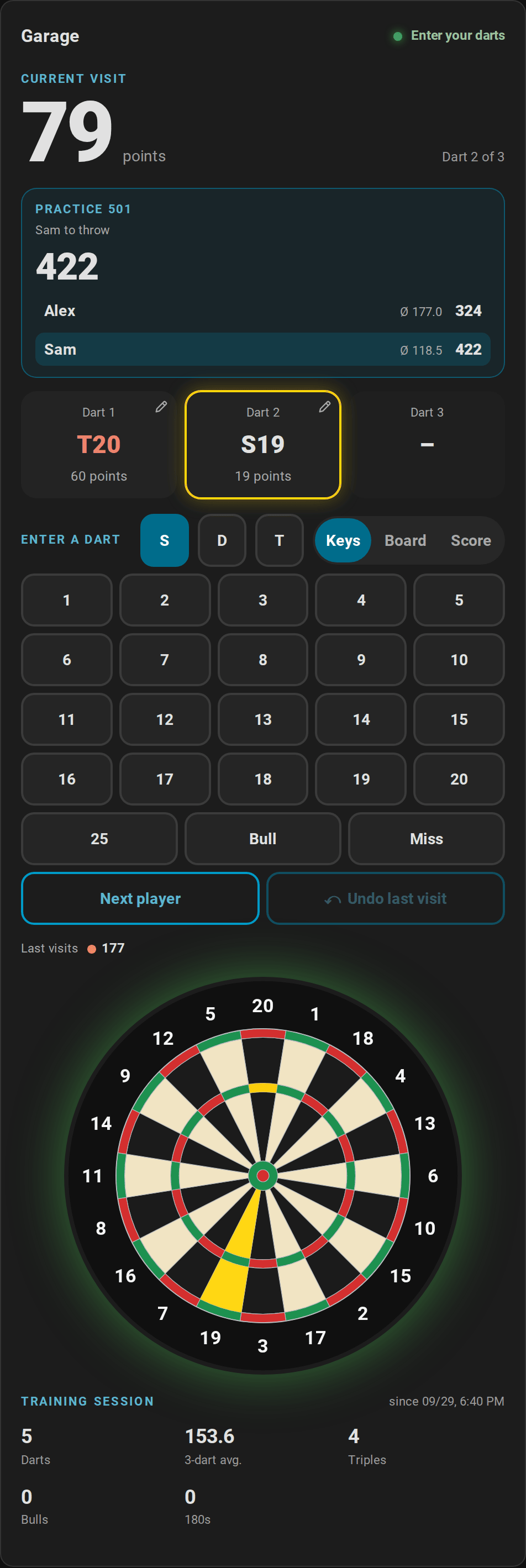
- A dart: tap S, D or T, then the number. 25, Bull and Miss have keys of their own. Every dart starts as a single again.
- Where it is: Board at the top of the keypad shows the board instead of the keys. Tap where the dart is, and the bed follows from the spot. Darts entered this way also count for the dart positions and their grouping. On a phone, a finger aims with a loupe and two fingers zoom, as when correcting a dart.
- The score of a visit: in X01, Score at the top of the keypad takes the visit as its score instead of its darts, as on a dart machine: type 140 and OK. The keypad says what the score leaves. A checkout asks for its darts and for the darts at a double, and a visit that left a double in reach asks for the darts at it, for the checkout rate; one tap answers. A score of more than the player has left busts, and so does what is left where no double finishes it, such as 159; the keypad says Bust before it goes in. A score that no visit makes from where the player stands, such as 179, or 180 before the opening double with double in, keeps OK off. The beds of such a visit stay unknown, so it counts for the averages, the 180s, the checkouts and the records, but not for the heatmap, the doubles or the triples.

- The visit: after the third dart the status says Visit complete. Next player ends the visit; it takes a second tap, so a stray tap never passes the turn. Without a dart, it passes, which counts as a visit of three misses.
- A mistake: tap a dart of the visit to put it into another bed. While no dart of the next visit is in, the curved arrow of Undo takes the last visit back, with the game as it was.
The actions autodarts.throw_dart, autodarts.enter_visit, autodarts.next_player and autodarts.undo_visit do the same from an automation, a script or a button of your own; with several boards, name the board's config_entry_id.
By voice: with the blueprint Enter darts by voice, you tell Assist your darts, as at a dart machine: "Alex has 140", "Checkout with two darts", "Triple 20", "Next player" or "Undo", in English, German, Spanish, French or Dutch. Assist answers in the words of the scoreboard's caller, such as "140 for Alex, 361 left. Sam, you require 501.", and refuses a visit for a player who is not at the board.
What works
Everything the integration does with darts, because it never needed the cameras for it:
- Every game: X01 from 101 to 1001 with legs, sets, double in and out, the checkout route and setup hints, the bull-off, teams and handicaps; the four Cricket games; the six party games for up to eight; the eight training games; the bot and tournaments.
- Every statistic: training sessions, personal bests, the daily goal and the streak, player profiles with their badges, achievements, trends, doubles, the leaderboard, the weekly report, the training calendar and the export. Darts entered by hand count for all of them like detected ones.
- The screen at the board: the scoreboard with the new game screen, the caller, celebrations and idle mode.
- Automations: the board events, such as
visit_completedorleg_won, come as with a board, withmanual: trueand the sourcemanual, so the light show, the callers and the reports blueprints work as they are.
What is different
| With Autodarts | Without Autodarts | |
|---|---|---|
| Darts | Detected by the cameras, corrected with a tap | Entered on the keypad |
| Status | Ready, takeout, detection stopped and more | Enter your darts and Visit complete; the sensor Detection status reads Entered by hand |
| Keypad | An option, while Practice manual entry is on | Always there, unless a card's keypad: false hides it |
| Darts of the visit | Darts entered by hand get a dashed frame | No frame, because every dart is entered by hand; corrections keep their pencil |
| Entities | Games, training and statistics, plus detection, connection, motion, cameras, board settings and the board PC | Games, training and statistics |
| Automatic dashboard | Views Live, Scoreboard, Training, Players, Game settings and Board | No Board view: there is no detection, camera or board PC |
| Board status card | Detection, connections, board PC, cameras and maintenance | A note that the board has none of them |
| Dart positions | For every detected dart | For darts entered on the keypad's board |
| A visit's score | Possible with Practice manual entry, while no dart of the visit is on the board | Possible in every X01 leg |
| Detection quality, calibration, online matches | Yes | No |
A screen that only shows the scoreboard, such as a TV without touch, hides the keypad with the card's option keypad: false; see the card guide.
Several boards
Each dartboard without Autodarts is an entry and a device of its own, with its own entities, games and statistics, and so is each Autodarts board beside them. The automatic dashboard gives every board its views. The actions of the integration then need the board's config_entry_id, as with several Autodarts boards.
To remove a board and its statistics, delete its entry in Settings → Devices & services → Autodarts.
Autodarts later
When your dartboard gets Autodarts, connect the board to it instead of adding a new one, and everything stays: the games, the training sessions, the players, their badges and every statistic, the entity IDs and your dashboards.
- Set up the Autodarts board in its Board Manager as usual.
- Open Settings → Devices & services → Autodarts, the menu (⋮) of the dartboard → Reconfigure.
- Choose Search for boards on this network or Enter board address, as when adding a board.
The dartboard then has the board's ID, the detection, the cameras, the board settings and the controls, and the automatic dashboard its Board view. Practice manual entry stays on, so the keypad's darts keep counting, and turning it off leaves the darts to the cameras. If Home Assistant finds the board on its own and offers Autodarts board found, ignore that offer and reconfigure the dartboard: added as a new entry, the board would start with statistics of its own.