Coming from another tool
Other projects bring an Autodarts board into Home Assistant or next to it. This page compares them with this integration and shows, for each one, the entities, events and blueprints that take its place, whether it can stay installed and how to remove it. The facts are as of October 2026, from each project's own documentation and code, which the links lead to. If a project has changed since then, tell us so that this page stays fair.
Jump to: At a glance · Can it stay? · Autodarts Local · Quevinsta's integration · belese's integration · Autodarts Connect Online · Darts Hub · MQTT bridges · darts-caller and darts-wled · Tools for Autodarts · The original integration
At a glance
| This integration | Autodarts app with Tools for Autodarts | darts-caller and darts-wled | Other Home Assistant integrations | |
|---|---|---|---|---|
| Runs without the cloud | Yes, with the local interface of the Board Manager | No, with an Autodarts account | No, darts-caller signs in to Autodarts | Some of them (details) |
| Entities and events in Home Assistant | Yes, an event for every dart, visit, takeout, bust, leg and match | No | No | Sensors of the current visit or game |
| Blueprints | Thirteen blueprints | No | No | No |
| Light show | Light show blueprint, for WLED or any light | WLED, with Tools | WLED, with darts-wled | Your own automations |
| Caller | On the scoreboard or your speakers | In the app, with a premium voice in Plus; more with Tools | Voice packs, with darts-caller | No |
| Statistics kept at home | Yes: averages, heatmaps, profiles and a year of history | No, in the Autodarts account | No | No |
| Without an Autodarts board | Yes, on a keypad | Yes, on a keypad or with Lens | No | No |
| Online matches | Your darts, and the moments of the match through the online bridge (experimental) | Yes | Yes | Some of them, through the cloud |
| License and cost | MIT, free | Autodarts: a free plan and the paid Plus; Tools: CC BY-NC 4.0 | Free, no license stated | MIT, Apache 2.0 or no license file |
As of October 2026, from the documentation and the code of each project. The sections below have the details and the sources.
Can it stay?
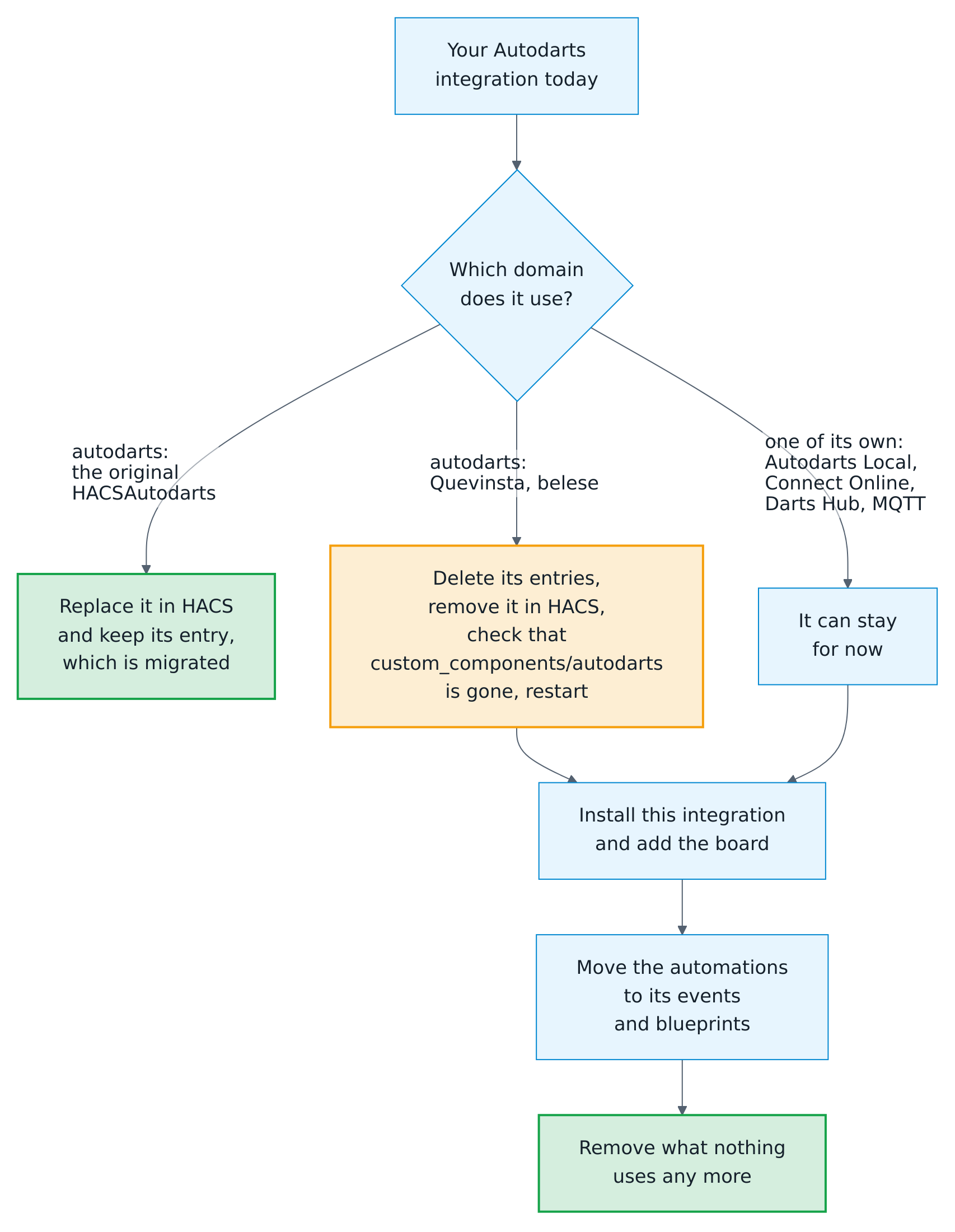
Home Assistant loads one integration per domain, so two integrations with the domain autodarts can't be installed at the same time. One with a domain of its own can stay while you move your automations, and go when nothing uses it any more.

| Project | Domain | Reads the board through | Next to this integration |
|---|---|---|---|
| Original integration by Trkal | autodarts |
The Board Manager, locally | Replaced: its entry is migrated |
| Autodarts for Home Assistant by Quevinsta | autodarts |
The Board Manager, locally | Remove it first |
| autodarts by belese | autodarts |
The Autodarts cloud | Remove it first |
| Autodarts Local | autodarts_local |
The Board Manager, locally | Can stay |
| Autodarts Connect Online | autodarts_connect |
The Autodarts cloud | Can stay |
| Darts Hub | darts_hub |
darts-hub or darts-caller, and the Board Manager | Can stay |
| MQTT bridges | mqtt |
Its own program and an MQTT broker | Can stay |
| darts-caller and darts-wled | Outside Home Assistant | The Autodarts cloud | Can stay; let one caller speak |
| Tools for Autodarts | In the browser | The Autodarts web app | Stays; the online bridge uses it |
Remove an integration with the same domain
- Note what uses it. The dialog of an entity lists the automations and scripts that use it under Related.
- Delete its entries in Settings → Devices & services: open the integration and, for every entry, its menu (⋮) → Delete. Do this first: after the switch, Home Assistant would hand the entries to this integration, which doesn't know their settings.
- Remove the code. In HACS, open the integration, then its menu (⋮) → Remove. For a manual installation, delete the folder
config/custom_components/autodarts. Check that the folder is gone. - Restart Home Assistant.
- Install this integration and add your board, as the installation guide describes.
Keep one with a domain of its own
- Install this integration beside it and add your board. Both read the same Board Manager.
- Move your automations, one at a time, with the tables below.
- When nothing uses the old integration any more, delete its entry in Settings → Devices & services, remove it in HACS and restart Home Assistant.
The entity IDs below are those of a board named Autodarts Board in a Home Assistant set to English, as in the examples of the automations. You find yours on the device page of the board.
Autodarts Local
Autodarts Local by Mastershort, domain autodarts_local, reads the state of the Board Manager every second: whether the board is online, its status, the darts of the visit and their sum, and three buttons for the detection.
| Autodarts Local | Here |
|---|---|
Connection: Online or Offline |
The Local connection binary sensor, under Health and connections |
Status, such as Throw or Takeout |
Detection status: throw, takeout, takeout_in_progress and the others of the live visit, with the event status_changed; for the takeout the events takeout_started and takeout_finished |
| Current Turn Score | Detected visit score, and the event visit_thrown the moment the third dart lands |
| Number of Throws | Darts in visit |
| Throw 1, Throw 2, Throw 3 | The throws attribute of Detected visit score, the Last dart sensor and the event dart_detected with dart_index and segment |
| The buttons Start Detection, Stop Detection and Reset Detection | The buttons Start detection, Stop detection and Reset detection, and the Detection switch, under Controls |
| The example automation Takeout Light | The takeout actions blueprint, or the example Light up the board while you pull the darts |
Can stay. Both call the device Autodarts Board, as this integration does for a board added by its address. While both are installed, the buttons here get IDs ending in _2, such as button.autodarts_board_start_detection_2. Remove Autodarts Local before you add the board here, and the buttons get the IDs your automations already use, such as button.autodarts_board_start_detection.
Autodarts for Home Assistant by Quevinsta
Autodarts for Home Assistant by Quevinsta, domain autodarts, is made for X01 and reads the state of the Board Manager every ten seconds: the three darts and their values, the visit, the remaining score, whether a checkout is possible, and the result of the leg.
| Quevinsta's integration | Here |
|---|---|
| Dart 1, Dart 2, Dart 3 and their values | The throws attribute of Detected visit score and the event dart_detected |
| Throw Summary, Turn Total | Detected visit score, and the segments and the score of the event visit_thrown |
| Remaining, Checkout Possible | Practice remaining score and Practice checkout, which is unknown when no route exists, in a practice game |
| Leg Won, Leg Lost, Leg Result | The events leg_won and match_won, with the name of the winner |
| Autodarts Status | The Local connection binary sensor |
Here, Home Assistant counts the practice game itself: X01 from 101 to 1001, the Cricket games, the party games and the training games. A game on play.autodarts.io is counted in the browser, and its score reaches Home Assistant only with the cloud match data, which is on hold.
Same domain: remove it first.
autodarts by belese
autodarts by belese, domain autodarts, follows the board through the Autodarts cloud with the email address and the password of your Autodarts account. It shows the board state, the players, the player at the board and the winner. Its last change was in February 2025.
| belese's integration | Here |
|---|---|
| Board state | Detection status, locally and without an account |
| Players, current player | players, player and name of Practice remaining score in a practice game, and the event turn_changed |
| Winner | The event match_won and the winner attribute of Practice remaining score |
This integration stores no password: the optional cloud link will use the Autodarts device login.
Same domain: remove it first.
Autodarts Connect Online
Autodarts Connect Online by casef007, domain autodarts_connect, is a beta that follows the board through the Autodarts cloud with the email address, the password and the board ID of your account. Its README says that it signs in with the public credentials of darts-caller for now. It sees online matches and bot games, with the name, score, average and Cricket marks of up to four players, and fires the event autodarts_throw for every dart.
| Autodarts Connect Online | Here |
|---|---|
The event autodarts_throw |
The event dart_detected, locally, for every dart on your board |
| Name, score and average of up to four players | scores of Practice remaining score for a match of up to four, and up to eight players in the party games and tournaments |
| Cricket marks | The marks, points and mpr of every player in the scores of Practice remaining score, in the Cricket games |
| Online matches | Your darts as usual, and busts, won legs and matches through the online bridge (experimental) |
Can stay. It sees more of an online match than this integration does today, such as the darts and scores of your opponents. If you play online most of the time, keep it beside this one.
Darts Hub
Darts Hub by etienne72230, domain darts_hub, needs darts-hub or darts-caller running in your network, on port 8079, and the Board Manager on port 3180. It shows the match, up to six players with their scores, the details of every dart with its position, and buttons to reset and calibrate the board.
| Darts Hub | Here |
|---|---|
| Board status, current event | Detection status and the board events |
| Players and scores of the match | Practice remaining score with its scores, for the practice game that Home Assistant counts |
| Dart 1 to 3 and the last dart, with value, multiplier, field and position | The throws attribute of Detected visit score, with segment, multiplier, score, bed and the position x/y |
| The buttons Reset Board and Calibrate Board | Reset detection and Start automatic calibration |
Can stay. This integration needs neither darts-hub nor darts-caller.
MQTT bridges
MQTT bridges, such as Autodarts MQTT by Quevinsta, are programs that you run yourself. They publish the board status, the number of darts and averages to an MQTT broker, and Home Assistant creates their entities through MQTT discovery.
| Autodarts MQTT | Here |
|---|---|
| Board status | Detection status |
| Number of throws | Darts in visit |
| 3-dart average | Training 3-dart average of the training session |
| Leg average | The average of the event leg_won |
Can stay. This integration needs neither a broker nor a program of its own. To remove a bridge, stop it and delete its device in Settings → Devices & services → MQTT.
darts-caller and darts-wled
darts-caller plays the sound files of a voice pack for the state of an Autodarts game and passes the game on to other programs, such as darts-wled, which drives WLED lights with it. darts-hub downloads, sets up and starts them. They run on a PC, and darts-caller signs in to your Autodarts account and follows its games.
What Home Assistant does now:
| darts-caller and darts-wled | Here |
|---|---|
| Calls of scores and checkouts | The caller of the scoreboard, through the screen at the board, or the dart caller and practice caller blueprints on your speakers; both also play the voice packs of darts-caller |
| WLED effects for a 180, a bust or a game shot | The light show blueprint with your WLED presets or other lights |
| Game events for other programs | Board events for every dart, visit, takeout, bust, won leg and match, for every automation of Home Assistant |
Can stay. darts-caller follows the cloud and this integration the board, so both work at the same time. Two callers talk over each other, though, and two programs that drive the same WLED lights fight over them: let one of each speak and light. In online matches, darts-caller also calls your opponents' scores, which this integration doesn't see.
Tools for Autodarts
Tools for Autodarts is a browser extension for the Autodarts web app, with more caller voices, sound effects, WLED effects, animations and many settings for the lobby and the match.
Stays. The online bridge uses its WLED feature: it calls Home Assistant with the moments of an online match, which become online_* board events. As with darts-caller, let one caller speak in the room: the one of the Autodarts app, the one of Tools or the one of Home Assistant.
The original integration
This integration started as a fork of Trkal/HACSAutodarts and uses the same domain autodarts. Replace it in HACS and keep its entry: Update from the original integration explains the steps.