Chrome extension template with Manifest V3 and delivery to the Chrome Web Store
A Chrome extension of Manifest V3 in TypeScript on Node 24, which every release brings to the Chrome Web Store by itself, signed in to Google without a stored secret.
Start one
uvx --from copier==9.19.0 copier copy --data project_type=chrome-extension gh:Dennis-Otto/repo-blueprint my-extension
cd my-extension
python3 .github/blueprint.py create
With uv and the GitHub CLI, as the quick start shows. Copier asks for the name, the owner and the other answers, and create makes the repository on GitHub, applies the settings as code and prints the checklist.
What you get
- The example: the extension in
extension/, withmanifest.jsonand its texts in_locales/en/, a service worker insrc/background.ts, which the build compiles intoextension/lib/, and its tests intest/.store/holds what the Developer Dashboard takes by hand: the listing of each language,store/listing.<language>.md, the reason of each permission instore/permissions.json, and the pictures. Replace it with the real extension; its tests show how. - The steps of
scripts/check.shfor this kind, the same on your machine and in the CI: those of a Node package, the lock file, Biome, tsc and node:test with every line, branch and function covered, and then Extension. It checks the manifest withscripts/check-manifest.mjs: Manifest V3, the version of the release, the limits of the store in every language, and a reason and a justification in the listings for each permission and host. Then it builds the zip of the store withscripts/package-extension.sh, the same zip for the same commit. - A test in Chrome: the CI loads
extension/into Chrome for Testing withscripts/load-extension.mjs, and fails when its service worker doesn't start. - Workflows of this kind: Chrome Web Store (
publish-store.yml), which delivers each release and looks after it every day, and the newest Node onmain(newest-node.yml). - The steps of every kind: the text files, the diagrams, the pages in one column, the fragments of the changelog, the accepted advisories, the lock files, the version, the Git hooks, ShellCheck for the shell scripts and the strict build of the website.
- Everything that every repository gets: the PR coach and the fix bot, the release bot, Renovate, the settings as code, the issue assistant, the website in English and German, the security checks and the blueprint bot, as the guide lists them.
The checks that a pull request needs
The ruleset Protect main of .github/repository.toml lets a pull request merge once these checks pass:
check (node):scripts/check.shwith the tools of Node, then the extension in Chrome for Testing.lint,diagrams,docs,conventional title,codeql,dependency-reviewandgitleaks, which every kind needs: every linter in one job, the pictures of the diagrams, the strict build of the website, the title of the pull request with its entry in the changelog, CodeQL, the review of new dependencies and the secret scan.
Delivery
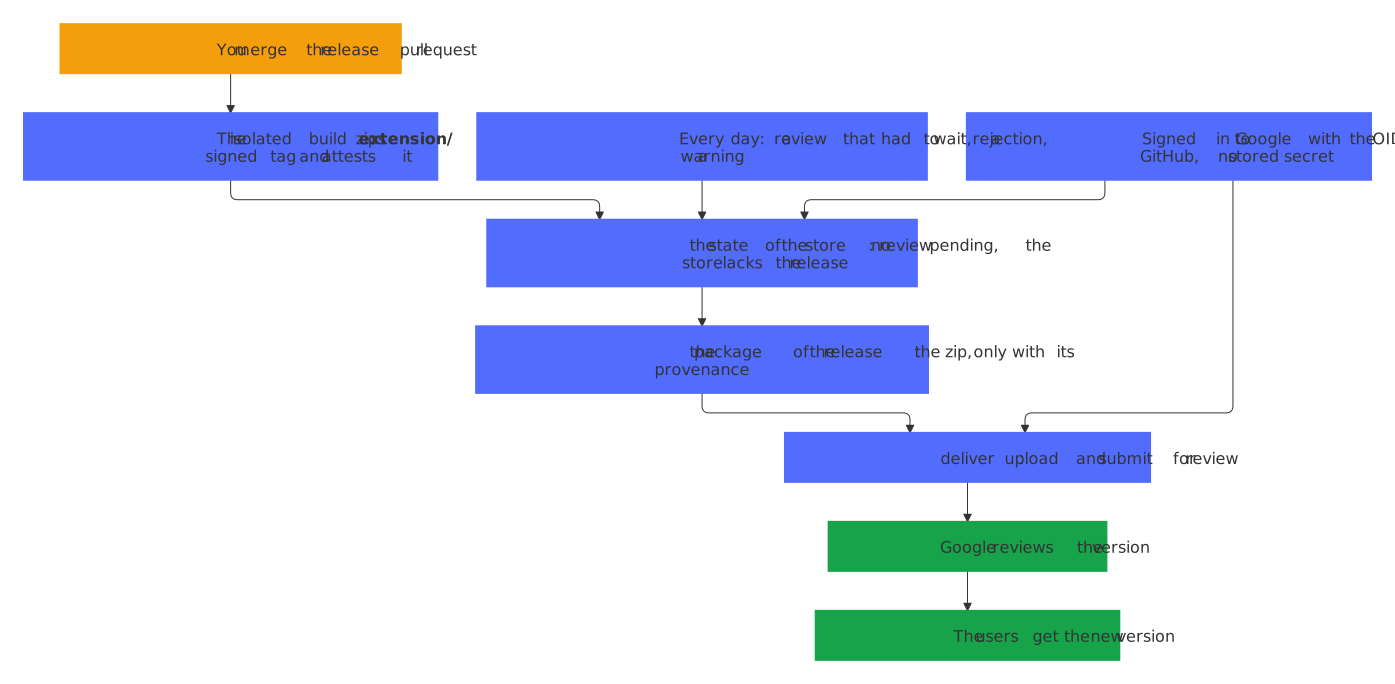
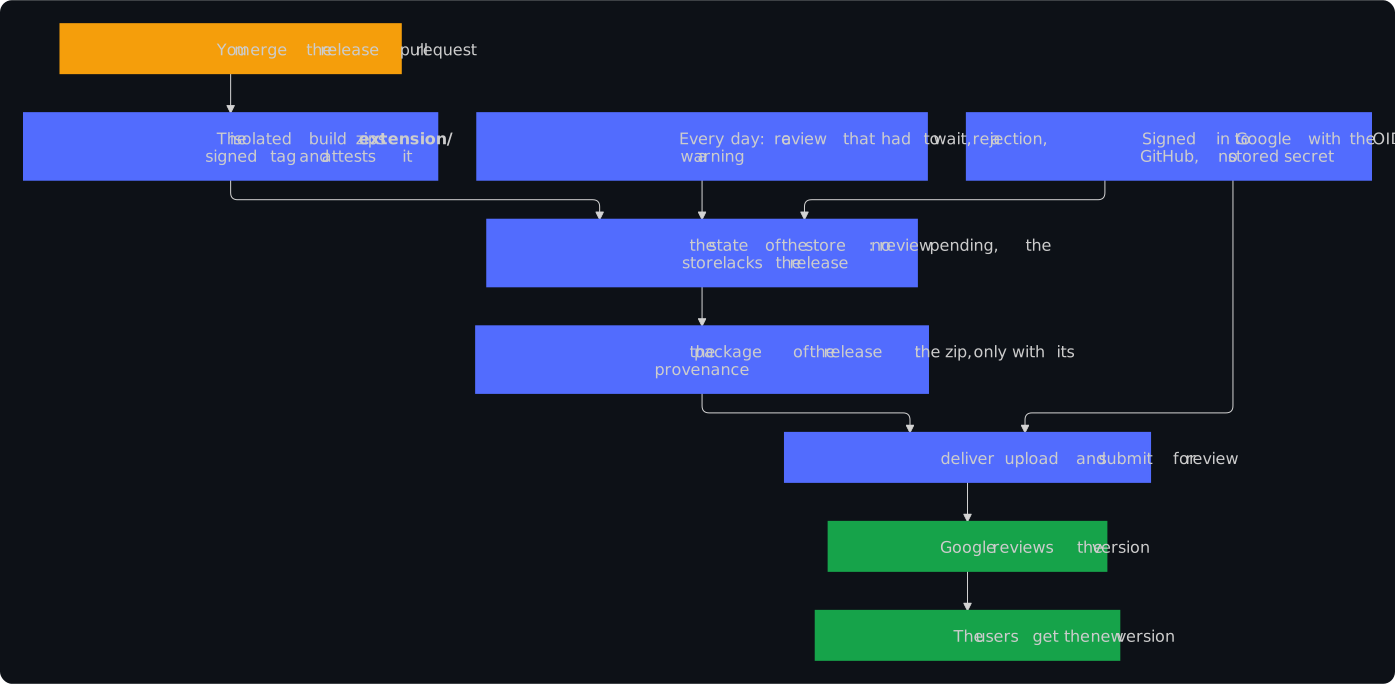
Merging the release pull request publishes the release. Its isolated build zips the extension from the signed tag and attaches the zip with its SBOM and the signed provenance of SLSA Build Level 3. The workflow Chrome Web Store then uploads exactly that zip, once it has checked the provenance, and submits it for review; Google publishes it after the review.
The workflow signs in to Google with the OIDC token of GitHub, through Workload Identity Federation, so no secret of the store is stored anywhere; a refresh token works until that is set up. It runs every day as well: it delivers a release whose review had to wait, and fails with the reason and the fix when Google rejects or warns. Decision 0085 records why.
Once by hand
python3 .github/blueprint.py checklist ticks off each step that it can see and names the rest, each with its link: the release app of the owner with its private key, as your own account shows, the token of the issue assistant unless its AI is off, OpenSSF Best Practices, the REUSE API and the social preview.
This kind adds these steps:
- Upload the first version by hand in the Developer Dashboard, fill in its listing and privacy practices from
store/, and set the variablesCWS_EXTENSION_IDandCWS_PUBLISHER_ID. - Set up the sign-in without a stored secret, with one script in the Cloud Shell of Google, and set the variables
CWS_WORKLOAD_IDENTITY_PROVIDERandCWS_SERVICE_ACCOUNT.
docs/releases.md of the new repository describes both, and what to do when a run of the workflow Chrome Web Store fails.
A real repository
No public repository of this kind follows the blueprint yet. The Variants workflow of the blueprint makes one from every change and runs its checks with their real tools, and updates one from the latest release as its blueprint bot would.
How the blueprint compares with other templates: the comparison.