Bots, their cost and the dashboard
The bots of issues and pull requests, what starts them and what they cost, and the dashboard of every repository.
Issues
A first analysis of every new issue by an AI that only reads, labels, duplicates, reminders, and closing with the release that ships the fix.
How: The issue assistant.
Welcome
A person's first pull request gets a comment with what helps it along: a title that is a Conventional Commit, the sign-off of every commit and scripts/check.sh; new issues get the analysis of the issue assistant instead.
How: welcome.yml.
Area labels
Every pull request gets the labels of the areas whose files it changes, by the paths in .github/labeler.yml, which belongs to the project.
How: area-labels.yml.
Branches
The branch bot keeps the pull requests that wait for auto-merge in a line, Renovate's too, and brings one at a time up to date with main, right after a merge and when auto-merge is turned on, so that each merges once its checks pass and no check runs for a pull request that can't merge next.
How: update-branches.yml, blueprint.py next-branch.
Pull requests that wait for auto-merge
main takes a pull request only when it is up to date with it, so only one of the pull requests that wait for auto-merge can merge next, and each merge leaves the others behind again. Bringing all of them up to date after every merge ran every check of each of them for the one that merged: about n²/2 runs of the checks for n pull requests, which kept the runners of the account busy and made every pull request wait longer. The branch bot keeps them in a line instead, as Kodiak and Bulldozer do, in the order in which their auto-merge was turned on, and brings only the first one up to date that can merge:
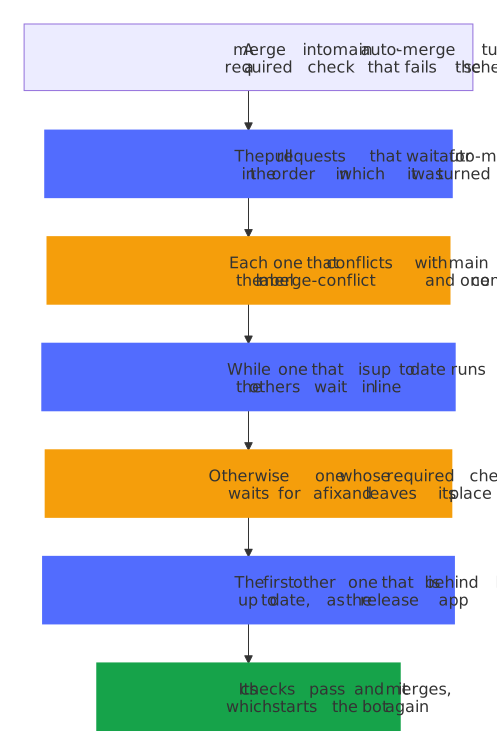
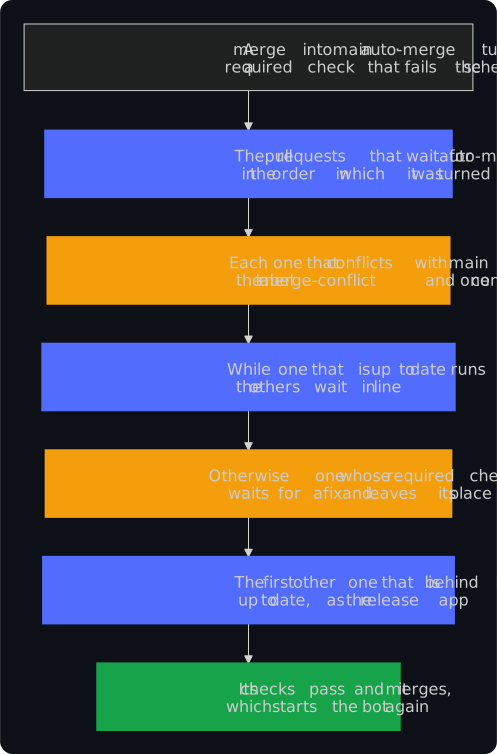
- One at a time: while the checks of the pull request at the front run, the bot brings no other one up to date. Its merge starts the next run of the bot, which brings the next one up to date, so they still merge one after the other without a person. Each pull request had to run its checks again after the merge before it anyway, so the line delays a merge only when the pull request before it fails, by one run of the checks, and with fewer jobs at once the runners of the account take every job sooner.
- At once: turning auto-merge on starts the bot, so a pull request that is behind and first in the line is brought up to date within about a minute; a merge into
main, turning auto-merge off and a required check that fails start it as well; a failed test only once it fails again, since the bots after the checks run it once more. The schedule, every six hours, is only a safety net, since GitHub runs schedules as it can, often hours late. - A failed check leaves its place: a pull request whose required check failed waits for a fix, and the next one moves up; so does one that is up to date and whose checks ended, but that something else holds up, such as a conversation to resolve. One that waits for a review or has a conversation to resolve, where the rules of
mainwant them resolved, isn't brought up to date either, since it couldn't merge after its checks. A check that isn't required holds up nothing. After a fix, the pull request takes its place again in the next run of the bot. - Conflicts and errors: a pull request that conflicts with
maingets the labelmerge-conflictand one comment, and the next one moves up; Renovate builds a branch of its own that conflicts anew. An update that GitHub refuses for a conflict is a conflict too, and one that someone pushed to since the list runs its checks anyway, so it is the one in flight. Any other request that GitHub refuses is a warning about that pull request, and the bot goes on with the next one; the run then fails, so that the bot-health bot hears of it. A run for auto-merge turned on or off shows as a check of that pull request, and the bot-health bot ignores such runs, so it passes with the warnings, and the next run reports them again. - Across changes of workflows: bringing a pull request up to date merges
maininto its branch, and oncemainchanged a workflow since, GitHub takes that merge only from a token that may change workflows. The bot's token of the release app may, as Renovate's does, so such a pull request, such as one of Renovate that updates the actions, comes up to date like any other instead of with a warning in every run. - The summary of every run shows the line: which pull request the bot brought up to date or runs its checks, and why each other one waits.
blueprint.py next-branchholds the logic, and the workflow checks out onlymainfor it, also when auto-merge is turned on.
Clean-up
Every week, the branches that main holds and the caches of closed pull requests go; a branch with work of its own stays and is listed after a month.
How: cleanup.yml.
What the bots cost
Every bot starts from an event, such as a merge into main, a pull request or the end of a check. A merge that auto-merge does with the token of a workflow starts no workflow, so Renovate, Dependabot's updates of the dev container, the release bot and the branch bot merge as the release app, and every merge into main is a push that starts the release bot and the branch bot at once:
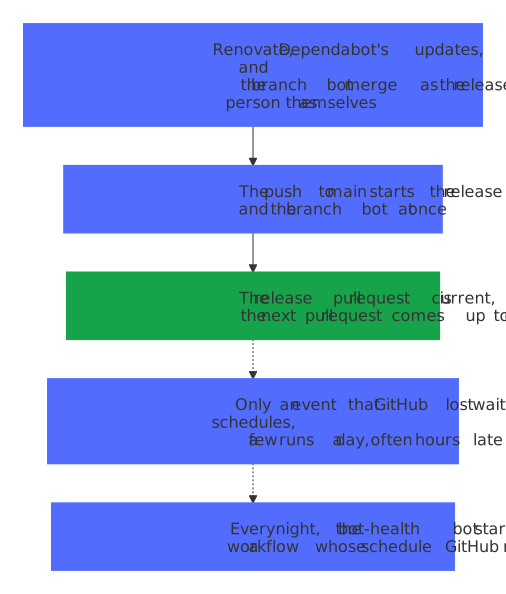
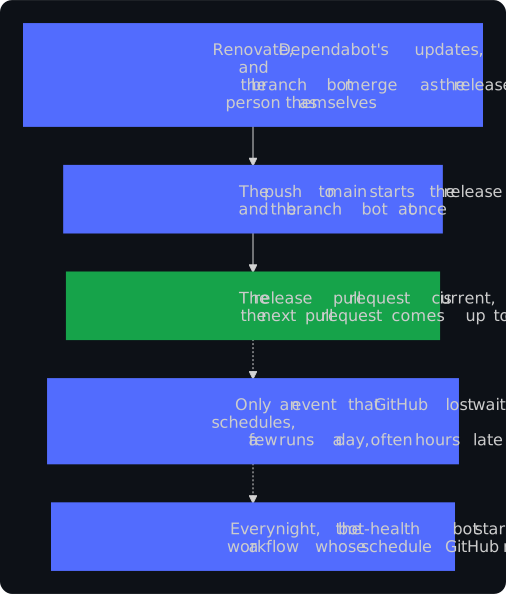
- Schedules are only a safety net: GitHub runs them as it can, in bursts every four to seven hours, often hours late and sometimes not at all. From 7 to 12 October 2026, it ran the hourly schedule of the release bot of the blueprint 21 times instead of about 117, and the half-hourly one of the branch bot 22 times instead of about 240, and none of 279 scheduled runs of the release bot made a release. So the release bot looks once a day on its schedule and the branch bot every six hours, the bot-health bot starts a workflow whose schedule GitHub missed, no schedule starts on the full hour, when GitHub has the most to start, and no comment of a workflow promises a time (decision 0033 of the decisions).
- Runs a week: the schedules of a project start 68 to 78 runs a week, about ten a day, where they started about 540 before. A test keeps every kind of project at twelve a day at most.
| Workflow | Schedule, in UTC | Runs a week |
|---|---|---|
| Update branches | every six hours, at ten past | 28, before 336 |
| Release | every day at 05:25 | 7, before 168 |
| Bot health, Findings, Issue lifecycle | every day | 21 |
| Property tests, in Python and Home Assistant projects | every day | 7 |
| The scanners, the SBOM, the mutation tests, the check of the latest release, the clean-up, the settings, the blueprint bot and the other weekly bots | once a week each | 12 to 15 |
| Together | 68 to 78, before about 540 |
- The blueprint: its own schedules come to 259 runs a week, with Renovate for every repository (84) and the dashboard (84), which cost nothing in a public repository.
- Private repositories: public repositories run Actions for free. A private one on GitHub Free has 2,000 minutes a month, and GitHub rounds every job up to a whole minute. Each run of a bot starts a short run of the bot-health bot after it, and each run of the release bot one of Issue lifecycle, which now skips the scheduled ones, so the schedules of every hour and every half hour came to close to 200 runs a day, about 6,000 a month had GitHub run them all, three times the free minutes. All the schedules of a project and the runs that they start now come to about 20 a day, about 600 a month. The checks of the pull requests cost more; decisions 0009 and 0027 keep their jobs few.
Dashboard
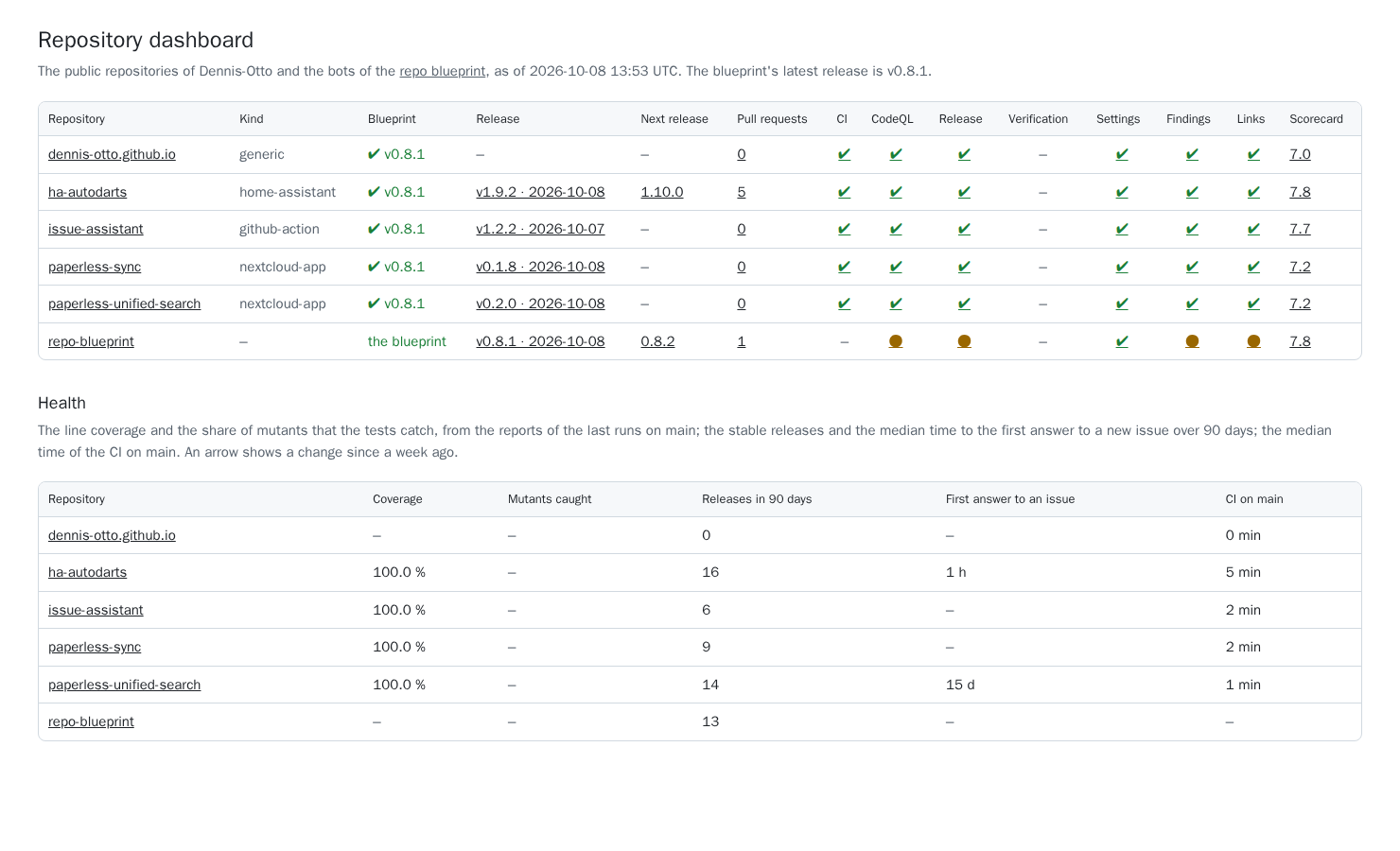
The dashboard shows every public repository of the owner at a glance: the release of the blueprint it is on, and the pull request of the blueprint bot that updates it in the colour of its checks; its latest release and the pull request of the next one; its open pull requests and those in conflict; the last run on main of its main workflows, the Docs workflow, which builds the website and, outside the blueprint, publishes it, the mutation tests and, in the blueprint, Renovate among them, where a run that GitHub skipped doesn't count and the verification is the newer of its weekly run and its job in the run that made the latest release; and its OpenSSF Scorecard. A second table shows the health of each: the line coverage and the share of mutants that the tests catch, or ✘ with the run where none is known and the last run failed, the stable releases and the median time to the first answer by a person, not a bot, to an issue over 90 days, the median time of the CI, and the median delay with which GitHub started the scheduled runs over 7 days, from the time at which the cron of each run's workflow was due last before GitHub created it, counting only schedules whose times are 12 hours apart or more, because GitHub drops most runs of a more frequent one and starts the rest hours late, so a run can't be matched to its time, each with an arrow when it moved since a week ago, from the history that the published dashboard keeps. The Dashboard workflow builds it with dashboard.py every two hours and after a change of the changelog, and publishes it on GitHub Pages, under the website of the blueprint, which is this documentation. When the history of the published dashboard can't be read, the run fails, and the website keeps its page and its trends instead of a history of one day; a report of a repository that can't be read leaves out that one value. It shows only what is public anyway, no finding of code scanning and no alert of Dependabot.
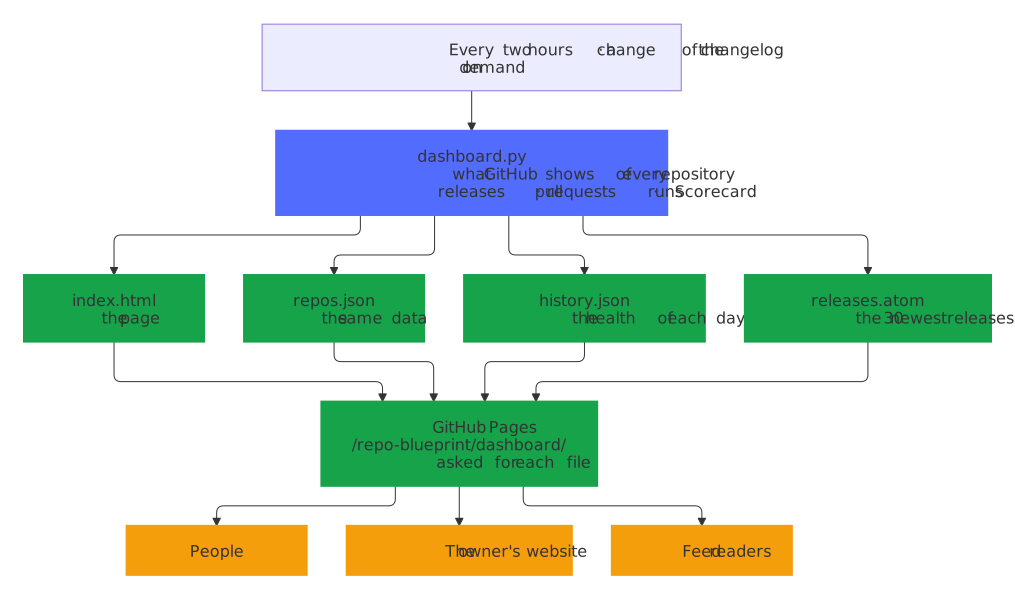
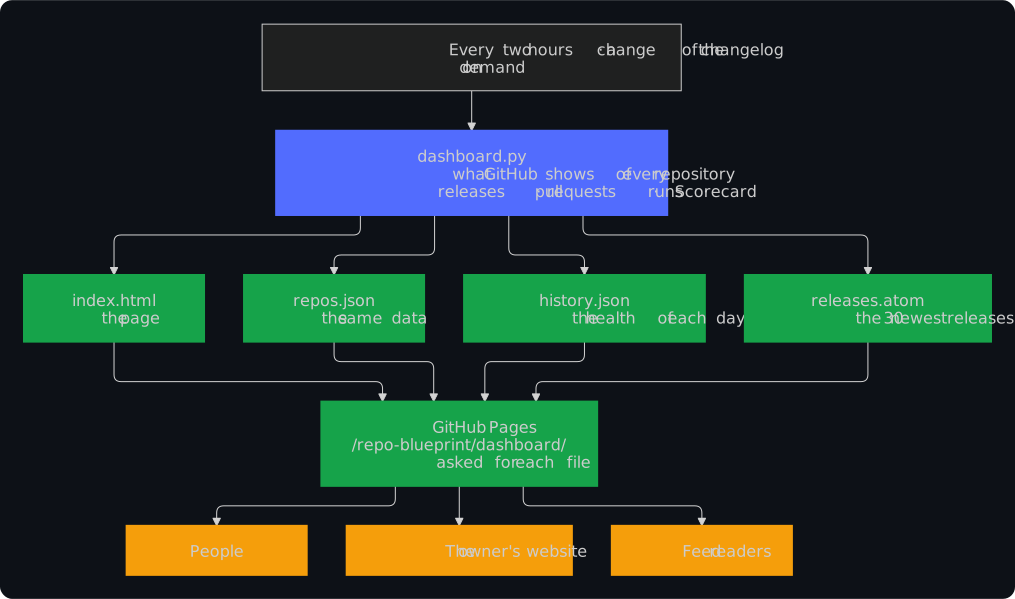
The data of the dashboard stays at its addresses, for the owner's website, which shows the version and the numbers of each project from it, for feed readers and for scripts of your own, also when the page changes. GitHub Pages serves them from the website of the blueprint, without a token and without a limit of GitHub's API:
dashboard/, ordashboard/index.html: the page.dashboard/repos.json: what the page shows, as JSON: itsschema, now1, which a change that takes a field away or changes its meaning raises; when it wasgenerated; theowner; the latest release of theblueprint; and inrepos, by name, each repository with itsname, its full namerepo(owner/name),url,description,homepageandstars, itskindand the release of theblueprintit is on, the openupdateof the blueprint bot with itstarget,number,urland thestateof its checks, itsrelease, the day it wasreleasedand itsrelease_url, itsnext_releaseand thenext_urlof its release pull request, itspullsandconflicts, the file of its CI workflowci, the lastrunsof its workflows by the names of the columns, each with itsstate,urland when itstarted, itsscorecardand itshealth: thecoverageandmutationscore in percent, the number ofreleasesin the last 90 days, the mediananswer_hoursuntil a first answer to an issue, the medianci_minutesof its CI and the medianschedule_minutesby which GitHub started its scheduled runs late. A value that isn't known, or isn't there, isnull.dashboard/history.json: thehealthof each repository for each of the last 120 days, which the arrows of the page compare with.dashboard/releases.atom: the 30 newest releases across all repositories, without prereleases, as an Atom feed, each with the first 500 characters of its notes; the page names it in its head, so a feed reader finds it from the address of the page.
The job that publishes the dashboard asks for each of the four after every deployment and fails when one is missing or holds something else.
Every Monday, the Weekly report workflow posts in the discussions what the public repositories of the owner released, merged and fixed in the seven days before its run, to the minute, with the totals of GitHub's search: their releases, merged pull requests and the updates among them, opened and closed issues, failed runs on main and the median time of their CI (weekly.py). Like the dashboard, it reports only what is public.