Repo Blueprint









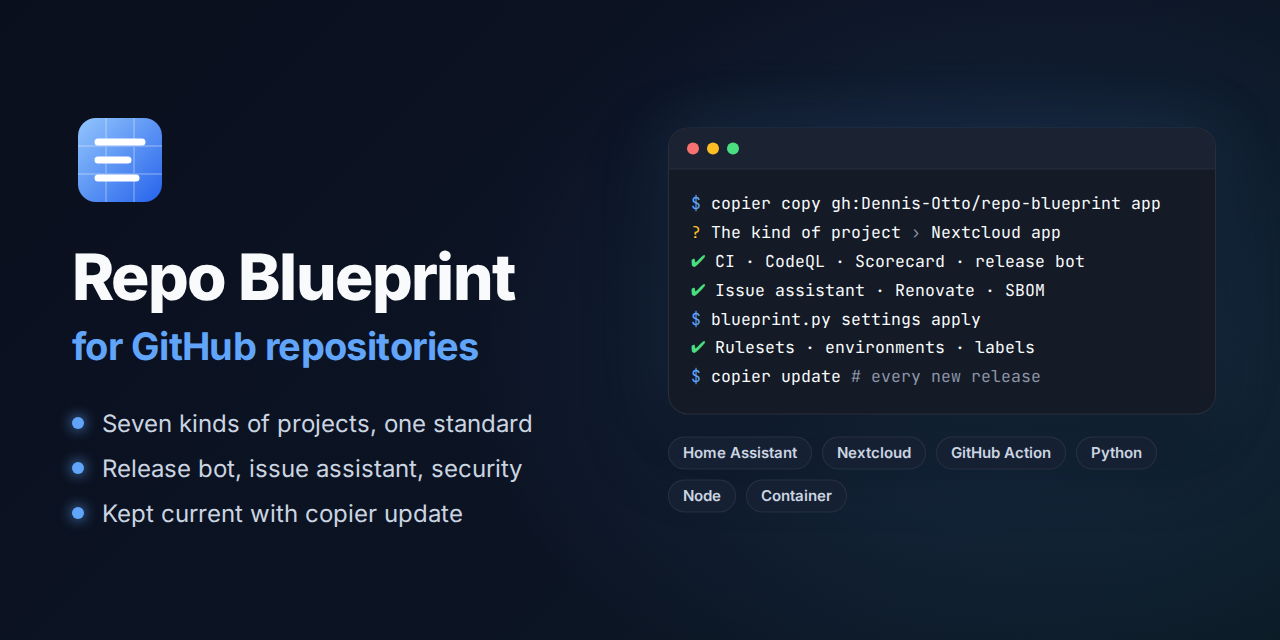
A Copier template for GitHub repositories that look after themselves: tests on every change, a release bot, security checks, an issue assistant and the settings of the repository as code, for seven kinds of projects. A bot brings every repository made from it up to each new release of the blueprint.
The website of the blueprint has this guide in English and German, together with the roadmap, the security design, the decisions and the dashboard.
💛 If the blueprint is useful to you, you can support its development. Deutsche Fassung.
How a repository looks after itself
Every change, yours or a bot's, is a pull request that merges once every check passes, and the release bot makes a signed release of what reaches main; three bots keep the repository current on their own. In the pictures, blue is the blueprint and its bots, orange is you and what is yours, and green is what comes out.
---
config:
  flowchart:
    wrappingWidth: 400
---
flowchart TB
    accTitle: How a repository looks after itself
    accDescr: copier copy makes a repository from the blueprint. Every change, yours or a bot's, is a pull request that merges once every check passes, and the release bot makes a signed release of what reaches main. Renovate, the blueprint bot and the settings bot keep the repository current on their own.

    blueprint[("Repo Blueprint")]
    you(["You"])
    renovate(["Renovate<br>every 2 hours"])
    updater(["Blueprint bot<br>after every release<br>and every week"])
    settings(["Settings bot<br>every week"])

    subgraph repo ["Your repository"]
        pr["Pull request"] --> checks{"Every check<br>passes?"}
        checks -- "yes" --> main["main"]
        main -- "release bot" --> release["Signed release"]
    end

    blueprint -- "copier copy" --> repo
    blueprint -. "a new release" .-> updater
    you -- "a change" --> pr
    renovate -- "updates" --> pr
    updater -- "copier update" --> pr
    settings -- "the settings as code" --> repo

    classDef bot fill:#526cfe2e,stroke:#526cfe,stroke-width:2px
    classDef person fill:#f59e0b2e,stroke:#f59e0b,stroke-width:2px
    classDef done fill:#16a34a2e,stroke:#16a34a,stroke-width:2px
    class renovate,updater,settings bot
    class you person
    class release done
What a new repository gets
| Area | What runs | How |
|---|---|---|
| Checks | scripts/check.sh on every change, the same locally and in the CI: tests with full coverage, on every core in Python projects, types, lint, packaging; a passing error of a download fails no run, because every download of the workflows tries again; the CI installs the Python tools with uv in seconds and keeps the packages of Composer and npm, krankerl and what mypy knows of the code in its cache, php-cs-fixer checks only the files that changed, Psalm reads the code of a Nextcloud app and what it uses, not all of vendor/, and a step that installs, builds or downloads ends after five minutes instead of holding a pull request |
the tools of each kind of project, hash-pinned |
| Lint | the workflows (actionlint), the license of every file (REUSE), the Markdown of every document (markdownlint), hints at the spelling in English and German (cspell) and at the style of the English (Vale) of the changed documents, the sign-off of every commit (DCO), the title of every pull request (Conventional Commits), an entry in the changelog for every change for users, a fragment in changelog.d/ or a line under Unreleased, checked as the release takes it in |
lint.yml, pull-request-title.yml |
| Security | CodeQL, OpenSSF Scorecard, dependency review, secret scan, SBOMs as SPDX and CycloneDX, OpenVEX, release tags signed without a key (gitsign) and checked before every build, findings watcher, the security audit of the workflows (zizmor), every lock file against the OSV database (OSV-Scanner), the network traffic of every job (Harden-Runner) | every action pinned to a commit hash |
| Releases | a pull request with the next version, decided from the titles of the merged pull requests (fix a patch, feat a minor, ! a major version, or a minor one while the version is below 1.0.0), and the text of the fragments in changelog.d/ and of Unreleased in the changelog as its notes; merging it publishes the release with its package, SBOM and the signed provenance of an isolated build (SLSA Build Level 3), delivers it, and then verifies it as its users can, also every week; where the repository variable BETA_CHANNEL is true, every change for users also becomes a beta of the next release, a prerelease for testers |
release-please, the release app, immutable releases, verify-release.yml |
| Dependencies | Renovate, which the blueprint runs for every repository every two hours as the release app: the actions, the dependencies, the images and the pins of the workflows, a week after their release, and at once an update that fixes a vulnerability or the new commit of a branch that an action follows; routine updates and releases of dependency updates merge themselves once every check passes, while the weekly refresh of every lock file, which brings the newest versions without the week of waiting, waits for the maintainer; the blueprint checks that Renovate reads every lock file that it brings. Dependabot keeps the Features of the dev container. | renovate.json5, renovate-blueprint.json5, dependabot.yml |
| Coverage | one comment on every pull request with the coverage of its tests against that of main, file by file |
after-checks.yml |
| PR coach | every check that fails says what it found, why that matters and how to fix it, with the commands to run: in the summary of the check, as its annotation and in one comment on the pull request that follows every push, also on a pull request from a fork; a title that is no Conventional Commit gets one that passes, and scripts/check.sh explains the step that stopped it on your machine too |
.github/checks.toml, .github/checks.project.toml, after-checks.yml |
| Fix bot | a check that fails fixes what a command can fix, such as the format of the code, trailing whitespace and line endings, the rules of markdownlint and the pages in one column: the bot commits the fixes onto a branch of the repository, also one of Renovate, as one commit, suggests them at their lines on a pull request from a fork, and keeps one pull request with the fixes of main that merges itself; python3 .github/blueprint.py fix run makes the same fixes on your machine |
autofix in .github/checks.toml, after-checks.yml |
| Mutation tests | every week, thousands of small changes of the code run against the tests, and the summary shows the share they notice and the mutants that survive; a low score is a report, never a failure, but a run that measures nothing fails; a pull request that changes how they run tries them | mutation.yml: mutmut, Infection |
| Flaky tests | a test run that fails, or whose job runs out of time, runs its failed jobs once more, unless the same jobs broke for the commit before; a job that passes then is reported as flaky in one issue, with the step, the test and the error that failed | after-checks.yml |
| Cancelled checks | the quick checks run once for each commit, so that no run for another commit cancels them; a run of a longer required check for the latest commit of a pull request that a late run for an older commit cancelled starts again by itself instead of blocking the merge | after-checks.yml |
| Failed releases | the release of a merge that fails, as at a push of its tag that GitHub refuses for a moment, runs its failed jobs once more by itself, where they stopped | after-checks.yml |
| Bot health | a bot or a scheduled workflow that fails on main runs its failed jobs once more where a second try can pass, and otherwise keeps one issue per workflow open, with the failed jobs, their steps and their first errors, which the next run that passes closes; every night, a look at the latest run of every workflow, those of the project too, which starts a workflow whose schedule GitHub missed or switched off; in the blueprint, one issue with the warnings and errors of Renovate |
bot-health.yml, blueprint.py bot-health |
| Fast checks | a check runs only where it can change a result: a scanner in the pull requests that change what it reads, on main only what keeps a baseline or publishes, the rest every week, and in the release pull request no scanner at all; the newest Python checks the main of a Python project after every change and every week |
the triggers and path filters of the workflows, newest-python.yml |
| Issues | a first analysis of every new issue by an AI that only reads, labels, duplicates, reminders, and closing with the release that ships the fix | the issue assistant |
| Community | README, contributing guide with the coding standards and the rule that every change brings its tests, code of conduct, security policy with how to verify a release and an assurance case, the security design of the software (docs/security.md), support, governance with the roles and the continuity of the project, issue forms, pull request template, records of the decisions that shape the project (docs/decisions/), discussions with forms for questions and ideas and an announcement of every release, sponsor button, social preview |
|
| Website | the documentation in docs/ as a website with search and a light and a dark theme, in English and, with German pages such as index.de.md next to the English ones, in German: every pull request builds it strictly, and so does scripts/check.sh once the tools of its preview are installed, on Linux, macOS and Windows; every change of main publishes the build of that check on GitHub Pages, with what a hook writes into site/.well-known/, with the fonts and scripts that it downloads kept in a cache for a week |
MkDocs with the Material theme, mkdocs.yml, docs.yml |
| Diagrams | every diagram as a picture that every reader sees, also in the GitHub app, the stores and e-mails, which draw no Mermaid: a Mermaid source in docs/diagrams/, drawn as an SVG for the light and one for the dark theme, while the website draws the source live; the check diagrams draws the pictures anew in every pull request that changes a diagram or adds a mermaid block, and the diagram bot commits the sources and pictures onto its branch; on main, a pull request of the diagram bot fixes what is still missing and merges itself; bash scripts/diagrams.sh --extract turns the mermaid blocks of existing Markdown into sources and their pictures |
scripts/diagrams.sh with mermaid-cli, lint.yml, after-checks.yml, diagrams.yml |
| Settings | the settings of the repository as code: merges, rulesets, security, Actions, environments, variables, labels, GitHub Pages, and every file of the community standards of GitHub; the settings bot applies them after every change and every week | .github/repository.toml and blueprint.py |
| Clean-up | every week, the branches that main holds and the caches of closed pull requests go; a branch with work of its own stays and is listed after a month |
cleanup.yml |
| Development | a dev container for VS Code and GitHub Codespaces with the tools of the checks and of the website, and a hook that runs them before every push, on Linux, macOS and Windows: scripts/check.sh fails when Git would skip it |
.devcontainer/, .githooks/pre-push |
| Coding agents | the rules of the repository for Claude Code, Codex, GitHub Copilot and Cursor: the commands of the checks and tests of its kind, the titles of pull requests and the versions they make, the changelog, the sign-off, and which files belong to the project and which to the blueprint, a list that a test of the blueprint keeps equal to the files an update never overwrites; the notes of the project join them from a file of its own | AGENTS.md, CLAUDE.md, .github/agents.project.md |
| Updates | right after every release of the blueprint, and every week, the blueprint bot runs copier update and opens a pull request |
blueprint-update.yml |
| App Store | for a Nextcloud app: the registration of its id with its certificate, once, by hand | register-app.yml |
| Upstream | for a Nextcloud app, every week: when Nextcloud has a new major version, a pull request raises max-version and merges itself once every check, the end-to-end tests included, passes against it; started by hand as a dry run, it shows the pull request it would open and changes nothing |
upstream.yml |
| Area labels | every pull request gets the labels of the areas whose files it changes, by the paths in .github/labeler.yml, which belongs to the project |
area-labels.yml |
| Branches | after every change of main, the branch bot brings each pull request that waits for auto-merge up to date, Renovate's too, so that it merges once its checks pass |
update-branches.yml |
From a change to a release
The title of a pull request decides the next version, and merging the release pull request does the rest:
---
config:
  flowchart:
    wrappingWidth: 400
---
flowchart TB
    accTitle: From a change to a release
    accDescr: A pull request whose title is fix, feat or feat! merges into main once every check passes. The release bot keeps a release pull request with the next version and the text of the fragments and of Unreleased. Merging it signs its tag first, in the next run of the release bot, then builds the release in isolation once the tag checks out, signs and publishes it, delivers it and verifies it, then and every week. With BETA_CHANNEL, every change for users also becomes a beta.

    pr["Pull request<br>fix: · feat: · feat!:"]
    main["main"]
    rpr["`Release pull request<br>chore: release x.y.z<br>notes from changelog.d/<br>and *Unreleased*`"]
    beta["Beta x.y.z-beta.N<br>for testers"]
    tag["Signed tag<br>at the merge, by the next run<br>checked before the build"]
    build["Isolated build<br>SLSA Build Level 3"]
    release["Release<br>package · SBOMs<br>provenance"]
    deliver["Delivery<br>PyPI · npm · GHCR<br>App Store · HACS"]
    verify["Verified as users can<br>at once and every week"]

    pr -- "every check passes" --> main
    main -- "release bot" --> rpr
    main -. "BETA_CHANNEL" .-> beta
    rpr -- "merged" --> tag --> build --> release
    release --> deliver
    release --> verify

    classDef bot fill:#526cfe2e,stroke:#526cfe,stroke-width:2px
    classDef done fill:#16a34a2e,stroke:#16a34a,stroke-width:2px
    class rpr bot
    class release done
A pull request describes what it changes for users in a file of its own, a fragment in changelog.d/, such as changelog.d/dark-mode.md, below the heading of its kind of change, such as ### Features. A new file conflicts with nothing, so pull requests that run at the same time merge one after another, without a person who merges main into each of them, and a release no longer conflicts with the pull requests that wait. The check changelog checks each fragment of a pull request as the release takes it in and counts only a new one as its entry, scripts/check.sh checks every fragment that waits on main as well, and the release bot moves every fragment into the section of the release and deletes it in the same commit. A line under ## Unreleased in CHANGELOG.md still works.
---
config:
  flowchart:
    wrappingWidth: 400
---
flowchart TB
    accTitle: The changelog without conflicts
    accDescr: Two pull requests each add a file of their own to changelog.d, so they merge into main one after the other without a conflict. The release bot writes the section of the next release from the fragments and the text of Unreleased into CHANGELOG.md of the release pull request, and deletes the fragments in the same commit. Merging it makes that section the notes of the release.

    a["Pull request<br>changelog.d/dark-mode.md"]
    b["Pull request<br>changelog.d/token-secret.md"]
    main["main<br>one file for each change"]
    rpr["Release pull request<br>the section of x.y.z in CHANGELOG.md<br>the fragments deleted"]
    notes["Release notes<br>each kind of change below one heading"]

    a -- "merged" --> main
    b -- "merged, without a conflict" --> main
    main -- "release bot" --> rpr
    rpr -- "merged" --> notes

    classDef person fill:#f59e0b2e,stroke:#f59e0b,stroke-width:2px
    classDef bot fill:#526cfe2e,stroke:#526cfe,stroke-width:2px
    classDef done fill:#16a34a2e,stroke:#16a34a,stroke-width:2px
    class a,b person
    class rpr bot
    class notes done
When the checks run
A check runs only where it can change a result, because an account of GitHub runs about 20 jobs at once, and each job that can't fail keeps a pull request waiting for a runner:
---
config:
  flowchart:
    wrappingWidth: 400
---
flowchart TB
    accTitle: When the checks run
    accDescr: Every pull request runs the required checks, and the scanners of what it changes: zizmor for a workflow, OSV-Scanner for a lock file, fuzzing for Python code and the link check for a document. The release pull request, which changes only the changelog and the version, runs the required checks without the scanners. After a merge, main runs only what keeps a baseline or publishes. Every week, main runs the scanners in full, the secret scan of the whole history, the SBOM and the newest Python.

    pr["Pull request"]
    rpr["Release pull request<br>changelog and version"]
    required["Required checks<br>tests · lint · docs · CodeQL<br>dependency review · secret scan"]
    scanners["Scanners of what it changes<br>workflows: zizmor · lock files: OSV-Scanner<br>Python: fuzzing · documents: links"]
    main["main"]
    baseline["What keeps a baseline or publishes<br>tests with coverage · newest Python<br>CodeQL · zizmor · OSV-Scanner · Scorecard<br>website · release · branch bot"]
    weekly["Scanners in full · fuzzing for 15 minutes<br>secret scan of the whole history<br>SBOM · newest Python"]

    pr --> required
    pr -- "changes what they read" --> scanners
    rpr -- "no scanner" --> required
    required -- "every check passes" --> main
    main -- "after a merge" --> baseline
    main -- "every week" --> weekly

    classDef bot fill:#526cfe2e,stroke:#526cfe,stroke-width:2px
    classDef person fill:#f59e0b2e,stroke:#f59e0b,stroke-width:2px
    classDef done fill:#16a34a2e,stroke:#16a34a,stroke-width:2px
    class pr person
    class rpr bot
    class main done
- After a merge:
maintakes a pull request only when it is up to date with it, so the merge givesmainthe files that the checks of the pull request passed.mainruns only the tests, whose coverage the coverage bot compares every pull request with, the analyses that code scanning compares with, and what publishes, such as the website and the release. Lint runs in the pull requests, the secret scan and the fuzzing there and every week, and the SBOM every week; every release has an SBOM of its own. - The release pull request changes only the changelog and the version, which can't change what a scanner finds. In the blueprint, the required check variants stands for the variants and updates of every kind of project: it passes when each passed, or when none had to run, as in the release pull request.
- The newest Python, beta included, runs the checks of a Python project after every change of
mainand every week, in a workflow of its own that keeps the CI ofmaingreen. A new Python breaks every pull request alike, and none waits for it. A failure keeps an issue open, which the weekly run closes once the checks pass again. - The runners are named with their version,
ubuntu-24.04, notubuntu-latest: GitHub moves that label to a new image one job at a time over weeks, as to Ubuntu 26.04 from 19 October 2026, so that the runs of one workflow would land on either image at random, with another Python, ShellCheck and Docker, and fail like a flaky test. In the blueprint, the Next runner workflow runs the variants on the next runner every week, and a failure keeps an issue open; once they pass there, a release of the blueprint moves every job to it. A workflow of your own, which an update leaves alone, keeps the runner it names: withubuntu-latest, it moves with GitHub's label.
When a check fails or stops
A check that a runner, a site or GitHub fails for a moment, or that a race of two runs cancels, needs no person: the bots after the checks run it once more, and leave red only what fails for a reason.
---
config:
  flowchart:
    wrappingWidth: 400
---
flowchart TB
    accTitle: When a check fails or stops
    accDescr: When a run of the checks or of the release ends, the bots after the checks look at how. Tests that failed or ran out of time at first run their failed jobs once more, unless the same jobs broke for the commit before; a job that passes then goes into the issue of flaky tests with its step, its test and its error, and one that fails again stays red. A required check that a late run for an older commit cancelled starts again. The release of a merge that failed runs its failed jobs once more, where they stopped.

    run["A run of the checks<br>or of the release ends"]
    tests["Tests failed or ran out of time<br>at the first attempt"]
    raced["A required check cancelled<br>by a late run for an older commit"]
    release["The release of a merge failed"]
    before{"The same jobs broke<br>for the commit before?"}
    again["The failed jobs run once more"]
    flaky["`Issue *Flaky tests*<br>job · step · test · error`"]
    restart["The run for the head<br>starts again"]
    resume["The failed jobs of the release<br>run once more, where they stopped"]
    red["Stays red, for you"]

    run --> tests
    run --> raced
    run --> release
    tests --> before
    before -- "no" --> again
    before -- "yes" --> red
    again -- "passes" --> flaky
    again -- "fails again" --> red
    raced --> restart
    release --> resume

    classDef bot fill:#526cfe2e,stroke:#526cfe,stroke-width:2px
    classDef person fill:#f59e0b2e,stroke:#f59e0b,stroke-width:2px
    classDef done fill:#16a34a2e,stroke:#16a34a,stroke-width:2px
    class again,restart,resume bot
    class red person
    class flaky done
- Once, not again and again: the flaky-test bot runs the failed jobs of the first attempt of a test run once more, and so does the bot for failed releases with a release that a merge started; the bot for cancelled checks starts a run twice at most. A job that GitHub stops at its time limit ends cancelled, not failed, and runs once more as well. A run that you or a newer run cancelled stays cancelled, even when a job that waits for the others failed because of it.
- A failure that repeats is real: when the same jobs broke for the commit before on the same branch, after they ran once more, the jobs don't run again, so that a broken test doesn't keep a runner busy for nothing.
- The issue of flaky tests gets a table for each run that passed when it ran again: each job that failed at first, with a link to its log, the step that broke, the tests that pytest names in the log, and the first error. A name or a line of a log is written as plain code, so a pull request can't end the table or mention anybody with it.
- The quick checks run once for each commit: the title and the changelog, the dependency review, the secret scan, the area labels and the website. A late run for an older commit, such as one that an edit of the release pull request starts while release-please pushes to it, no longer cancels them for the head. The checks that take minutes, the tests, Lint, CodeQL and the variants, still cancel the run for an older commit; the bot for cancelled checks repairs a race there.
- Other workflows of tests that a repository has, such as visual tests, join the CI and Docker E2E with
copier update --data "test_workflows=Visual check, Screenshot bot". - The link check of a pull request reads the documents that it changes, and every document when it changes the rules, or moves or deletes a file that a document may link to. lychee keeps the answers of the sites for a day and asks again for a link that failed, so that a site that is down for a moment fails only the pull requests that link to it.
The PR coach
A check that fails explains itself, to you and to everyone who sends a pull request, also from a fork: what it found, why that matters and how to fix it, with the commands to run.
---
config:
  flowchart:
    wrappingWidth: 400
---
flowchart TB
    accTitle: The PR coach
    accDescr: A push to a pull request, also one from a fork, runs the checks. A check that fails explains itself in its summary and as its annotation, from the explanations of .github/checks.toml and .github/checks.project.toml. After the checks, the PR coach reads the check runs and their annotations from the API, without running any code of the pull request, and keeps one comment on the pull request up to date: a section for each check that failed, with the problem, why it matters, the fix and its commands. You push the fix, and once every check passes, the comment says so.

    push(["A push to a pull request<br>also from a fork"])
    checks{"Every check<br>passes?"}
    explain["The check that failed explains itself<br>in its summary and as its annotation"]
    coach["The PR coach after the checks<br>reads the check runs from the API<br>and runs no code of the pull request"]
    comment["One comment on the pull request<br>for each check: the problem, why it matters,<br>the fix and its commands"]
    passed["The comment says<br>every check passed"]
    catalog[(".github/checks.toml<br>.github/checks.project.toml")]

    push --> checks
    checks -- "no" --> explain --> coach --> comment
    comment -- "you push the fix" --> push
    checks -- "yes" --> passed
    catalog -.-> explain
    catalog -.-> coach

    classDef bot fill:#526cfe2e,stroke:#526cfe,stroke-width:2px
    classDef person fill:#f59e0b2e,stroke:#f59e0b,stroke-width:2px
    classDef done fill:#16a34a2e,stroke:#16a34a,stroke-width:2px
    class explain,coach,comment bot
    class push person
    class passed done
- In the check: a job that fails ends with a step that writes the explanation of its check into the summary and as an annotation, which the list of the checks shows.
scripts/check.shdoes the same for the step that stopped it, on your machine as well, and in the CI the files of the pull request show the problems of the text files, of Ruff and of actionlint at their lines. - One comment, also for a fork: the runs of a pull request from a fork can't write to it, so the coach runs after the checks, in the repository itself. It keeps one comment with a section for each check that failed, the findings of its annotations and a link to its log, and a suggested title when the title is no Conventional Commit. A pull request whose checks never failed gets no comment; once every check passes, a comment that listed failures turns into a short all-clear.
- Safe with any pull request: the coach reads the check runs and their annotations from the API and checks out only the explanations of the default branch; it runs no code of the pull request. Text that a pull request controls, such as a file name, a message or a title, appears only as code, cut to a short length, so it can't mention anybody, link anywhere or break the comment.
- Every check explains itself: the explanations are in
.github/checks.toml, which the blueprint keeps current, and those of a project's own checks in.github/checks.project.toml, which belongs to the project and wins. A test of the blueprint fails for a required check or a step ofscripts/check.shwithout an explanation, andpython3 .github/blueprint.py coach verifylists them in a repository.
Pull requests fix themselves
Fix first, explain second: what a command can fix of a check that failed, the pull request fixes by itself, also a pull request of Renovate, and main too.
---
config:
  flowchart:
    wrappingWidth: 400
---
flowchart TB
    accTitle: Pull requests fix themselves
    accDescr: A check fails. Where a command fixes what it found, such as the format of the code, the whitespace of a text file or the rules of markdownlint, the job of the check runs the commands of autofix from .github/checks.toml and keeps the files that they changed. After the checks, the fix bot takes these files as data, only text files that the commit has: on a pull request from a branch of the repository, also one of Renovate, it commits them as one commit onto the branch, and the checks run again; on a pull request from a fork, it suggests them at their lines; on main, it keeps one pull request from bot/self-heal that merges itself. What no command fixes, the PR coach explains.

    failed(["A check fails"])
    command{"A command<br>fixes it?"}
    fix["The job of the check runs the commands of autofix<br>and keeps the files that they changed"]
    bot["The fix bot after the checks<br>takes only text files that the commit has"]
    branch["A branch of this repository, also Renovate's:<br>one commit, and the checks run again"]
    fork["A pull request from a fork:<br>suggestions at their lines"]
    main["main: one pull request from bot/self-heal<br>that merges itself"]
    coach["The PR coach explains<br>what no command fixes"]
    green(["Every check passes"])
    catalog[(".github/checks.toml<br>autofix")]

    failed --> command
    command -- "yes" --> fix --> bot
    command -- "no" --> coach
    bot --> branch
    bot --> fork
    bot --> main
    branch --> green
    main --> green
    fork -- "you commit the suggestions" --> green
    catalog -.-> fix

    classDef bot fill:#526cfe2e,stroke:#526cfe,stroke-width:2px
    classDef person fill:#f59e0b2e,stroke:#f59e0b,stroke-width:2px
    classDef done fill:#16a34a2e,stroke:#16a34a,stroke-width:2px
    class fix,bot,branch,fork,main,coach bot
    class failed person
    class green done
- The check fixes: each explanation of
.github/checks.tomlsays inautofixwhich commands fix what its check finds, or why no command can; a test of the blueprint fails for one that doesn't say. When a check fails, its job runs those commands on the head of the pull request, with the tools that it installed already: the text files, the pages in one column and Ruff or php-cs-fixer forscripts/check.sh, markdownlint for the Markdown. It keeps the files that they changed as an artifact. - One commit on a branch of the repository: once the checks of the commit that fix have ended, the fix bot commits all their fixes as one commit onto the branch, as the release app, with its sign-off, and the checks run again; the comment of the PR coach names the files. This works on the branches of Renovate and the other bots as well, so that an update of a formatter stays green and merges itself.
- Suggestions on a fork: no bot pushes to a fork, so the bot suggests the fixes at their lines of the pull request, ten at most in one review and none twice; Commit suggestion takes one. A fix that no suggestion shows, such as line endings, names its file, and the PR coach the command.
- main heals itself: when a check of
mainfails with fixes, one pull request frombot/self-healholds them and merges itself once every check passes; the bot closes it oncemainneeds none, and a failure of the bot keeps one issue open. - Safe with any pull request: the bot runs nothing of a pull request with a token that can write. It takes the fixes as data, with
blueprint.pyofmain, and lets through only text files that the commit has already, by plain paths, outside.gitand the workflows. It commits at most twice in a row (once more for a check that ends later), never a third time, and a pull request with the labelno-bot-fixesgets no commit. - On your machine:
python3 .github/blueprint.py fix runruns the commands of every step ofscripts/check.sh, andpython3 .github/blueprint.py fix textfixes the text files alone.
Diagrams that fix themselves
The GitHub app, HACS, the Nextcloud App Store, PyPI and the e-mails of GitHub draw no Mermaid and show a mermaid block as code. So every diagram is a picture of its source, and the bots keep it that way without a person.
---
config:
  flowchart:
    wrappingWidth: 400
---
flowchart TB
    accTitle: How the diagrams fix themselves
    accDescr: A pull request that adds a mermaid block or changes a diagram, and Renovate with a new version of mermaid-cli, run the check diagrams, which draws the diagrams anew. On a branch of the repository, the diagram bot commits the sources and pictures onto the branch, and the checks run again; a fork keeps the failing check, which says the command. After the merge, and every week, main is drawn too: when a diagram is not yet a picture of its source, one pull request from bot/diagrams fixes it and merges itself. So every reader sees every diagram.

    change["`A pull request adds a *mermaid* block<br>or changes a diagram`"]
    renovate["Renovate brings<br>a new mermaid-cli"]
    check{"The check diagrams:<br>every diagram a picture<br>of its source?"}
    bot["The diagram bot commits<br>sources and pictures<br>onto the branch"]
    fork["A fork: the check<br>says the command"]
    merged["The pull request merges"]
    main{"main, after every change<br>and every week:<br>every diagram a picture?"}
    fix["`One pull request from<br>*bot/diagrams* that<br>merges itself`"]
    done["Every reader sees<br>every diagram"]

    change --> check
    renovate --> check
    check -- "no, a branch" --> bot
    bot -- "checks again" --> check
    check -- "no, a fork" --> fork
    check -- "yes" --> merged --> main
    main -- "yes" --> done
    main -- "no" --> fix --> done

    classDef bot fill:#526cfe2e,stroke:#526cfe,stroke-width:2px
    classDef person fill:#f59e0b2e,stroke:#f59e0b,stroke-width:2px
    classDef done fill:#16a34a2e,stroke:#16a34a,stroke-width:2px
    class bot,renovate,fix bot
    class change,fork person
    class done done
- A pull request fixes itself: when a pull request from a branch of the repository adds a
mermaidblock or changes a source, the check diagrams runsbash scripts/diagrams.sh --extract, and the diagram bot commits the sources and pictures it made onto the branch, as the release app, with a comment that names the pages it changed. The checks of that commit pass. A pull request from a fork gets the failing check, whose summary lists the files and the command. mainfixes itself: after every change ofmainthat touches a diagram or adds amermaidblock, and every week, the Diagrams workflow draws every diagram ofmain. When something is missing, such as the blocks of a repository right after the update of the blueprint, it keeps one pull request from the branchbot/diagramswith the fix, which merges itself once every check passes, and closes it whenmainis fixed otherwise. A failed run opens an issue, which the weekly run closes once the bot passes again.- A new renderer draws anew: Renovate keeps the image of mermaid-cli in
scripts/diagrams.shcurrent; the check draws the pictures again on its branch, and the diagram bot commits them, so the update still merges on its own. - Nothing but diagrams: the bot runs no code of a pull request. It commits only sources in
docs/diagrams/, SVG pictures indocs/images/diagrams/and pages of Markdown, by plain paths, onto the very commit that the check drew, and only for a branch of the repository.
Mutation tests
The mutation tests show the lines that the tests run but don't check: every Saturday they change the code in thousands of small ways, the mutants, and run the tests that cover each one. A mutant that no test notices survives.
---
config:
  flowchart:
    wrappingWidth: 400
---
flowchart TB
    accTitle: How the mutation tests run
    accDescr: Every Saturday, on demand, and for a pull request that changes how they run, the Mutation workflow runs the mutants. mutmut changes the Python in a copy of the repository and leaves out the tests marked mutation_unsafe; Infection changes the PHP of a Nextcloud app, with the bootstrap of its tests. When mutants ran, the summary shows the score and the surviving mutants, the artifact keeps them and the dashboard shows the score. A run that measured nothing fails and shows the last words of the tool.

    start["Every Saturday · on demand<br>a pull request that changes<br>mutation.yml or mutmut"]
    python["mutmut<br>the Python, in a copy in mutants/<br>without the tests marked mutation_unsafe"]
    php["Infection<br>the PHP of a Nextcloud app<br>with tests/bootstrap.php"]
    score["The summary and the artifact<br>the score · the surviving mutants"]
    dashboard["`The dashboard<br>*mutants caught*`"]
    fail["The run fails<br>with the last words of the tool"]

    start --> python
    start --> php
    python -- "mutants ran" --> score
    php -- "mutants ran" --> score
    score --> dashboard
    python -. "nothing measured" .-> fail
    php -. "nothing measured" .-> fail

    classDef bot fill:#526cfe2e,stroke:#526cfe,stroke-width:2px
    classDef done fill:#16a34a2e,stroke:#16a34a,stroke-width:2px
    class python,php bot
    class score,dashboard done
- The score is the share of the mutants that a test noticed, among those of the code that the tests run: for mutmut the killed among the killed and the survived, for Infection its Covered Code MSI. The dashboard shows it as mutants caught.
- A low score fails nothing, not even below a minimum that the project's own configuration sets, but a run in which no mutant ran does, with the end of the output of mutmut or Infection in its summary: a broken configuration shows up in the week it breaks, not as an empty dashboard.
- A pull request that changes how the mutants run,
mutation.ymlor the pinned mutmut, tries them, mutmut for a quarter of an hour, and shows a defect as a red check before the weekly run. The check isn't required, so a pull request that merges itself, such as an update of mutmut, doesn't wait for it: its red check is a warning to read. - mutmut runs the tests in a copy of the repository,
mutants/, with the changed code and without Git. A test that can't work there, because it reads the code as text or asks Git, gets the marker@pytest.mark.mutation_unsafe, and the mutation tests leave it out; thepyproject.tomlof a new Python project registers the marker. - A configuration of the project wins: a
[tool.mutmut]table inpyproject.tomlor a[mutmut]section insetup.cfgfor mutmut, aninfection.json5for Infection. Without one, mutmut mutatescustom_components/,src/or the modules and packages of the root, and Infection mutateslib/on PHP 8.3, withtests/bootstrap.php, which loads the classes of Nextcloud.
When a bot fails
GitHub mails the failure of a scheduled run only to whoever last changed its schedule, and that of another run to whoever started it, in these repositories the release app for most runs: a red bot used to show only in the Actions tab, as when Findings, Mutation and Renovate failed for days. The bot-health bot (bot-health.yml) makes each such failure an issue, and closes it once the bot passes again.
---
config:
  flowchart:
    wrappingWidth: 400
---
flowchart TB
    accTitle: What the bot-health bot does when a bot fails
    accDescr: When a run of a bot or a scheduled workflow ends on the default branch, the bot-health bot looks at it; runs of pull requests start nothing. A first failure that a second try can fix runs its failed jobs once more. A failure that stays opens one issue for the workflow, or updates it, with the failed jobs, their steps and their first errors. A run that passes closes the issue. Every night, the bot looks at the latest run of every workflow, in case GitHub lost an event, and starts a workflow whose schedule GitHub missed or switched off.

    run(["A run of a bot ends<br>on main"])
    nightly(["Every night<br>the latest run of every workflow"])
    passed{"Passed?"}
    first{"A first failure<br>that a second try can fix?"}
    again["Runs the failed jobs<br>once more"]
    issue["One issue for the workflow<br>the failed jobs · their steps<br>their first errors"]
    closed["Closes the issue<br>passes again in the run"]
    missed["Starts a workflow<br>whose schedule GitHub missed"]

    run --> passed
    nightly --> passed
    nightly -- "a schedule missed<br>or switched off" --> missed
    passed -- "yes" --> closed
    passed -- "no" --> first
    first -- "yes" --> again
    again -. "its end" .-> run
    first -- "no" --> issue

    classDef bot fill:#526cfe2e,stroke:#526cfe,stroke-width:2px
    classDef person fill:#f59e0b2e,stroke:#f59e0b,stroke-width:2px
    classDef done fill:#16a34a2e,stroke:#16a34a,stroke-width:2px
    class run,nightly,again,missed bot
    class issue person
    class closed done
- One issue per workflow, titled like Findings fails on main, with the labels
bot-failureandmaintenance. It names the latest failed run, its attempt and its trigger, and a table of the failed jobs with the step that failed and the first error of each, from the annotations of the run. A later failure in the same place only updates it, without a notification; a failure in another job or step adds a comment. The next run that passes closes it with a link to that run. - A second try only where it can pass: a first failure runs its failed jobs once more, as the flaky-test bot does for the tests, unless another bot already did. Findings, which fails while an alert is open, Mutation, which takes hours to measure the same again, and the property tests and the fuzzing, which failed on an input that they found, are reported at once. A run that GitHub couldn't start, because its workflow file is invalid, too.
- Which runs count: those of the bots and scheduled workflows that
bot-health.ymllists, on the default branch, from a schedule, a push, a start by hand or another workflow, never from a pull request or a fork. The checks that run in pull requests, such as the CI, the website or CodeQL, and the workflows of the project count in the nightly look, which takes the latest finished run of every workflow on the default branch, so that none of their runs for a pull request starts a run of the bot. GitHub gives a run that the end of a check of a pull request starts, as it starts After the checks, the default branch too, so the nightly look counts only the other runs of such a workflow. The Diagrams workflow, Newest Python and the Next runner keep an issue of their own. - Missed schedules: GitHub runs a schedule late at busy times, sometimes not at all, and switches the schedules of a repository off after 60 days without activity. Every night, a workflow whose last run is older than the latest time of its schedule, six hours ago or more, starts by hand, at most four a night so that the pull requests keep their runners; Findings, Issue lifecycle and the Issue assistant sync of the blueprint start with
dry_runoff, as their schedule runs them. A schedule that GitHub switched off is switched on again. - Renovate's problems: Renovate runs centrally in the blueprint and logs a lock file that it can't read as a warning, without failing. The Renovate workflow keeps one issue, Renovate logs problems, with the warnings and errors of its latest run that had any, by repository, and closes it after three runs in a row without one. A public issue names public repositories only.
- The bot reads runs, jobs and annotations and writes issues with the
GITHUB_TOKENof its job, and checks out only the default branch, never the code of a pull request. A repository whose.github/labels.toml, which belongs to the project, lacksbot-failuregets the label from the bot; add it to the file to keep its color and description in one place.
Kinds of projects
| Kind | Stack | Checks | Delivery |
|---|---|---|---|
| Home Assistant integration | Python 3.14, pytest-homeassistant-custom-component | Ruff, mypy, tests, HACS, hassfest | a zip asset for HACS |
| Nextcloud app | PHP 8.2, Composer | php-cs-fixer, Psalm with its taint analysis, PHPUnit with every line covered | signed package to the App Store |
| GitHub Action | Python 3.12 of the runner, composite action | Ruff, mypy, tests, a run of the action | release tags and a moving major tag |
| Python package | Python 3.12, Hatchling | Ruff, mypy, tests, build | PyPI, trusted publishing |
| Node package | Node 24, TypeScript | tsc, node:test with full coverage, pack | npm with provenance |
| Container image | Alpine by digest | Hadolint, build, self-test | GHCR, multi-arch, with SBOM and provenance |
| Repository without a build | text files, shell scripts | releases only |
Every kind starts with a small working example and its tests: replace it with the real code.
Start a repository
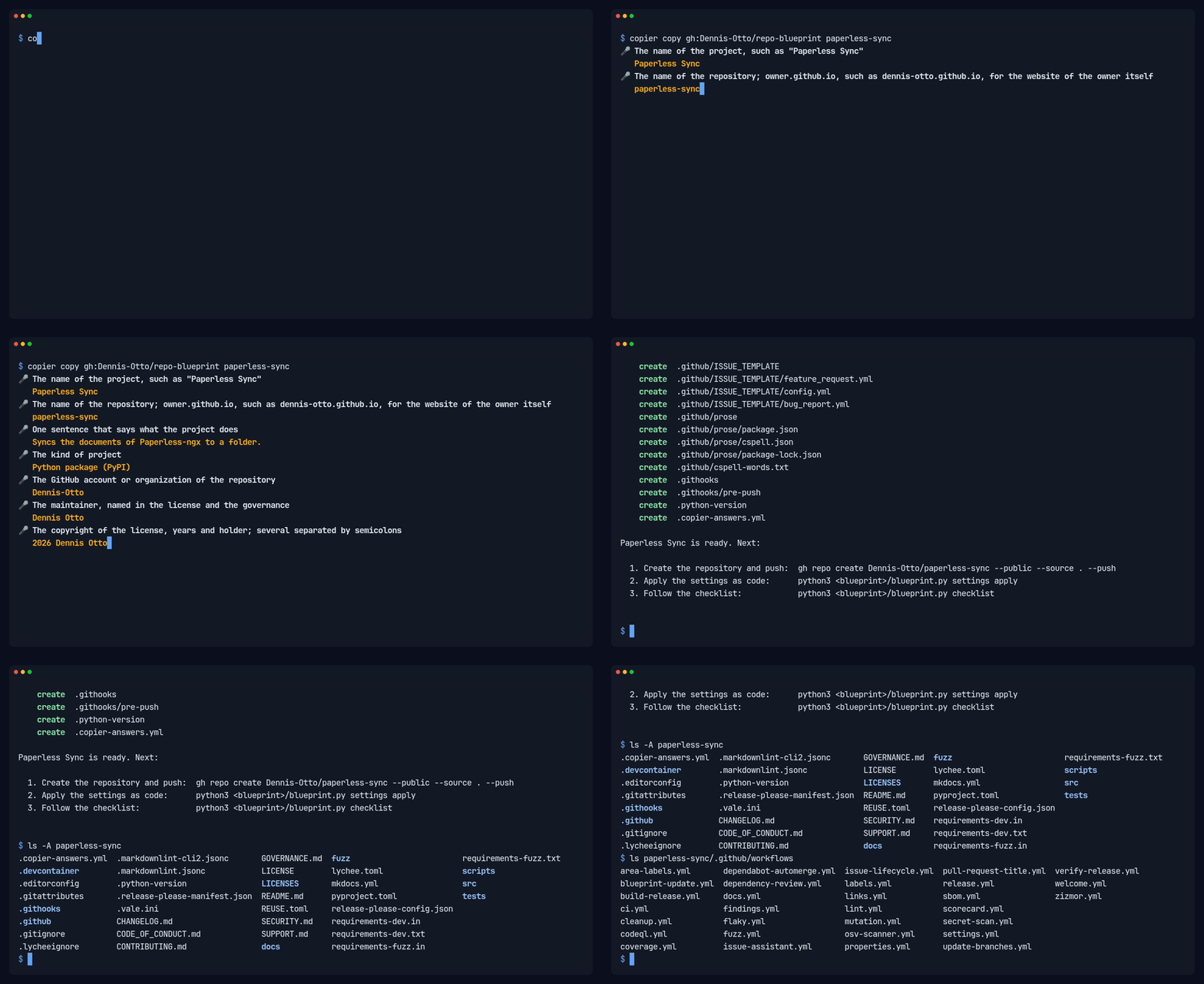
Copier 9.4 or later, Git, the GitHub CLI and a checkout of the blueprint (for blueprint.py):
copier copy gh:Dennis-Otto/repo-blueprint my-project
cd my-project
git init && git add --all && git commit --signoff --message "chore: start from the blueprint"
gh repo create Dennis-Otto/my-project --public --source . --push
python3 ../repo-blueprint/blueprint.py settings apply
python3 ../repo-blueprint/blueprint.py checklist
Copier asks for the name, a one-sentence description, the kind of project, the license (MIT, MIT-0, BSD-3-Clause, Apache-2.0, GPL-3.0-or-later or AGPL-3.0-or-later) and a few details of the kind. settings apply sets everything the API can set; checklist shows what is left for a person, such as the secrets, and which steps are done.
Once per repository
- The release app opens the release and update pull requests, so that their checks run. Install it on the repository, and set its private key as the secret
RELEASE_AUTOMATION_PRIVATE_KEYof the environmentrelease. The app needs the permissions Actions, Administration, Checks, Commit statuses, Contents, Issues, Pages, Pull requests, Variables and Workflows (read and write), and Dependabot alerts, Environments and Secrets (read): with them the settings bot applies the settings as code, Renovate updates the dependencies, and the rollout of the blueprint starts the blueprint bot of every repository after a release. Renovate gets a token without Administration. The release workflow creates every release tag with the app, and the ruleset Release tag creation lets nobody else create one; the variablesRELEASE_AUTOMATION_CLIENT_IDandRELEASE_AUTOMATION_APP_IDin.github/repository.tomlname the app, and a project with an app of its own sets both in.github/repository.project.toml. - The issue assistant needs
CLAUDE_CODE_OAUTH_TOKENin the environmentissue-assistant. - Delivery: trusted publishing on PyPI or npm, the app certificate of a Nextcloud app, or the HACS submission, as the checklist says.
checklist prints the gh secret set commands; the value is typed into the prompt of the GitHub CLI and never appears anywhere else.
An existing repository
An existing repository takes the blueprint on a branch, in one pull request:
copier copy --overwrite --vcs-ref vX.Y.Z --data sample_code=false gh:Dennis-Otto/repo-blueprint .with the answers that fit the repository, without the sample code and tests of a new one, such as its description, topics and homepage as they are on GitHub, so thatsettings applychanges nothing there. The files of the project (README, changelog, code, tests, manifests, labels, issue forms, icons) stay as they are.- Look at the diff of every file of the blueprint and put back what belongs to the project only: sections of SECURITY.md or CONTRIBUTING.md, rules of Renovate (in
.github/renovate.json5), hosts of the issue assistant, ignore rules.copier updatekeeps these changes from then on. - Write the version of the latest release into
version.txtand.release-please-manifest.json, startCHANGELOG.mdwith## Unreleased, and give.github/labels.tomlthe labels of the bots (autorelease: pending,autorelease: tagged,merge-conflict,maintenance,bot-failure,docker). - Put the checks of the project alone, such as its end-to-end tests, into
.github/repository.project.tomlandscripts/check-project.sh; remove the workflows, scripts and tests that the blueprint replaces, and delete files of the template that the project doesn't need, such as a sample test. A repository withoutdocs/has no website until it writesdocs/index.md;mkdocs.ymlshows how German pages join it. - Open the pull request. Once its new checks pass,
blueprint.py settings applyswitches the required checks, the variables and the labels, and the pull request can merge.
The configuration of the checks belongs to the blueprint and looks for the code where a new project of the same kind has it. Every file it names comes with the blueprint, also without the sample code:
| Kind | Code | Tests | From the blueprint |
|---|---|---|---|
| Nextcloud app | lib/ |
PHPUnit tests in tests/Unit/ |
psalm.xml and phpunit.xml, with the tests/bootstrap.php and tests/stubs/ that they load |
| Node package | src/, built into dist/ |
test/, typechecked by tsconfig.json; the npm test of a new project runs test/**/*.test.ts |
tsconfig.json and tsconfig.build.json, which need typescript and @types/node in the package.json of the project |
The other kinds set these places in files of their own, such as pyproject.toml. What lies in tests/ belongs to the project: the copy and every update add only the files that are missing there, so an app with its own bootstrap keeps it.
Settings as code
---
config:
  flowchart:
    wrappingWidth: 400
---
flowchart TB
    accTitle: The settings as code
    accDescr: The settings of a repository live in .github/repository.toml, with those of the project alone and the labels. blueprint.py settings apply, run by an administrator, and the settings bot, after every change and every week, make GitHub match them; settings check shows what differs.

    files[".github/repository.toml<br>repository.project.toml<br>labels.toml"]
    apply(["settings apply<br>by an administrator"])
    bot(["Settings bot<br>after every change<br>and every week"])
    github["GitHub<br>merges · rulesets · security<br>Actions · environments<br>variables · labels · Pages"]

    files --> apply --> github
    files --> bot --> github
    github -. "settings check<br>shows what differs" .-> files

    classDef bot fill:#526cfe2e,stroke:#526cfe,stroke-width:2px
    classDef person fill:#f59e0b2e,stroke:#f59e0b,stroke-width:2px
    class bot bot
    class apply person
.github/repository.toml holds the settings of a repository; blueprint.py settings check compares them with GitHub and settings apply makes GitHub match:
- Repository: squash merges with the title of the pull request, auto-merge, branch updates, deleted branches, signed-off web commits, no wiki or projects.
- Security: immutable releases, private vulnerability reporting, Dependabot alerts with the security updates of Renovate, secret scanning with push protection.
- Actions: read-only tokens by default, no approvals by workflows, actions pinned to commit hashes, approval for the workflows of every outside contributor.
- Rulesets: Protect main (pull requests only, squashed, linear history, every required check, no deletion or force push), Release tags (
v*.*.*never moves) and Release tag creation (only the release app, whose App IDRELEASE_AUTOMATION_APP_IDnames, creates av*.*.*tag, which the release workflow signs). - Variables and environments:
PUBLISH_TO, the release app (RELEASE_AUTOMATION_CLIENT_IDandRELEASE_AUTOMATION_APP_ID), and environments that onlymainmay use, with the secrets they need. - Pages: GitHub Pages publishes the website that the Docs workflow builds.
blueprint.py needs Python 3.12 and the GitHub CLI signed in as an administrator, and nothing else. It never reads or prints the value of a secret. Every repository has a copy in .github/blueprint.py and .github/blueprint/, and the settings bot (settings.yml) compares its settings with the settings as code every week and after every change of them, so that no repository drifts.
Updates
---
config:
  flowchart:
    wrappingWidth: 400
---
flowchart TB
    accTitle: How an update of the blueprint arrives
    accDescr: Right after every release of the blueprint, and every week, the blueprint bot verifies the latest published release first. A release that is not immutable, whose tag is not on the main branch of the blueprint or that the release workflow of the blueprint didn't sign fails the run, and nothing is updated. Otherwise the bot runs copier update to that release. When its pull request is still open and you have committed to its branch, the bot leaves the branch to you and says once that a newer release is out. Otherwise it opens the pull request, or moves the open one on to the new release. With conflicts, which turn auto-merge off, or with BLUEPRINT_AUTOMERGE set to off, it waits for the maintainer; otherwise it merges itself once every check passes.

    bot(["Blueprint bot<br>after every release<br>and every week"])
    verified{"Release immutable,<br>on main, signed by<br>its release workflow?"}
    refused(["Fails the run<br>nothing is updated"])
    yours{"Your commits<br>on its open<br>pull request?"}
    note(["Leaves it to you<br>and says once that<br>a newer release is out"])
    pr["Pull request<br>with the changes<br>the open one moves on"]
    conflicts{"Conflicts?"}
    off{"Automerge<br>off?"}
    checks{"Every check<br>passes?"}
    merged["Merges itself"]
    wait(["Waits for<br>the maintainer"])

    bot -- "the latest<br>published release" --> verified
    verified -- "no" --> refused
    verified -- "yes: copier update" --> yours
    yours -- "yes" --> note
    yours -- "no" --> pr --> conflicts
    conflicts -- "no" --> off
    off -- "no" --> checks
    checks -- "yes" --> merged
    conflicts -- "yes: marked in the files<br>auto-merge off, labeled" --> wait
    off -- "yes" --> wait
    checks -- "no" --> wait

    classDef bot fill:#526cfe2e,stroke:#526cfe,stroke-width:2px
    classDef person fill:#f59e0b2e,stroke:#f59e0b,stroke-width:2px
    classDef done fill:#16a34a2e,stroke:#16a34a,stroke-width:2px
    class bot bot
    class wait,note,refused person
    class merged done
The blueprint bot (blueprint-update.yml) runs copier update every week, and right after every release of the blueprint, whose Rollout workflow starts it in every repository of the release app. It takes the latest published release of the blueprint that .copier-answers.yml names, a fork of it perhaps, never a tag whose release is still a draft. Before it updates, it verifies the release: the release must be immutable, its tag must point at a commit of the blueprint's main no older than the version the repository has, and the release workflow of the blueprint must have signed the tag (gitsign, as SECURITY.md shows). Any other release fails the run before Copier renders anything, with the reason and what to do in the summary of the run, so a tag that someone else pushed reaches no repository; when GitHub or Sigstore doesn't answer, the bot asks three times and then waits for its next run. A blueprint that isn't on GitHub can't be verified, so the bot doesn't update from one. The bot keeps one pull request on the branch blueprint/update: a newer release moves that pull request on, with its number and its auto-merge, instead of replacing it. Without conflicts it merges itself once every check passes. Conflicts stay in it as markers for the maintainer, in the files that the update touched; they turn its auto-merge off and add the label merge-conflict. The repository variable BLUEPRINT_AUTOMERGE set to off makes every update wait for the maintainer. Run it by hand under Actions → Blueprint update, or locally with copier update.
---
config:
  flowchart:
    wrappingWidth: 400
---
flowchart TB
    accTitle: How a release of the blueprint rolls out
    accDescr: Once the Release workflow has published and verified a release, the Rollout workflow takes the repositories of the release app one after the other, the quickest checks first. It starts the blueprint bot of a repository and waits up to 15 minutes for the bot and the checks of its update pull request, then goes on with the next one. A repository whose bot it can't start, or whose bot fails, fails the run by its name, and the others still get the release.

    release(["Release workflow<br>publishes and verifies<br>a release"])
    next["Next repository<br>the quickest checks first"]
    start["Starts its<br>blueprint bot"]
    wait["Waits up to 15 minutes<br>for the bot and the checks<br>of its pull request"]
    failed(["The run fails<br>by the name of<br>the repository"])
    more{"Another<br>repository?"}
    finished["Every repository<br>has the release<br>in a pull request"]

    release --> next --> start --> wait --> more
    start -- "GitHub fails<br>three times" --> failed
    wait -- "the bot fails" --> failed
    failed -. "the others<br>go on" .-> more
    more -- "yes" --> next
    more -- "no" --> finished

    classDef bot fill:#526cfe2e,stroke:#526cfe,stroke-width:2px
    classDef person fill:#f59e0b2e,stroke:#f59e0b,stroke-width:2px
    classDef done fill:#16a34a2e,stroke:#16a34a,stroke-width:2px
    class release,next,start,wait bot
    class failed person
    class finished done
The Rollout workflow of the blueprint brings each release to the repositories of the release app one after the other, those with the quickest checks first: it starts the blueprint bot of a repository and gives the bot and the checks of its update pull request up to 15 minutes before it starts the next one, so that the update pull requests don't all wait for the runners of the account at once. A repository whose bot it can't start, or whose bot fails, fails the run by its name; the others still get the release. It rolls out every release that a run of the Release workflow published, whether the merge of the release pull request started that run, the hourly schedule or a start by hand; a release that the run of a later merge finished, because the run of its own merge was lost, waits for a start by hand (Actions → Rollout) or the weekly run of the bots. Started by hand itself, it rolls out the latest release. Rollouts of releases that come close together overlap, but never in the same repository: there, the newer release takes the place of an older one that still waits.
Once you commit to the branch of the pull request, to resolve the markers for example, the bot leaves the branch to you: when a newer release is out, it says so in one comment, and after you merge or close the pull request, its next run brings the rest. A merge of main with the button Update branch doesn't count as your commit, and an auto-merge that you switch off stays off. An update that only records a new release in .copier-answers.yml comes as a pull request too, and the updates carry the modes of files, such as a script that becomes executable.
The blueprint owns the workflows, scripts/check.sh and the community files: their changes arrive with the updates. Files that belong to the project are never overwritten: the README, the changelog, the security design in docs/security.md, the dependency manifests and lock files (Renovate keeps them current), the code and the tests, the website's mkdocs.yml and pages, the issue forms, the labels and their paths, accepted findings, and the notes for coding agents. Checks of a project alone belong in scripts/check-project.sh, which scripts/check.sh runs last.
The issue assistant
---
config:
  flowchart:
    wrappingWidth: 400
---
flowchart TB
    accTitle: How a release of the issue assistant reaches every repository
    accDescr: Every morning, the sync bot of the blueprint takes the latest published release of the issue assistant and verifies it: the release must be immutable, GitHub's attestation of it must hold, its tag must point at a commit of the main branch of the issue assistant, and its release workflow must have signed the tag. Any other release fails the run, and nothing changes. Otherwise the bot runs install of the release in the root of the blueprint, which writes the four workflows and the firewall policy of the release and moves every pin of the action, and keeps one pull request with the result, which merges itself once every check passes. The next release of the blueprint brings it to every repository with the blueprint bot.

    release(["A release of the<br>issue assistant"])
    bot(["Sync bot<br>every morning"])
    verified{"Immutable, attested,<br>on main, signed by<br>its release workflow?"}
    refused(["Fails the run<br>nothing changes"])
    install["install of the release<br>in the blueprint: the four workflows,<br>the firewall policy, every pin"]
    pr["Pull request from<br>bot/issue-assistant<br>merges itself once<br>every check passes"]
    blueprint["The next release<br>of the blueprint"]
    fleet["Every repository,<br>with its blueprint bot"]

    release --> bot
    bot -- "the latest<br>published release" --> verified
    verified -- "no" --> refused
    verified -- "yes" --> install --> pr --> blueprint --> fleet

    classDef bot fill:#526cfe2e,stroke:#526cfe,stroke-width:2px
    classDef person fill:#f59e0b2e,stroke:#f59e0b,stroke-width:2px
    classDef done fill:#16a34a2e,stroke:#16a34a,stroke-width:2px
    class bot,install,pr,blueprint bot
    class release,refused person
    class fleet done
The four workflows of the issue assistant and its firewall policy are templates of its release, with which the check issue-assistant compares every repository, so a pin of the action that moved alone would fail that check; Renovate leaves the action alone. The sync bot of the blueprint (sync-issue-assistant.yml, in the blueprint alone) takes over each new release instead. Every morning it takes the latest published release of the issue assistant and verifies it as the blueprint bot verifies a release of the blueprint: the release must be immutable, GitHub's attestation of it must hold (gh release verify), its tag must point at a commit of the issue assistant's main, and its release workflow must have signed the tag. Any other release fails the run with the reason in its summary, and nothing changes; so does a release older than the one that the blueprint has, since GitHub calls a release latest by its date, not by its version. Then the bot runs install of exactly the verified commit in the root of the blueprint, takes over the firewall policy of the release, moves every pin of the action to it, that of the check in the Lint workflow too, and gives a workflow that is new in the release the file of the template that renders it in every repository; a release whose install changes anything else fails the run, and the maintainer takes it over by hand. The bot keeps one pull request on the branch bot/issue-assistant, fix(deps): update the issue assistant to vX.Y.Z, which merges itself once every check passes and moves on to a newer release; once someone else commits to its branch, the bot leaves the branch alone until the pull request is merged or closed. The next release of the blueprint, which publishes itself when it holds only updates, brings the release to every repository. Installing runs without secrets; only the job of the pull request has the release app, and it runs nothing of the release. Run it by hand under Actions → Issue assistant sync; with dry_run, it verifies and installs the latest release and shows what would change without a pull request, as it does in every pull request that changes the bot. The bot-health bot (bot-health.yml) keeps one issue open about a failed run, with the reason of a refusal, and closes it once a run passes.
What belongs to a project
---
config:
  flowchart:
    wrappingWidth: 400
---
flowchart TB
    accTitle: What belongs to the blueprint and what to the project
    accDescr: copier update brings the changes of the blueprint's files, merged line by line with the changes of the repository, and never overwrites the files of the project. A project adds checks, settings, notes for coding agents and workflows of its own beside those of the blueprint.

    blueprint[("Repo Blueprint")]

    subgraph repo ["Your repository"]
        theirs["`**The blueprint's files**<br>workflows · scripts/check.sh<br>.github/repository.toml<br>community files · AGENTS.md`"]
        mine["`**The project's files**<br>README · CHANGELOG · docs/<br>code and tests<br>manifests and lock files<br>issue forms · labels`"]
        adds["`**What the project adds**<br>scripts/check-project.sh<br>.github/repository.project.toml<br>.github/agents.project.md<br>.github/checks.project.toml<br>workflows of its own`"]
    end

    blueprint -- "copier update<br>merged line by line" --> theirs
    blueprint -. "never overwritten" .-x mine
    theirs -- "joined by" --- adds

    classDef bot fill:#526cfe2e,stroke:#526cfe,stroke-width:2px
    classDef person fill:#f59e0b2e,stroke:#f59e0b,stroke-width:2px
    class theirs bot
    class mine,adds person
The blueprint keeps the shared parts of every repository equal; a project adds its own without forking them:
- Changes in the blueprint's files survive updates:
copier updatemerges the changes of the blueprint with those of the repository, line by line, and marks a conflict only where both changed the same lines. - Settings of the project alone go into
.github/repository.project.toml, such as the checks of its end-to-end tests or an environment with its secrets.blueprint.pyand the settings bot add them to.github/repository.toml. - Checks of the project alone go into
scripts/check-project.sh, whichscripts/check.shruns last; workflows of the project alone are workflow files of their own. - Notes for coding agents go into
.github/agents.project.md, such as the architecture of the project and the commands of its own checks.AGENTS.md, which the blueprint keeps current, has the rules of every repository and points to them, andCLAUDE.mdbrings both to Claude Code. - Explanations of the checks of the project alone, which the PR coach shows when one fails, go into
.github/checks.project.toml; they win over those of.github/checks.toml. - Several copyright holders, such as the authors of a fork, are the answer
copyright, separated by semicolons; LICENSE and REUSE.toml name each of them. - Files under another license, such as third-party artwork, get a
.licensefile next to them, as REUSE describes. - The package of a Nextcloud app is checked by
scripts/check-package.sh ARCHIVE unsigned|signedif the project has one:scripts/check.shruns it on the package that krankerl builds, the release on the package before and after signing. - The version in other lines of a file of the release, such as the tag in the URL of a screenshot in
appinfo/info.xml, follows each release when the line ends with the commentx-release-please-version, such as<!-- x-release-please-version -->.
Tools in every repository
bash scripts/check.sh: the checks of the CI, locally.bash scripts/diagrams.sh: draws every diagram ofdocs/diagrams/that a page shows as its pictures indocs/images/diagrams/, with Docker, and leaves the other sources alone;--extractfirst turns everymermaidblock of the Markdown into a source and its picture and writes thealtof each picture from its source, and--checkchecks without Docker whatscripts/check.shchecks.bash scripts/social-preview.sh: renders.github/social-preview.htmlinto the 1280×640 image that GitHub shows for links to the repository; upload it under Settings → Social preview.
Dashboard
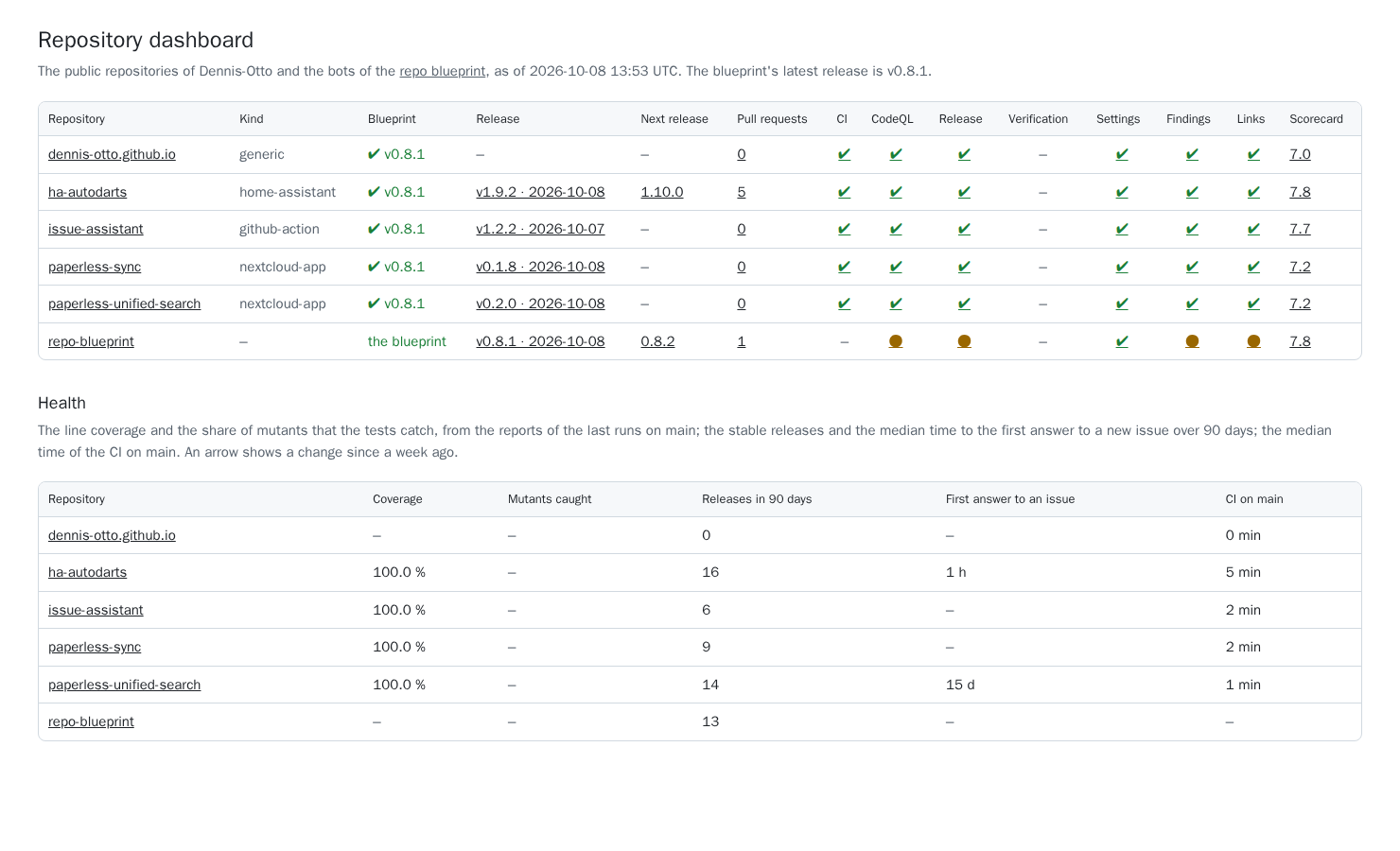
The dashboard shows every public repository of the owner at a glance: the release of the blueprint it is on, its latest release and the pull request of the next one, its open pull requests and those in conflict, the last run of its main workflows on main, and its OpenSSF Scorecard; a second table shows the health of each: the line coverage and the share of mutants that the tests catch, the stable releases and the median time to the first answer to an issue over 90 days, and the median time of the CI, each with an arrow when it moved since a week ago, from the history that the published dashboard keeps. The Dashboard workflow builds it with dashboard.py every six hours and publishes it on GitHub Pages, under the website of the blueprint, which is this documentation. It shows only what is public anyway, no finding of code scanning and no alert of Dependabot.
Every Monday, the Weekly report workflow posts in the discussions what the public repositories of the owner released, merged and fixed in the week: their releases, merged pull requests and the updates among them, opened and closed issues, failed runs on main and the median time of their CI (weekly.py). Like the dashboard, it reports only what is public.
How the blueprint works
---
config:
  flowchart:
    wrappingWidth: 400
---
flowchart TB
    accTitle: How the blueprint works
    accDescr: Copier renders a new repository from the questions in copier.yml and the files in template/, which take in the workflows of .github/workflows/, the manifests of stacks/ and blueprint.py. Renovate keeps the workflows and the stacks current.

    renovate(["Renovate"])

    subgraph here ["This repository"]
        workflows[".github/workflows/<br>run here and are<br>the templates"]
        stacks["stacks/<br>manifests and<br>lock files"]
        tool["blueprint.py<br>settings · checklist<br>bots"]
        template["template/<br>the files of<br>a new repository"]
        questions["copier.yml<br>the questions"]
    end

    copier(["Copier"])
    repo["A new repository"]

    renovate -. "keeps current" .-> workflows
    renovate -.-> stacks
    workflows --> template
    stacks --> template
    tool --> template
    template --> copier
    questions --> copier
    copier --> repo

    classDef bot fill:#526cfe2e,stroke:#526cfe,stroke-width:2px
    classDef done fill:#16a34a2e,stroke:#16a34a,stroke-width:2px
    class renovate bot
    class repo done
copier.ymlholds the questions.template/holds the files of a new repository; a file or folder name such as[% if stack == 'php' %]composer.json[% endif %]carries its condition, and a name that renders empty is left out. The delimiters{= =}and[% %]appear in no workflow, script or manifest, so${{ }}of GitHub Actions and[[ ]]of Bash and TOML stay as they are.- The workflows in
.github/workflows/run in this repository and are the templates of the workflows of every new repository: actionlint lints them and Renovate keeps their actions current here. A line marked Not in the blueprint itself switches a job off in this repository and disappears in new ones. blueprint.pystarts the tool of the settings as code, the checklist and the bots. Its code is inblueprint/, a module for each task, with aruff.tomlof its own, so that the Ruff settings of a project don't apply to it.stacks/holds the dependency manifests and lock files of each kind of project, which Renovate keeps current; a new project starts from them.tests/checksblueprint.pyagainst a simulated GitHub and renders every kind of project; the Variants workflow renders each one and runs its own checks with its real tools, and also updates a repository of each kind from the latest release to the commit, which must bring every file of the blueprint as a new repository has it and pass the same checks: in every pull request but the release pull request, and every week. The Windows workflow runsscripts/check.shon Windows as well, in Git Bash like a contributor there, every week and for each pull request that changes the code or the tests. The Next runner workflow runs the Variants every week on the runner that the jobs move to next.docs/makes this documentation the website of the blueprint: its pages include the READMEs, and the Dashboard workflow publishes them with the dashboard underdashboard/.
Where the blueprint is heading: the roadmap. What it protects and trusts: its security design.
Contributions are welcome: see CONTRIBUTING.md. Questions and problems: SUPPORT.md. Report vulnerabilities privately, as SECURITY.md describes.
License
MIT No Attribution: repositories made from the blueprint owe it nothing, not even a notice. Every file names its license in the machine-readable form of REUSE.