Website, diagrams and screenshots
The website of the documentation, and the diagrams and screenshots that keep themselves current.
Website
The documentation in docs/ as a website with search and a light and a dark theme, which follows the system until the reader picks one, in English and, with German pages such as index.de.md next to the English ones, in German: every pull request builds it strictly and checks the built pages: every link and anchor, also those written in HTML, with lychee and without the network, and what the hooks of the website promise, such as a sitemap in every folder of pages and the 404 page in the default language, that no page loads more than 1,200 KB at once, and that every page shows each picture of its Markdown, the parts of the README included, with blueprint.py site-check, and scripts/check-site.sh adds the checks of the project; so does scripts/check.sh once the tools of its preview are installed, on Linux, macOS and Windows; every change of main publishes the build of that check on GitHub Pages, with what a hook writes into site/.well-known/, with the fonts and scripts that it downloads kept in a cache for a week, signs its provenance, which gh attestation verify checks, and asks the published website for the home page of each language; accessible, with the contrast and the underlined links that WCAG 2.2 AA asks for, which axe-core checks on every page in both themes in every pull request; quick on a phone, with pictures that load as the reader comes to them, a GIF with an MP4 beside it played as that video, a picture for each theme loaded only in its theme, a picture that the README shows from main of its own repository, such as https://github.com/OWNER/NAME/raw/main/screenshots/settings.png, served from the checkout, so that the pull request that adds a screenshot shows it on its website too, and one that git doesn't track fails the build, the diagrams as their pictures instead of Mermaid, and the release of Mermaid that draws a remaining mermaid block pinned; in the language of each page for the search and search engines, with a description and the date of its newest file for each page, the full addresses of its languages, and a page without a translation kept from search engines; the badges stay on GitHub; a header that shows the version of the latest release, which the hooks read from git at the build, so that no page has the reader's browser ask the API of GitHub, which blueprint.py site-check checks, and a footer with links to the owner on GitHub, to their website with all of their projects and to GitHub Sponsors, as .github/FUNDING.yml names it, in the language of the page, unless mkdocs.yml sets extra.social; a page Automation, which the hooks write from .github/workflows/ at every build, in English and German: every workflow with the comment at its top and what starts it, each schedule in words, the checks that main requires, and the environments and secrets that it uses, and a docs/automation.md of the project in its place.
How: MkDocs with the Material theme, mkdocs.yml, docs.yml, .github/mkdocs_blueprint.py, .github/a11y/.
Diagrams that fix themselves
Every diagram as a picture that every reader sees, also in the GitHub app, the stores and e-mails, which draw no Mermaid: a Mermaid source in docs/diagrams/, drawn as an SVG for the light and one for the dark theme, which the website shows as well, in the theme that the reader switches to, so that a page with a diagram loads no Mermaid; the check diagrams draws the pictures anew in every pull request that changes a diagram or adds a mermaid block, and the diagram bot commits the sources and pictures onto its branch; on main, a pull request of the diagram bot fixes what is still missing and merges itself; bash scripts/diagrams.sh --extract turns the mermaid blocks of existing Markdown into sources and their pictures.
How: scripts/diagrams.sh with mermaid-cli, lint.yml, after-checks.yml, diagrams.yml.
The GitHub app, HACS, the Nextcloud App Store, PyPI and the e-mails of GitHub draw no Mermaid and show a mermaid block as code. So every diagram is a picture of its source, and the bots keep it that way without a person.
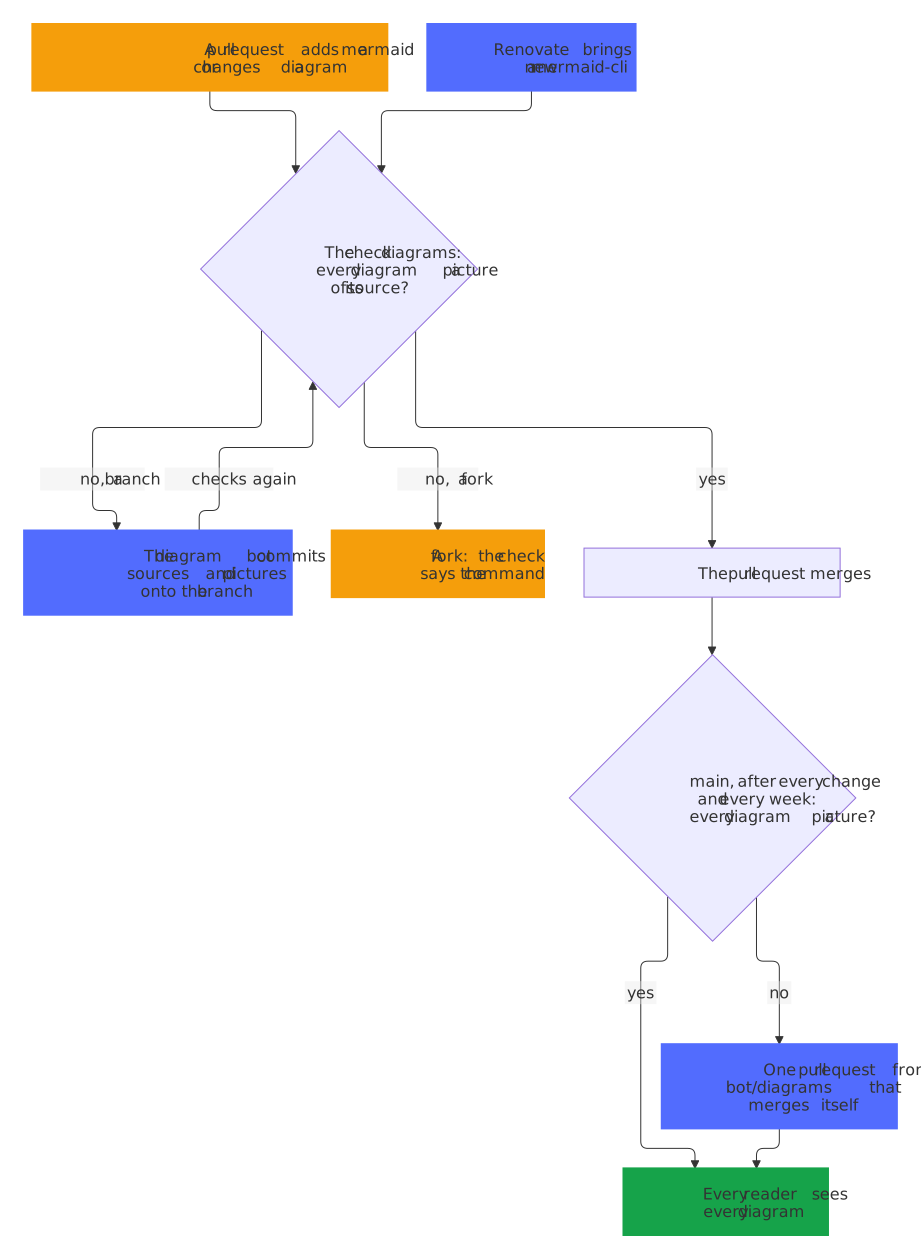
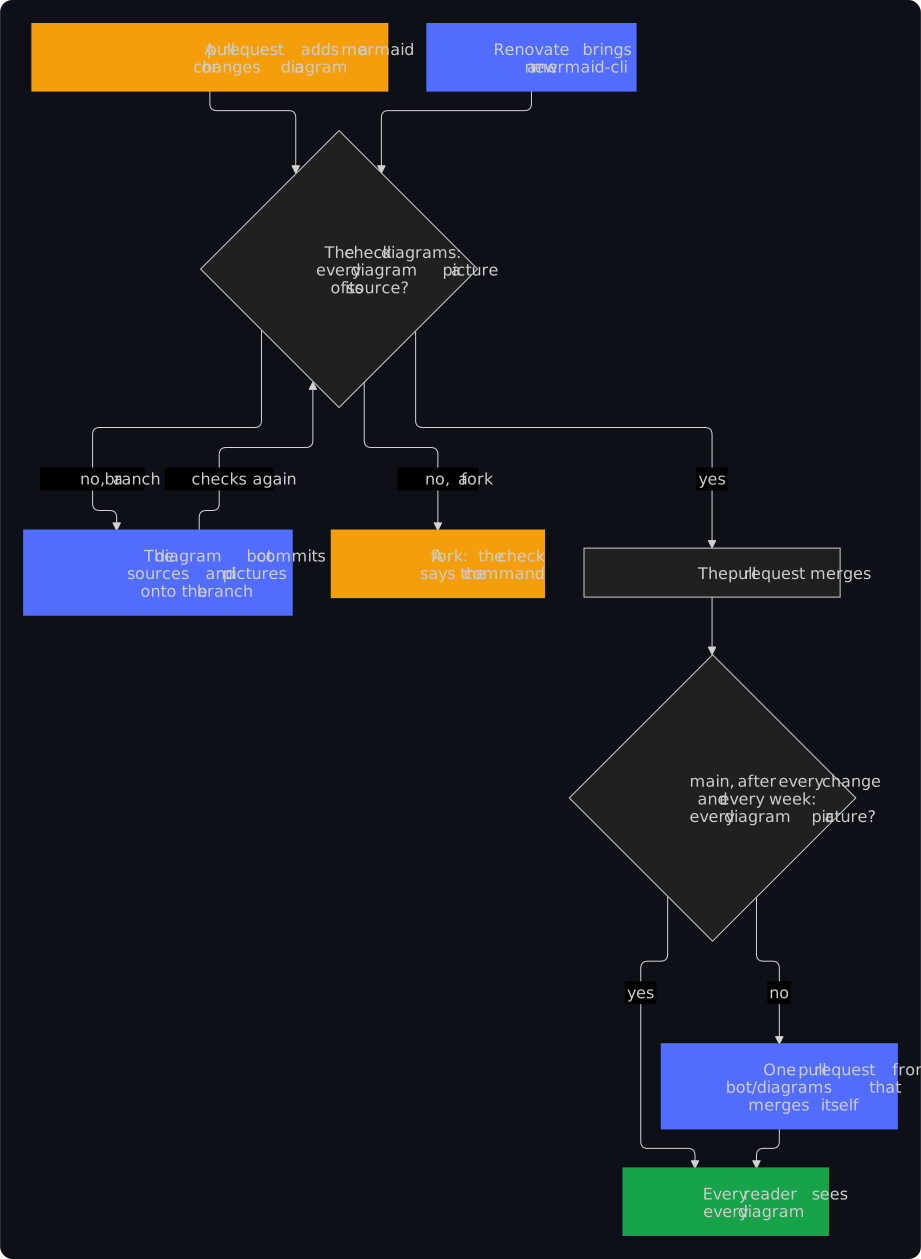
- A pull request fixes itself: when a pull request from a branch of the repository adds a
mermaidblock or changes a source, the check diagrams runsbash scripts/diagrams.sh --extract, and the diagram bot commits the sources and pictures it made onto the branch, as the release app, with a comment that names the pages it changed. The checks of that commit pass. A pull request from a fork gets the failing check, whose summary lists the files and the command. mainfixes itself: after every change ofmainthat touches a diagram or adds amermaidblock, and every week, the Diagrams workflow draws every diagram ofmain. When something is missing, such as the blocks of a repository right after the update of the blueprint, it keeps one pull request from the branchbot/diagramswith the fix, which merges itself once every check passes, and closes it whenmainis fixed otherwise. A failed run opens an issue, which the weekly run closes once the bot passes again.- A new renderer draws anew: Renovate keeps the image of mermaid-cli in
scripts/diagrams.shcurrent; the check draws the pictures again on its branch, and the diagram bot commits them, so the update still merges on its own. - Nothing but diagrams: the bot runs no code of a pull request. It commits only sources in
docs/diagrams/, SVG pictures indocs/images/diagrams/and pages of Markdown, by plain paths, onto the very commit that the check drew, and only for a branch of the repository.
Screenshots that renew themselves
The pictures of the project, renewed by a bot only when their pixels change: after a change of what they show, after every release and every week, the screenshot bot runs scripts/screenshots.sh without secrets and keeps one pull request with the pictures that look different, which merges itself; a new repository starts with a script that renders the social preview and photographs its website and, by its kind, its integration in Home Assistant or its app in Nextcloud, each in Docker and in both themes.
How: scripts/screenshots.sh, .github/screenshots-paths.txt, screenshot-bot.yml.
The pictures of a project, in its README, on its website and in the stores, show it as it was when someone last took them. The screenshot bot takes them again whenever what they show can have changed, and changes a file only when its pixels change.
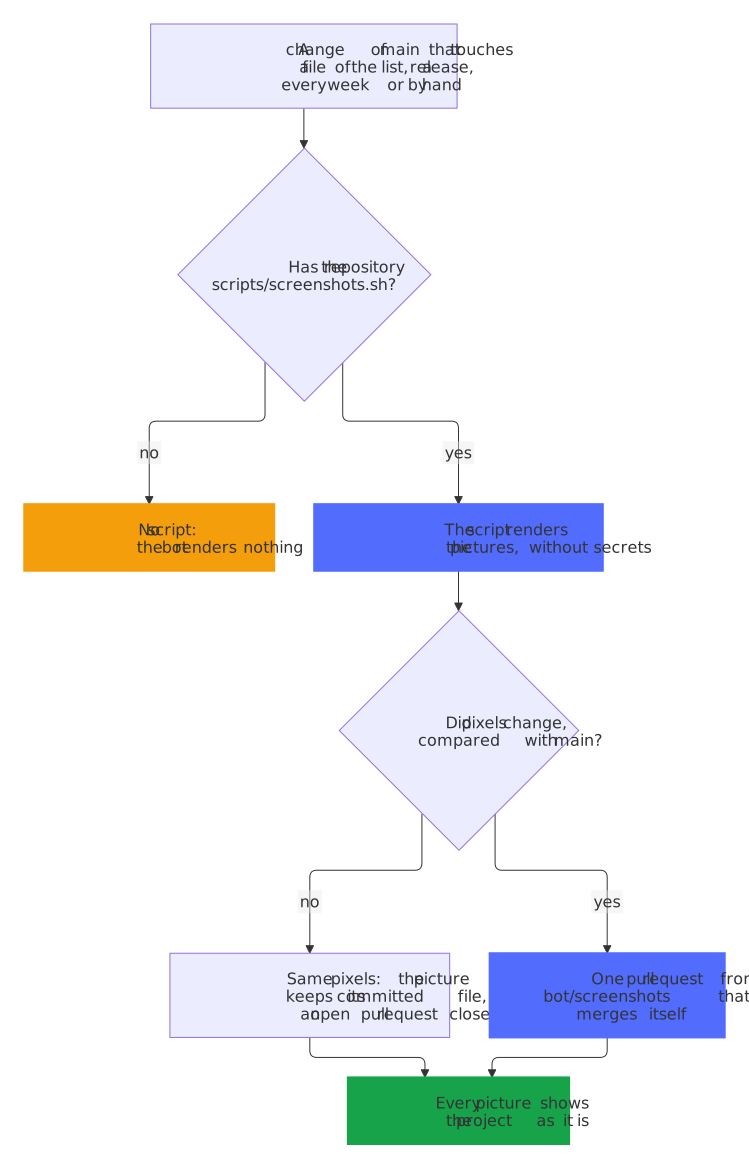
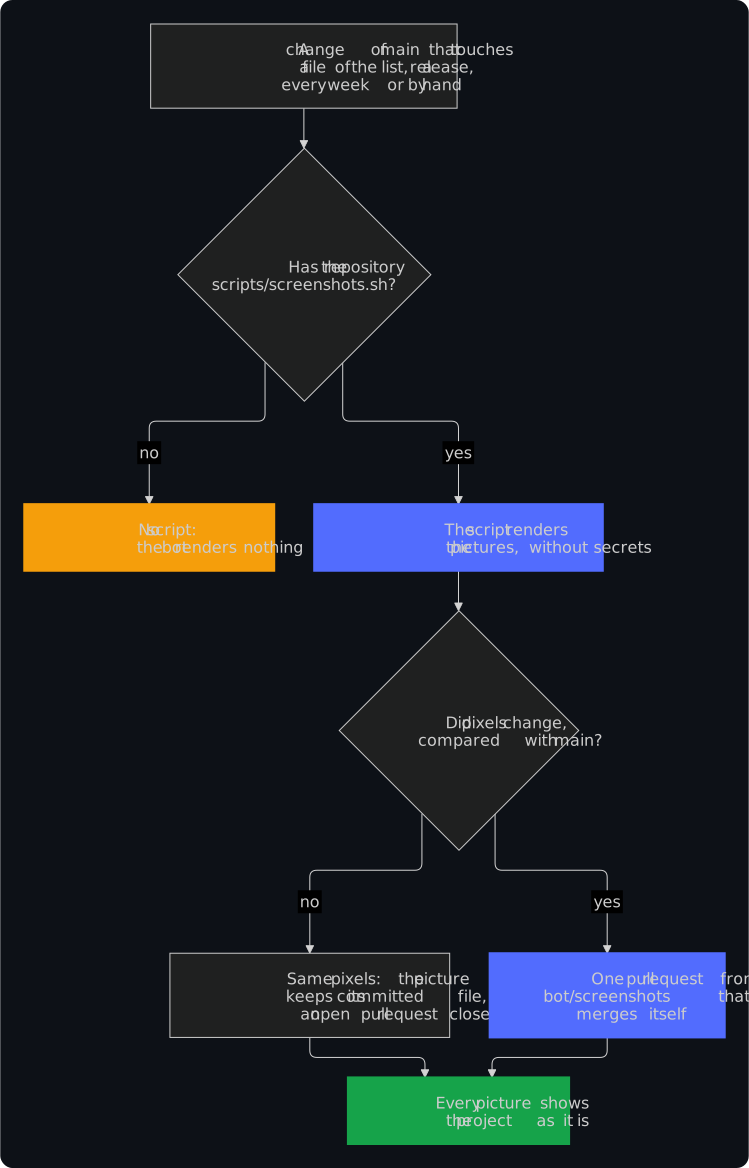
- A script turns it on: every repository has the Screenshots workflow (
screenshot-bot.yml), which renders nothing until the project hasscripts/screenshots.sh. The script renders the pictures in place, wherever the documentation, the stores or the social preview take them from; a new repository starts with one that renders the social preview,.github/social-preview.png, and photographs what it makes, as the next point says..github/screenshots-paths.txtlists the files whose change can change the pictures, as the paths of a workflow. Both belong to the project, so an update of the blueprint leaves them alone. - What a new repository photographs: the home page of its website, which the script builds with the tools in
.venv-docs; a Home Assistant integration also its page in a Home Assistant in Docker, which runs withcustom_components/and the integration set up by its config flow, and a Nextcloud app the app in the apps of the settings of a Nextcloud in Docker, with the app enabled. Each picture comes asdocs/images/screenshots/<name>.pngin the light theme and<name>.dark.pngin the dark one, for a<picture>, taken by the Chromium of the social preview's image with Playwright, hash-pinned in.github/screenshots-browser-requirements.txt, which Renovate moves together with the image. The server and the browser share a Docker network without a way out, the clock of the browser stands still, its window is 1280×800, and the letters have gray edges, so the same code renders the same pixels; Renovate keeps the images of Home Assistant and Nextcloud in the script current, and a project adds its own pictures to the functionshoot(). - When it renders: after a change of
mainthat touches a file of the list, the script or the list, after every release, whose version a picture may show, every Friday and on demand. It runs the script without secrets, with a token that only reads, with Docker, with the whole history, so that the website shows the date of each page as published, and with the tools of the website in.venv-docs, asCONTRIBUTING.mdsets them up, for a script that photographs its pages. - Only pixels count:
blueprint.py screenshots keepcompares each picture that the script changed with the one ofmainby its pixels, frame by frame for an animation, and gives each one that looks the same its committed file back, so a new encoder, browser or runner changes no file. A frame that repeats the one before counts once, the time that each frame shows not at all, and a fully transparent pixel has no color. - One pull request that merges itself: when pixels changed, the bot keeps one pull request from
bot/screenshots, docs: update the screenshots, as the release app, with a table of the pictures and the share of the pixels that changed in each. It merges itself once every check passes, the bot keeps it current withmain, and closes it whenmainlooks as rendered without it. A changed social preview gets a reminder to upload it under Settings → General → Social preview. Without the release app, the run warns and keeps the pictures as an artifact for three days. - Nothing but pictures: the job with the release app runs nothing of the script. It takes PNG, JPEG, GIF and WebP files whose content starts as their kind does, by plain paths, outside
.gitand the workflows, and leaves out every other file that the script changed, which the description of the pull request names. A large set of pictures goes in several commits. A failed run keeps an issue of the bot-health bot open until a run passes again. - On your machine:
bash scripts/screenshots.sh, thenpython3 .github/blueprint.py screenshots restore, which gives every picture that looks the same its committed file back and lists the others. It compares the pixels with Pillow, whichpython3 -m pip install --require-hashes -r .github/screenshots-requirements.txtinstalls. - The blueprint's own pictures renew themselves too: after a release that changed the questions, the template, the workflows or the dashboard, as
.github/docs-pictures/paths.txtlists them, and on demand, the Docs pictures workflow runsscripts/docs-pictures.sh, which recordscopier copyand photographs the dashboard and, with.github/docs-pictures/github_pages.py, pages of GitHub that no longer change, as a reader without an account sees them: an update of the blueprint with its checks, the assets of a release and the comment of the PR coach, in both themes and with a clock long after them, so that GitHub writes their dates in full. It keeps one pull request frombot/pictures, docs: renew the pictures, in the same way.