Dependencies and updates
How the dependencies and the files of the blueprint stay current, and which files belong to the project.
Dependencies
Renovate, a few times a day as the release app of the owner, for every repository: the Renovate workflow of the blueprint runs it for the repositories of its owner, and that of each repository for every other owner, or the owner installs the Mend Renovate app, as your own account shows; the actions, the dependencies, the images and the pins of the workflows, a week after their release, on Mondays, and at once an update that fixes a vulnerability or the new commit of a branch that an action follows; routine updates and releases of dependency updates merge themselves once every check passes, while the weekly refresh of every lock file, which brings the newest versions without the week of waiting, waits for the maintainer; an update of what the users run, such as the requirements of a Home Assistant integration, the dependencies of a Python package or the base image of a container, leads to a patch release; Renovate keeps no issue open: what waits for the maintainer is a pull request, and what fails reaches the issue Renovate logs problems; the tools that the workflows download by their sha256, such as gitsign, move with their checksum; the blueprint checks that Renovate reads every lock file that it brings, and the step Lock files of scripts/check.sh that Renovate can compile again every lock file of pip-compile in the repository, also one of the project itself, which Renovate would skip with no more than a warning, and blueprint.py locks --fix puts the = between an option of its command and its value; a version that another package pins exactly, such as the Pillow that Home Assistant pins for the tests, is accepted with every advisory in osv-scanner.toml, with its reason and until a date, and blueprint.py advisories writes a rule for it, so that Renovate tries no fix that the lock file can't take. Dependabot keeps the Features of the dev container.
How: renovate.json5, renovate-blueprint.json5, renovate-accepted.json5, osv-scanner.toml, dependabot.yml.
Updates
Right after every release of the blueprint, and every week, the blueprint bot runs copier update and opens a pull request.
How: blueprint-update.yml.
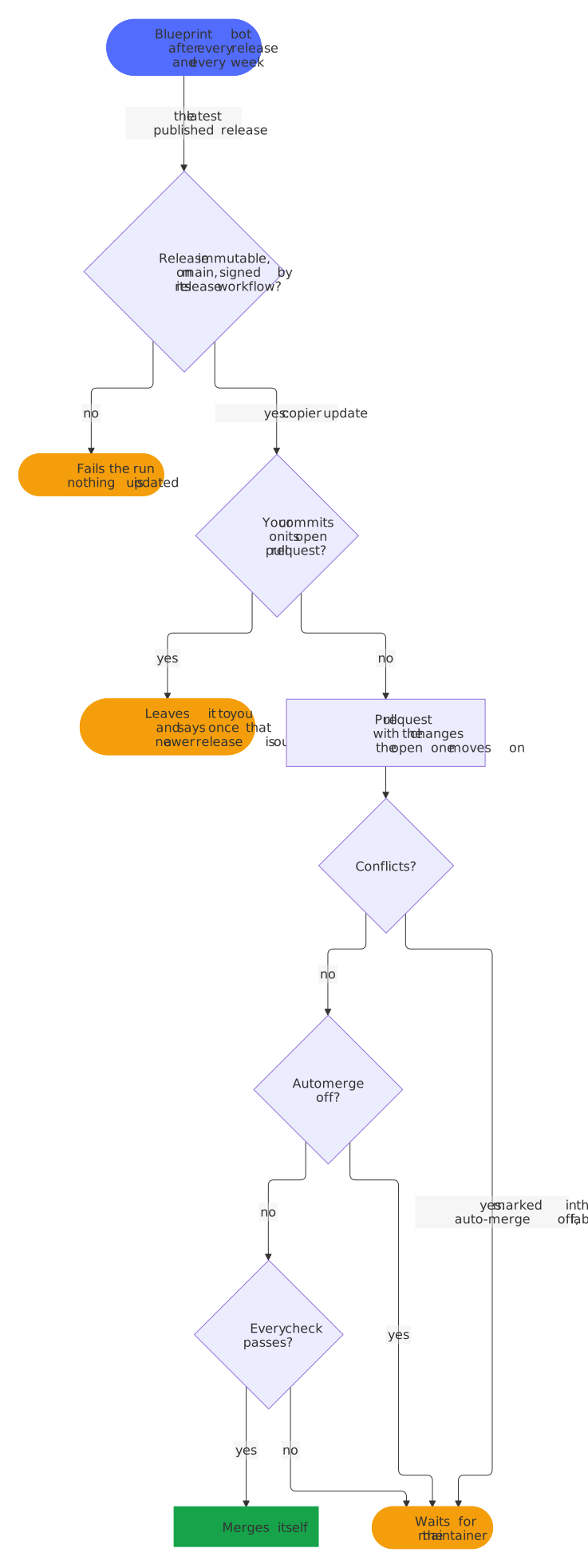
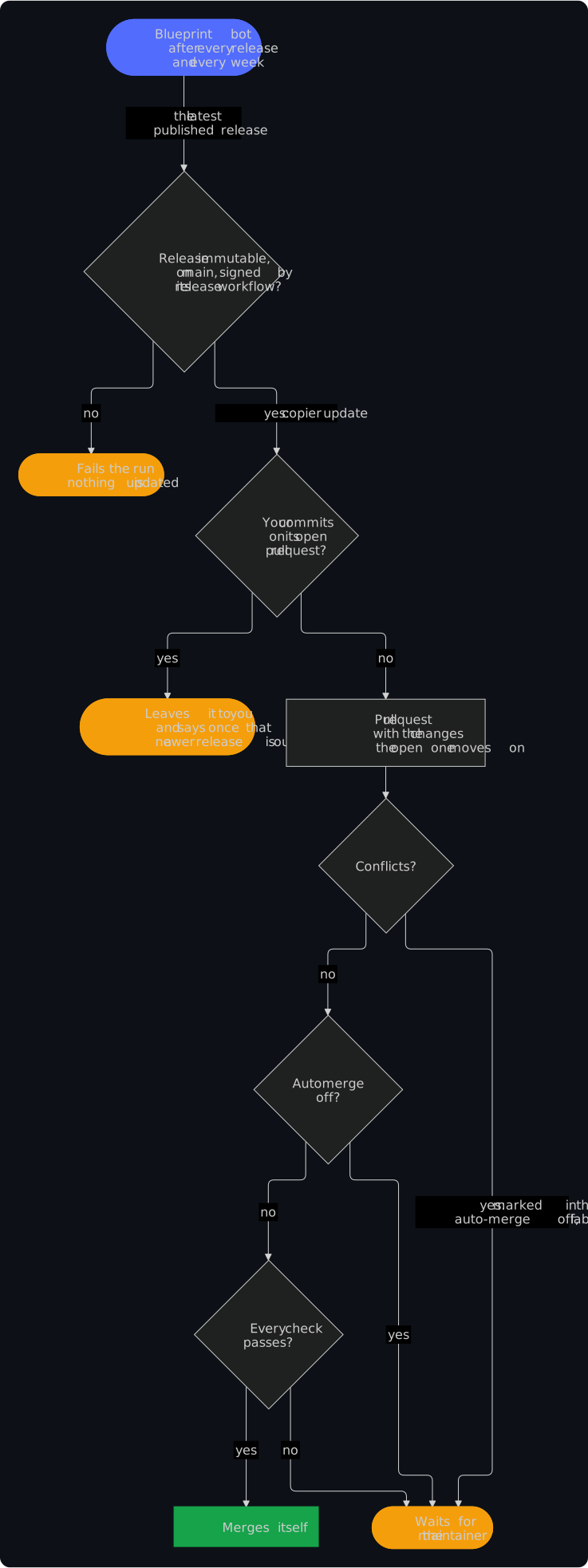
The blueprint bot (blueprint-update.yml) runs copier update every week, and right after every release of the blueprint, whose Rollout workflow starts it in every repository of the release app. It takes the latest published release of the blueprint that .copier-answers.yml names, a fork of it perhaps, never a tag whose release is still a draft. Before it updates, it verifies the release: the release must be immutable, its tag must point at a commit of the blueprint's main no older than the version the repository has, and the release workflow of the blueprint must have signed the tag (gitsign, as SECURITY.md shows). Any other release fails the run before Copier renders anything, with the reason and what to do in the summary of the run, so a tag that someone else pushed reaches no repository; when GitHub or Sigstore doesn't answer, the bot asks three times and then waits for its next run. A blueprint that isn't on GitHub can't be verified, so the bot doesn't update from one. The bot keeps one pull request on the branch blueprint/update: a newer release moves that pull request on, with its number and its auto-merge, instead of replacing it. Its description shows the notes of every release that it brings, the releases that it skipped too, each in a section of its own to open, the newest first, with references to the issues of the blueprint that stay links to them, a link that compares the version before with the new one, and the files that it changes; with conflicts, a checklist of the files to resolve and how; and whether it merges itself, and how BLUEPRINT_AUTOMERGE changes that. Without conflicts it merges itself once every check passes. Conflicts stay in it as markers for the maintainer, in the files that the update touched; they turn its auto-merge off and add the label merge-conflict. The repository variable BLUEPRINT_AUTOMERGE set to off makes every update wait for the maintainer. Run it by hand under Actions → Blueprint update, or locally with the Copier that it uses, in a virtual environment: pip install --require-hashes -r .github/copier-requirements.txt && copier update --defaults --conflict inline.
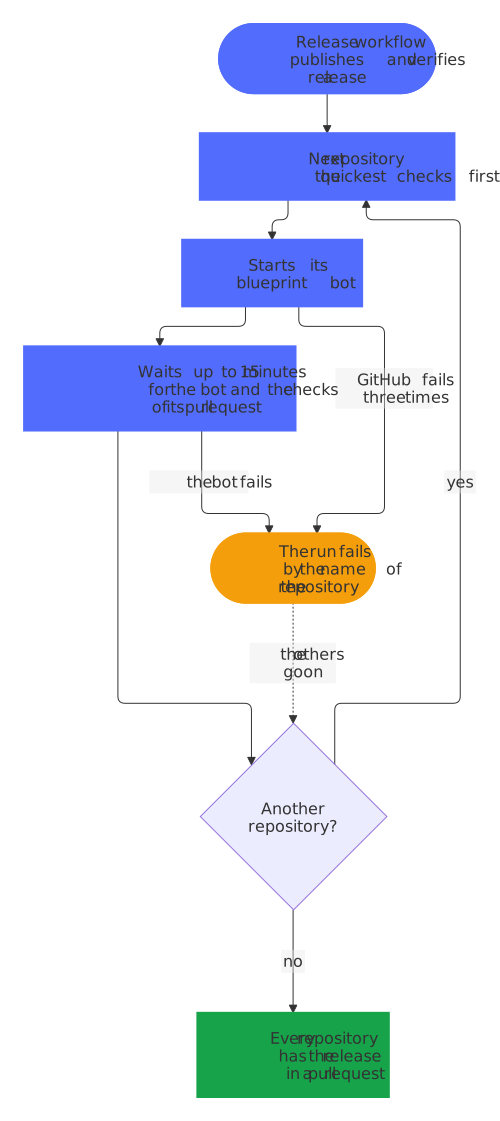
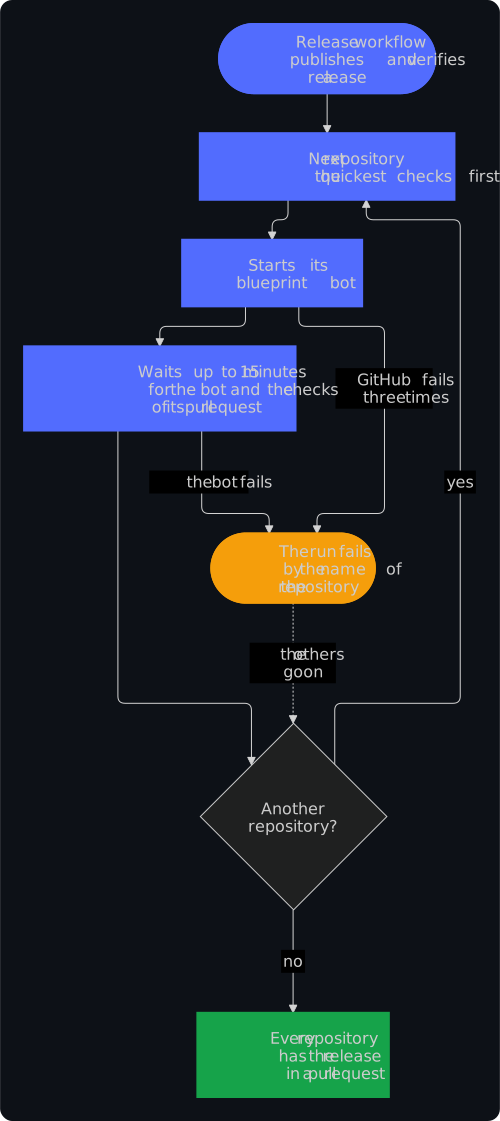
The Rollout workflow of the blueprint brings each release to the repositories of the release app one after the other, those with the quickest checks first: it starts the blueprint bot of a repository and gives the bot and the checks of its update pull request up to 15 minutes before it starts the next one, so that the update pull requests don't all wait for the runners of the account at once. A repository whose bot it can't start, or whose bot fails, fails the run by its name; the others still get the release. It rolls out every release that a run of the Release workflow published, whether the merge of the release pull request started that run, the daily schedule or a start by hand; a release that the run of a later merge finished, because the run of its own merge was lost, waits for a start by hand (Actions → Rollout) or the weekly run of the bots. Started by hand itself, it rolls out the latest release. Rollouts of releases that come close together overlap, but never in the same repository: there, the newer release takes the place of an older one that still waits. Every release goes out right after it is verified, and the weekly run stays as a safety net, so that a fix reaches every repository within minutes instead of a week (decisions 0052 and 0010 of the decisions).
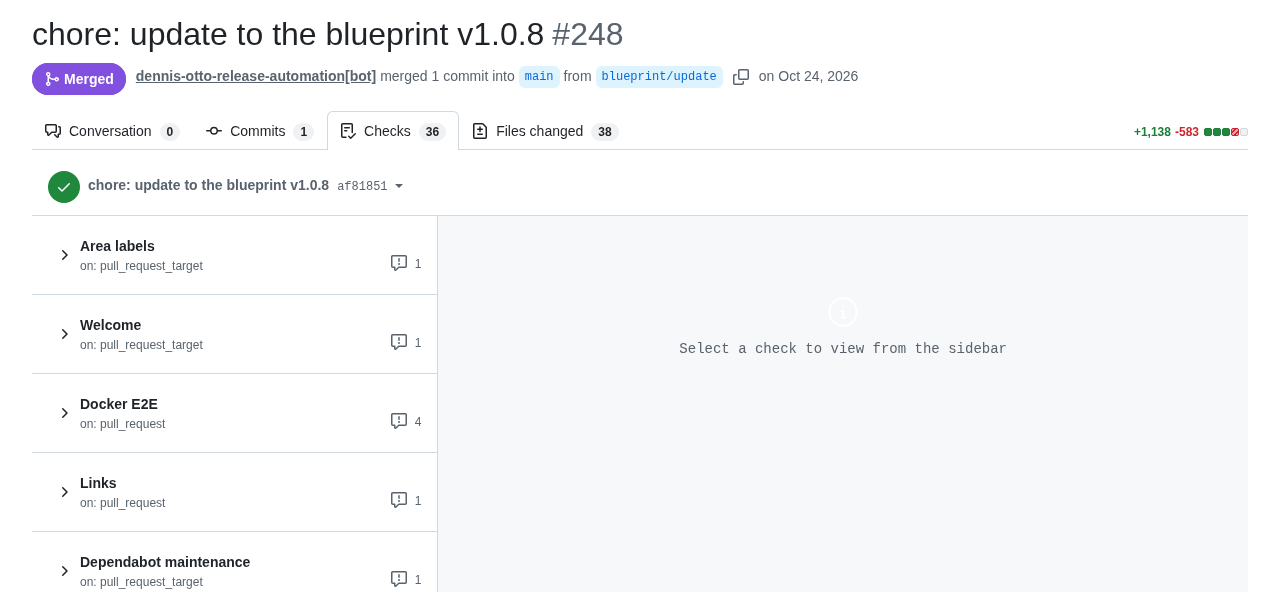
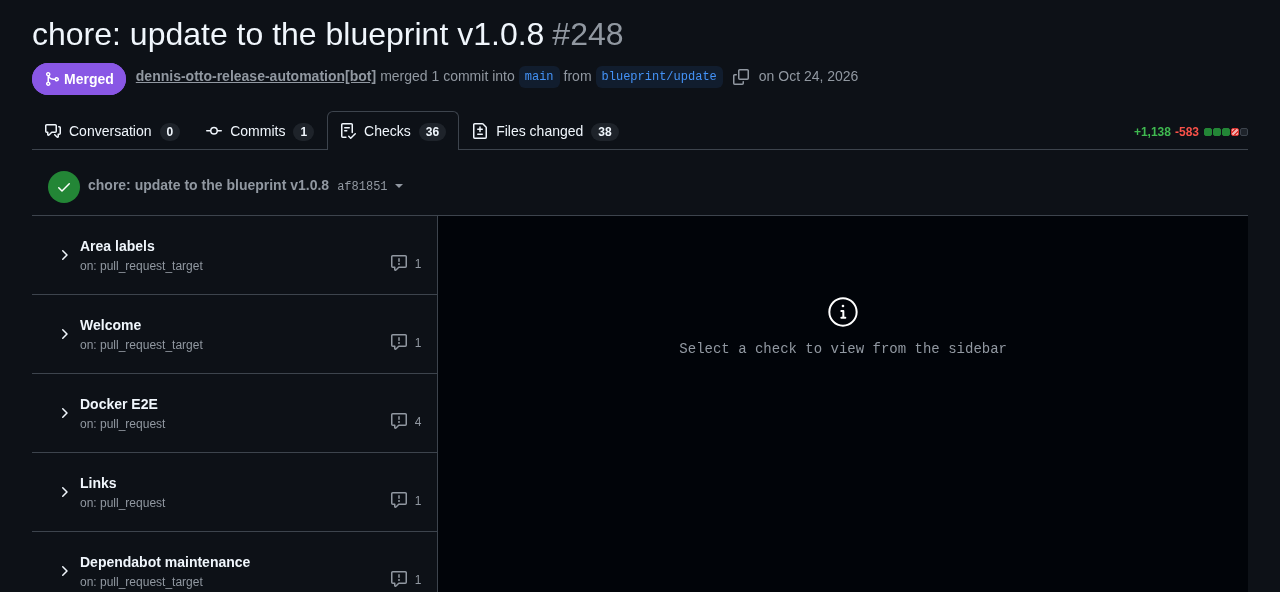
An update of the blueprint in paperless-sync, as the Rollout brought it: the pull request of the release app merged itself once its 36 workflows of checks had passed:
Once you commit to the branch of the pull request, to resolve the markers for example, the bot leaves the branch to you: when a newer release is out, it says so in one comment, and after you merge or close the pull request, its next run brings the rest. A merge of main with the button Update branch doesn't count as your commit, and an auto-merge that you switch off stays off. An update that only records a new release in .copier-answers.yml comes as a pull request too, and the updates carry the modes of files, such as a script that becomes executable.
The blueprint owns the workflows, scripts/check.sh and the community files: their changes arrive with the updates. Files that belong to the project are never overwritten: the README, the changelog, the security design in docs/security.md, the dependency manifests and lock files (Renovate keeps them current), the code and the tests, the website's mkdocs.yml and pages, the issue forms, the labels and their paths, accepted findings, and the notes for coding agents. Checks of a project alone belong in scripts/check-project.sh, which scripts/check.sh runs last.
The issue assistant
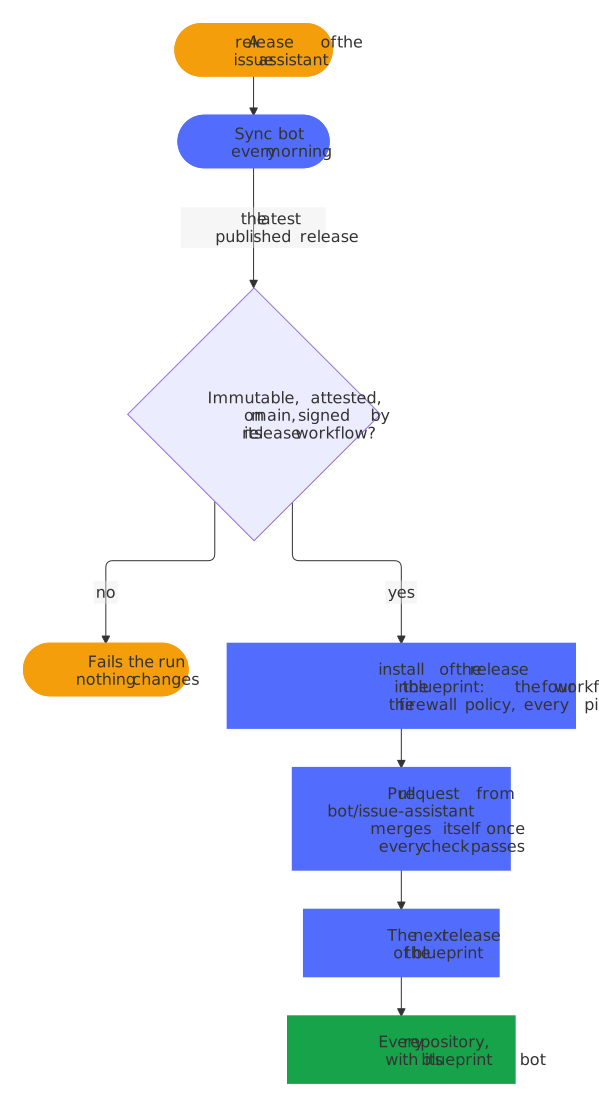
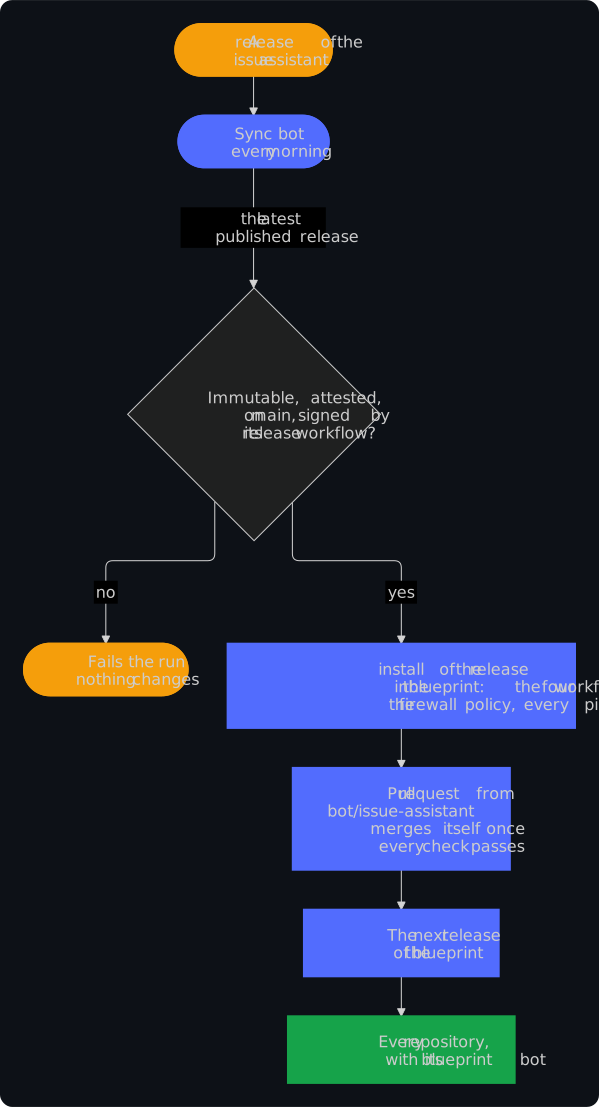
The four workflows of the issue assistant and its firewall policy are templates of its release, with which the check of the issue assistant, a step of lint, compares every repository, so a pin of the action that moved alone would fail that check; Renovate leaves the action alone. The sync bot of the blueprint (sync-issue-assistant.yml, in the blueprint alone) takes over each new release instead. Every morning it takes the latest published release of the issue assistant and verifies it as the blueprint bot verifies a release of the blueprint: the release must be immutable, GitHub's attestation of it must hold (gh release verify), its tag must point at a commit of the issue assistant's main, and its release workflow must have signed the tag. Any other release fails the run with the reason in its summary, and nothing changes; so does a release older than the one that the blueprint has, since GitHub calls a release latest by its date, not by its version. Then the bot runs install of exactly the verified commit in the root of the blueprint, takes over the firewall policy of the release, moves every pin of the action to it, that of the check in the Lint workflow too, and gives a workflow that is new in the release the file of the template that renders it in every repository; a release whose install changes anything else fails the run, and the maintainer takes it over by hand. The bot keeps one pull request on the branch bot/issue-assistant, fix(deps): update the issue assistant to vX.Y.Z, which merges itself once every check passes and moves on to a newer release; once someone else commits to its branch, the bot leaves the branch alone until the pull request is merged or closed. The next release of the blueprint, which publishes itself when it holds only updates, brings the release to every repository. Installing runs without secrets; only the job of the pull request has the release app, and it runs nothing of the release. Run it by hand under Actions → Issue assistant sync; with dry_run, it verifies and installs the latest release and shows what would change without a pull request, as it does in every pull request that changes the bot. The bot-health bot (bot-health.yml) keeps one issue open about a failed run, with the reason of a refusal, and closes it once a run passes.
Upstream
For a Nextcloud app, every week: when Nextcloud has a new major version, a pull request raises max-version and merges itself once every check, the end-to-end tests included, passes against it; started by hand as a dry run, it shows the pull request it would open and changes nothing.
How: upstream.yml.
What belongs to a project
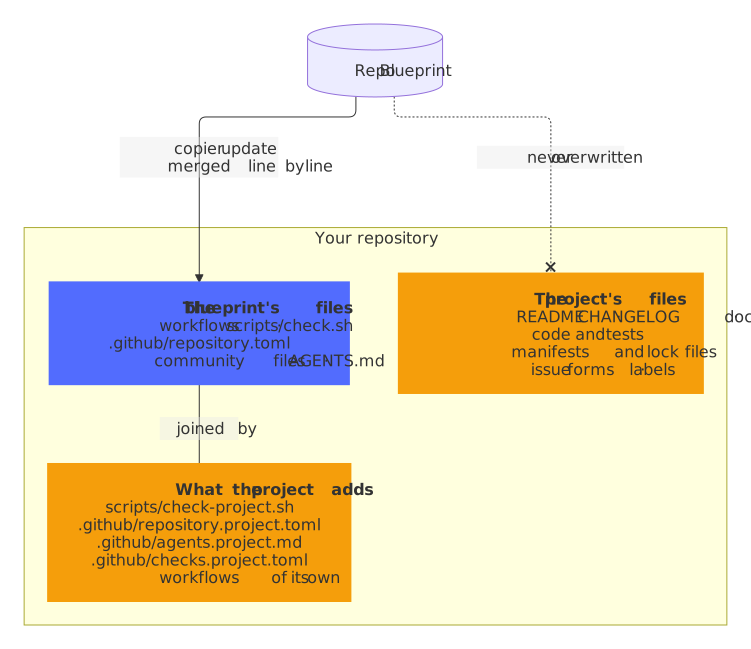
The blueprint keeps the shared parts of every repository equal; a project adds its own without forking them:
- Changes in the blueprint's files survive updates:
copier updatemerges the changes of the blueprint with those of the repository, line by line, and marks a conflict only where both changed the same lines. - Settings of the project alone go into
.github/repository.project.toml, such as the checks of its end-to-end tests, an environment with its secrets or the patterns of the actions that only its own workflows run.blueprint.pyand the settings bot add them to.github/repository.toml. - Checks of the project alone go into
scripts/check-project.sh, whichscripts/check.shruns last, and those of its website, such as of itsrobots.txt, intoscripts/check-site.sh, which the check docs runs with the folder of the built website; workflows of the project alone are workflow files of their own. - Notes for coding agents go into
.github/agents.project.md, such as the architecture of the project and the commands of its own checks.AGENTS.md, which the blueprint keeps current, has the rules of every repository and points to them, andCLAUDE.mdbrings both to Claude Code. - Explanations of the checks of the project alone, which the PR coach shows when one fails, go into
.github/checks.project.toml; they win over those of.github/checks.toml. - Several copyright holders, such as the authors of a fork, are the answer
copyright, separated by semicolons; LICENSE and REUSE.toml name each of them. - Files under another license, such as third-party artwork, get a
.licensefile next to them, as REUSE describes. - The package of a Nextcloud app is checked by
scripts/check-package.sh ARCHIVE unsigned|signedif the project has one:scripts/check.shruns it on the package that krankerl builds, the release on the package before and after signing. - The version in other lines of a file of the release, such as the tag in the URL of a screenshot in
appinfo/info.xml, follows each release when the line ends with the commentx-release-please-version, such as<!-- x-release-please-version -->.