Translate
Languages · FAQ · Contributing
The app speaks English, German, French, Spanish and Dutch. The French, Spanish and Dutch texts were drafted with the help of an AI, with the words that Nextcloud itself uses in these languages, and wait for native speakers to read them: a word that sounds wrong to you in Nextcloud is worth a pull request, and so is a language that the app doesn't speak yet. You need a text editor or the editor of GitHub, no PHP and no build.
The languages
| Language | Catalog | Addresses you with | Written by |
|---|---|---|---|
| English | the texts in the code | you | the maintainer |
| German | l10n/de.json, and l10n/de_DE.json for Deutsch (Förmlich: Sie) |
du, and Sie | the maintainer |
| French | l10n/fr.json |
vous | an AI, waiting for review |
| Spanish | l10n/es.json |
tú | an AI, waiting for review |
| Dutch | l10n/nl.json |
je | an AI, waiting for review |
Nextcloud takes the catalog of the language of an account, and the English texts of the code where the app has no catalog in that language. It takes a catalog for the exact language alone: an account set to a regional variant, such as Español (México), es_MX, needs a catalog of its own, even one that copies l10n/es.json.
Where the texts are
l10n/<language>.json, such asl10n/fr.json: the texts that PHP shows, in the search and its results, the widget New in Paperless of the dashboard, the personal and the administration settings and the warnings of the overview. Correct the texts here.l10n/<language>.js: the same texts for the browser, which shows the messages of the settings. A command writes it from the.json; never edit it by hand.appinfo/info.xml: the listing of the App Store,<summary lang="fr">with one line and<description lang="fr">with the page of the app in Markdown. The App Store reads it with every release. The website has pages in English and German only, so the description of another language links the English documentation.
How a catalog reads
Each line pairs a text of the code, in English, with its translation:
{
  "translations": {
    "Paperless documents": "Documents Paperless",
    "The archive account %s does not exist.": "Le compte d’archive %s n’existe pas.",
    "The request failed (HTTP {status}).": "La requête a échoué (HTTP {status}).",
    "_%n user_::_%n users_": ["%n utilisateur", "%n utilisateurs", "%n utilisateurs"]
  },
  "pluralForm": "nplurals=3; plural=(n == 0 || n == 1) ? 0 : n != 0 && n % 1000000 == 0 ? 1 : 2;"
}
- The English text on the left stays as it is, character for character: the code looks the translation up by it. Change only the text on the right.
- Placeholders stay, such as
%s,%1$s,%n,{status}and{account}: the app puts a name, a number or a link there. The words around them may move, and%1$sand%2$smay swap places. - A plural, whose text reads
_singular_::_plural_, has as many forms aspluralFormnames withnplurals: German and Dutch one and other, French and Spanish three. Nextcloud, however, picks only one or other for French and Spanish (form 0 or 1), never the third form for millions, so the middle form repeats the other form, as in Nextcloud's own catalogs;scripts/check-l10n.mjsfails otherwise.pluralFormis the one of Nextcloud's own catalog of the language. - Nextcloud's words: a word that Nextcloud shows as well takes Nextcloud's translation, such as Search connected services, which is Rechercher dans les services connectés, Buscar servicios conectados and Verbonden diensten zoeken; the catalogs of Nextcloud's server have them. The words of Paperless, such as the permission View of Correspondents, take those of Paperless-ngx in the language.
- French typography: a no-break space before
:,;,?and!and inside«and», as Nextcloud writes French.
Correct a translation
- Open the catalog in
l10n/on GitHub, such asfr.json, and edit it with the pencil; GitHub makes a fork and a branch for you. Or, in a clone, edit the file in your editor. - Change the translation on the right. For the App Store, change
<summary lang="fr">or<description lang="fr">inappinfo/info.xml. -
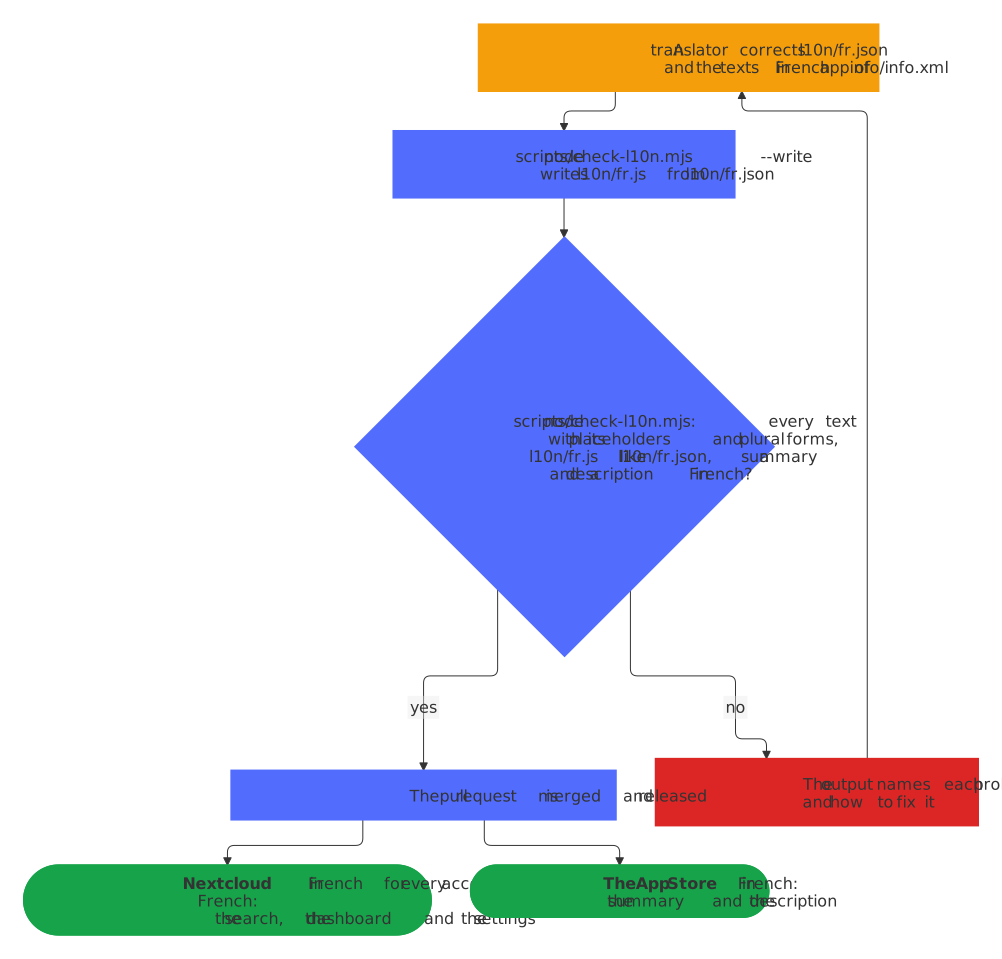
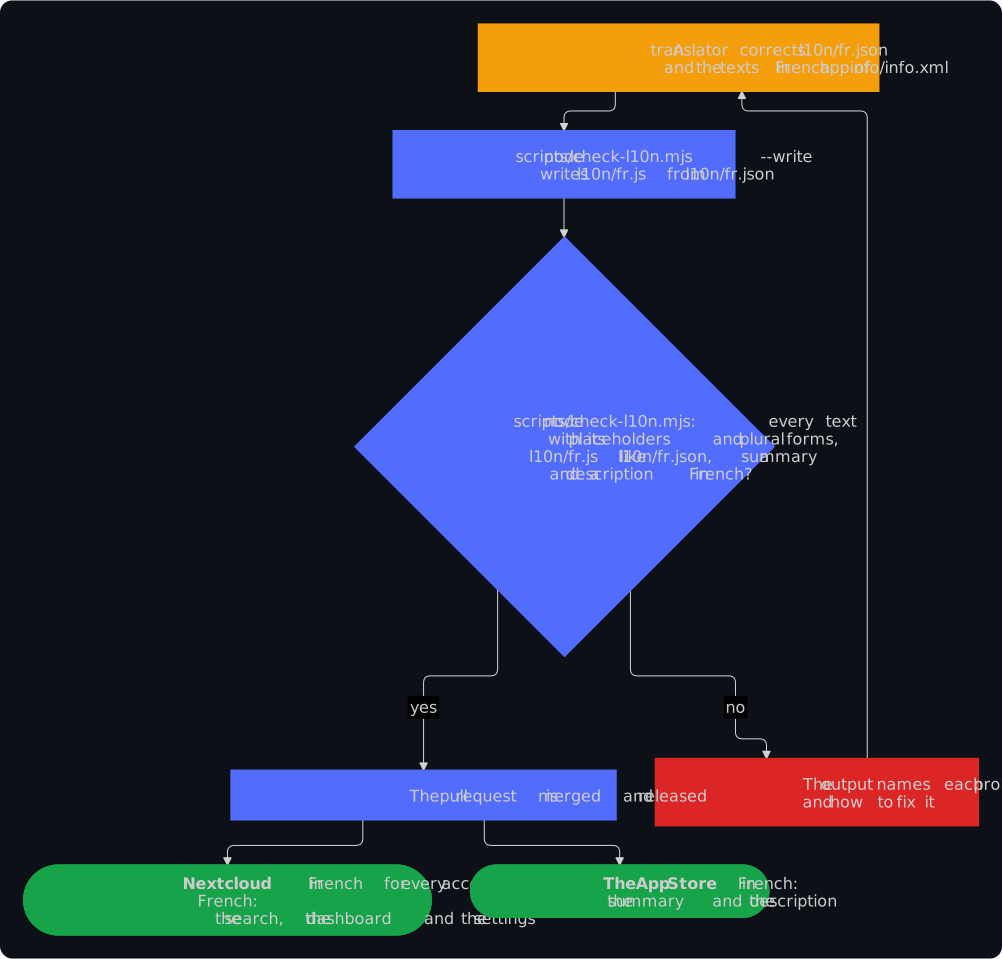
Write the catalog of the browser anew and check the translations, with Node.js:
node scripts/check-l10n.mjs --write
node scripts/check-l10n.mjs
Without Node.js, open the pull request anyway: its check names each problem with its fix, and the fix bot writes the catalog of the browser for you, or suggests it on a fork.
-
Open a pull request with a title such as
fix(l10n): correct the French of the dashboard, and say in its description what read wrong. Each commit needs a sign-off,git commit -s; the editor of GitHub adds it when you tick its box. CONTRIBUTING.md has the rest.
Add a language
- Copy
l10n/de.jsontol10n/<language>.json, named with the code of the language in Nextcloud, such asitfor Italian orpt_BRfor Brazilian Portuguese, the names of the files in the catalogs of Nextcloud's server. - Translate every text on the right, and set
pluralFormto the one of Nextcloud'score/l10n/<language>.json, with as many forms for each plural as it names. - Add
<summary lang="it">and<description lang="it">toappinfo/info.xml, after those of the other languages, translated from the English ones; the description ends with the link to the English documentation. - Run the two commands above, which write
l10n/<language>.jsand check every catalog. - Name the language where the others are named: Languages in
README.mdandREADME.de.md, the FAQ indocs/faq.mdanddocs/faq.de.md, the table above in this page and its German twin, the languages of the App Store intests/Unit/AppInfo/AppStoreListingTest.php, and the versions of Nextcloud in the new description forscripts/check-project.sh, such as- Nextcloud 33 a 35. - Open a pull request with a title such as
feat(l10n): speak Italian, which ships the language in the next release.
What the check checks
node scripts/check-l10n.mjs runs with bash scripts/check.sh and in every pull request, and fails when:
- a text of the code has no translation in a catalog, or a catalog translates a text that no code uses any more;
- a translation is empty, or has other placeholders than its text;
- a plural has another number of forms than the
pluralFormof its catalog names; - a catalog for the browser,
l10n/<language>.js, holds anything other than itsl10n/<language>.json; appinfo/info.xmlhas no summary or no description for the App Store in the language of a catalog, where a regional variant, such asde_DE, takes those of its language,de.
Each problem names the file, the text and the fix. The check can't tell a good translation from a bad one: that takes a native speaker.