Runs by hand
A maintainer starts the assistant on one issue by hand, from the Actions tab, the GitHub CLI or the REST API, and can tell it what to do, such as "ask for the logs". It answers each task once; to have it answer again, a maintainer ticks override and accepts the cost of another run. The task backlog gives the issues that were open before the assistant came their first analysis, a few at a time: see the backlog below.
Start one
Under Actions → Issue assistant → Run workflow, with these inputs:
| Input | Default | What it does |
|---|---|---|
issue |
The number of the issue; for backlog, the issue after which it starts, 0 for the oldest |
|
mode |
triage |
The task: triage for a first analysis, follow-up for the answer to the reporter, one of the replies to a comment, or backlog for the first analyses of the open issues without one |
instruction |
empty | What the assistant should do, in your words, such as "ask for the logs"; for triage and follow-up, at most 500 characters |
override |
off | Answer again, also where the task already has its comment; only for maintainers. The button 🤖 Assistant again of Repo Pager is a ready-made way: it starts this run with override on an issue, in the maintainer's name, from a message in Telegram |
comment |
off | For backlog: post each first analysis as a comment, not only its labels |
dry_run |
on | Only show in the summary what the assistant would post |
The same with the GitHub CLI, or with any tool that calls the REST API, such as a chat bot like Repo Pager:
gh workflow run issue-assistant.yml -f issue=42 -f instruction="Ask for the logs" \
  -f override=true -f dry_run=false
gh api repos/OWNER/NAME/actions/workflows/issue-assistant.yml/dispatches \
  -f ref=main -f 'inputs[issue]=42' -f 'inputs[override]=true' -f 'inputs[dry_run]=false'
Who may do what
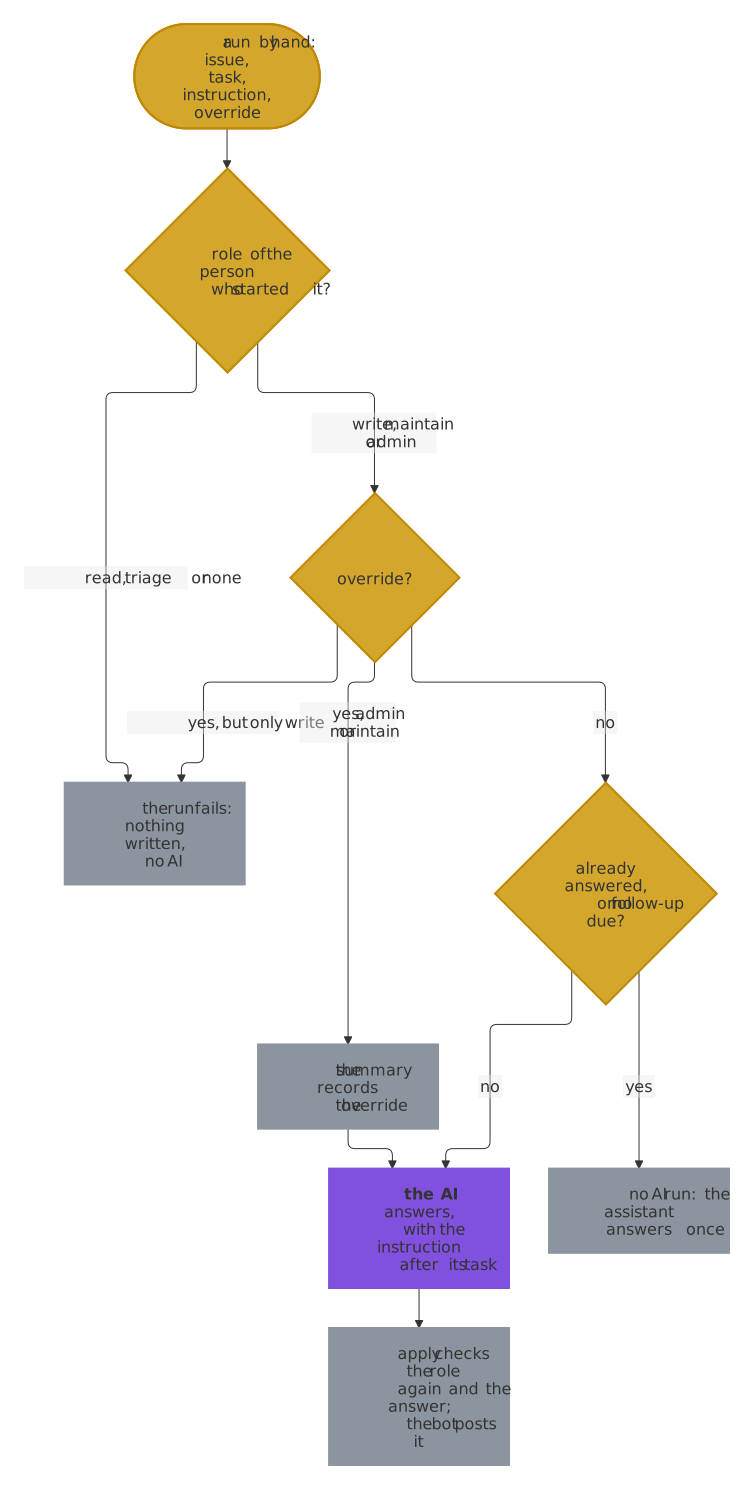
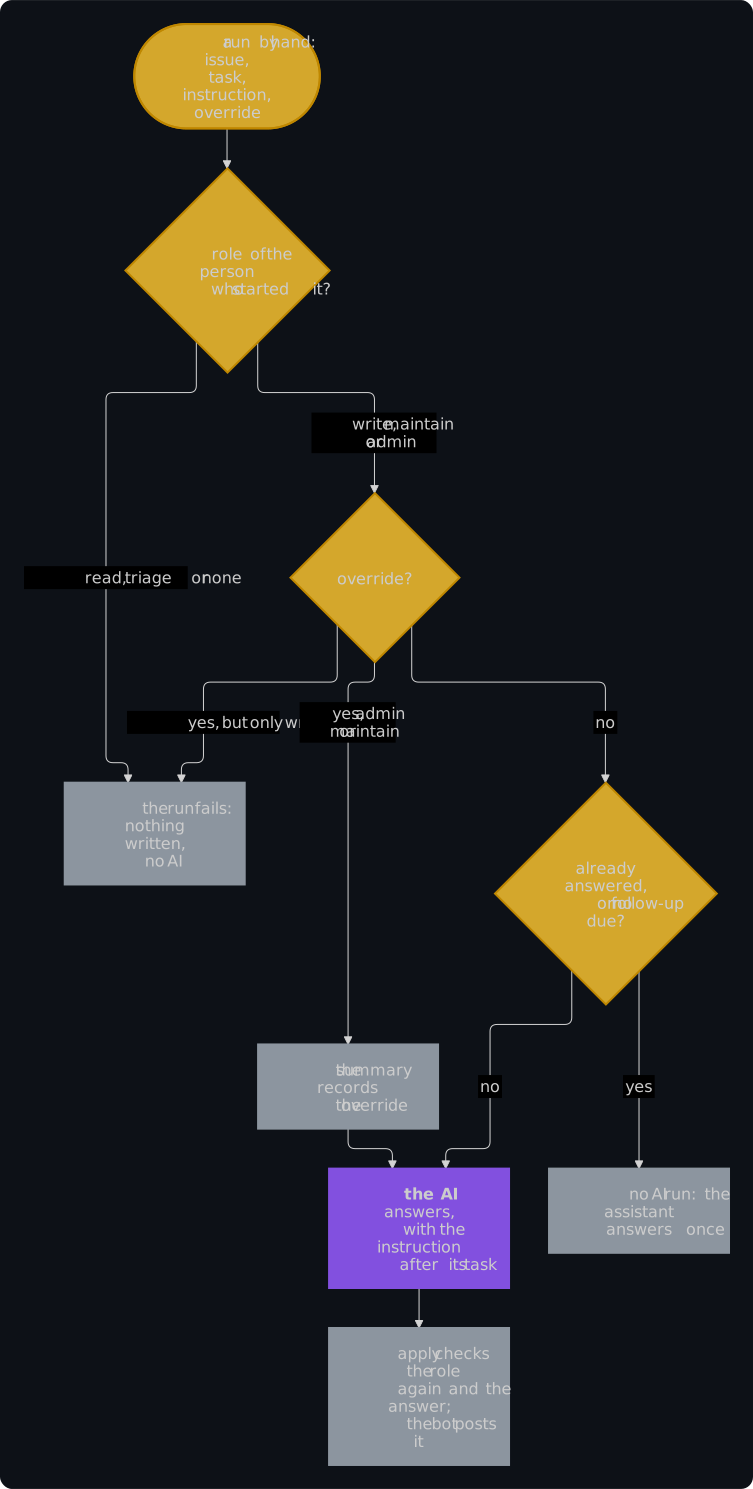
- Someone with write access starts a run. GitHub lets everyone with write access start a workflow, and an app with the right to run workflows too, so the job Handle the event (
event) asks GitHub for the role of the person who started the run, or who ran it again, before it writes anything and before the AI runs. A role ofreadortriage, or an account that isn't a person, fails the run with the reason in its summary. - Only a maintainer overrides the one-comment rule. The assistant posts one first analysis on an issue and one follow-up to each answer of its reporter, so that its runs stay few. A maintainer, with the role
adminormaintain, ticksoverrideto have it answer again, as/assistant againof the slash commands does for a first analysis. A run withoverridefrom someone with the rolewritefails, and nothing runs. - Without the override, a task answers once. A
triage,follow-upormaintainer-questionthat already has its comment ends in the jobevent, without the AI, and its summary says so. So does afollow-upthat is not due: a maintainer joined the conversation, the last analysis asked no questions, or the assistant followed up as often asmax_follow_upsallows. An issue without a first analysis, such as one that a maintainer opened, gets it without the override. - Each override is in the summary. The summary of the job
event, a notice of the run and the summary of the job Check and post the analysis (apply) name the person who overrode the rule, so the Actions tab lists every override. The assistant keeps no count in a file that anyone could change. - A tool acts for a person. A tool that starts runs through the REST API, such as a chat bot of the maintainer, uses a token that acts for a person, such as the user access token of a GitHub App: the token of the app itself names the app as the actor, which has no role, and fails the run.
What the instruction steers
- It follows the task. The engine reads the instruction after its task, as words of the person who started the run, and follows them as far as its rules and the form of its answer allow: it can ask the reporter for the logs, but it can't post anything that the checks refuse, read anything else or change its rules.
- The issue stays material. The issue, its comments and the other texts that the AI reads stay material to analyze, also where one claims to come from a maintainer, as in every run.
- The summary shows it. The instruction is on one line in the summary of the run, which everyone who can read the repository can see in the Actions tab.
- The comment is the assistant's. The bot of the assistant posts the comment, checked as every other one; a comment in a maintainer's own name is theirs to write.
The backlog
A repository that starts with the assistant has issues that were open before it came: they have no labels of the assistant, no search for a duplicate and no question for what is missing, and the digest and the duplicate search of new issues start with them as they are. A maintainer gives them their first analysis with the task backlog, a dry run first:
gh workflow run issue-assistant.yml -f mode=backlog -f issue=0
gh workflow run issue-assistant.yml -f mode=backlog -f issue=0 -f dry_run=false
- The oldest first, a few at a time. The job
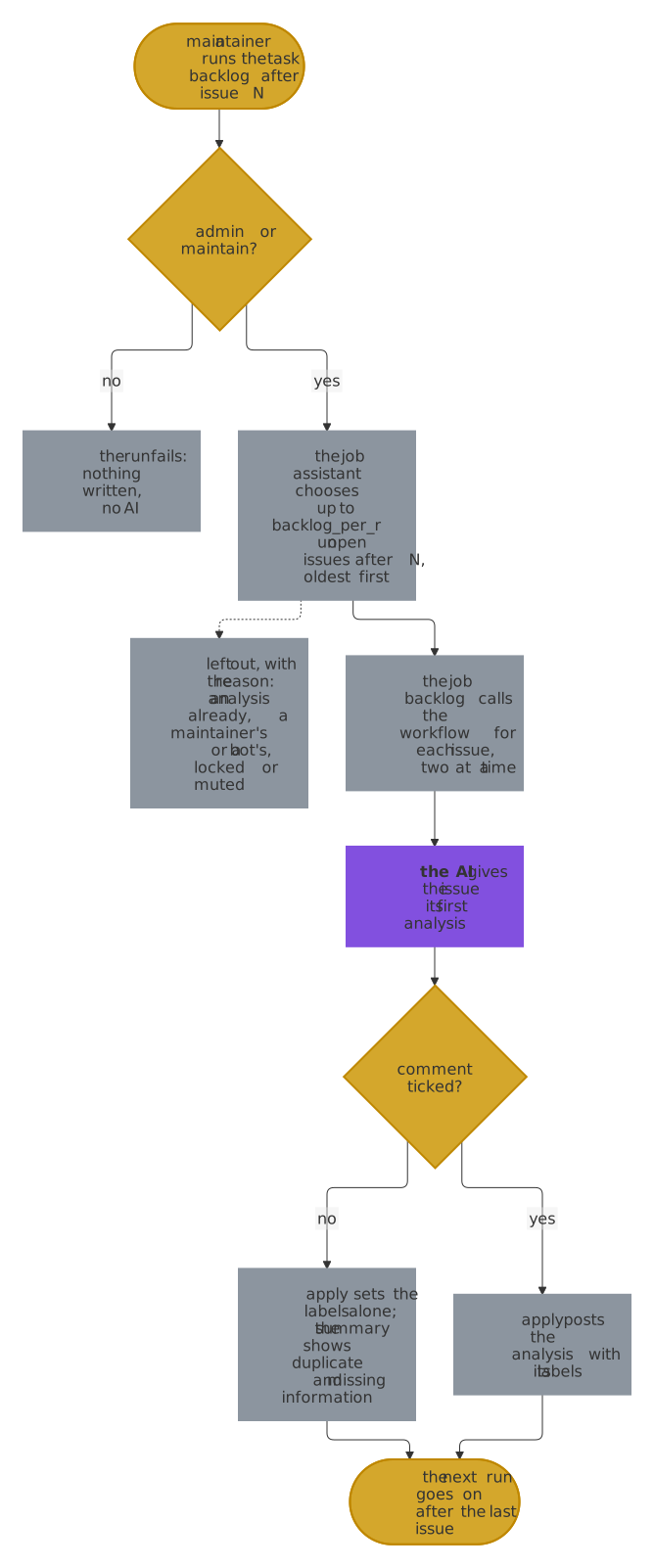
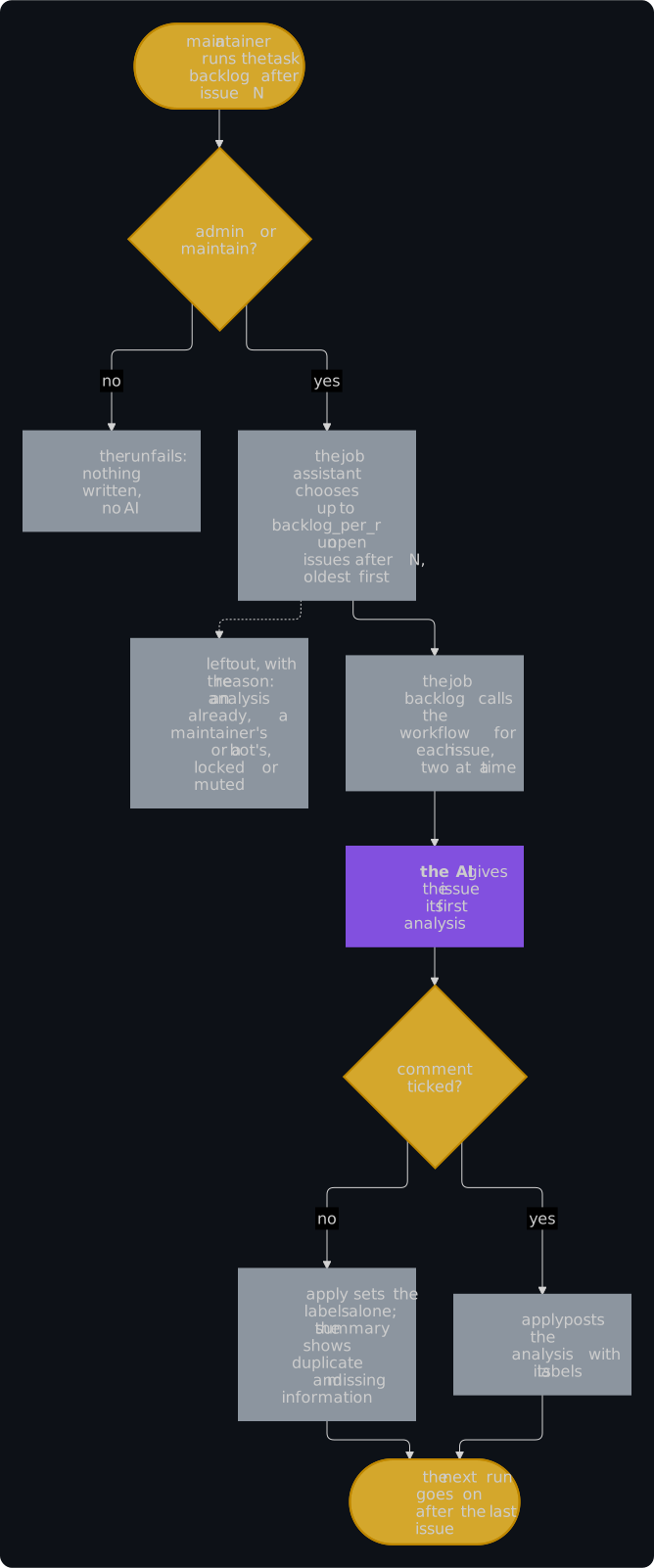
assistantlists the open issues after the number ofissueby their number, and chooses up tobacklog_per_runof[engine]inconfig.toml, 20 by default and at most 256: those that a first analysis would have taken as new issues. It leaves out an issue with a first analysis already, one that a maintainer or a bot opened, a locked or muted one, and one whose reporter ticked the box that keeps the AI out; its summary names each with the reason. - One call for each issue. The job
backlogcalls the reusable workflow once for each chosen issue, two at a time, so that a long backlog holds up neither the runners nor the engine. Each call is a run by hand oftriageon its issue: the jobeventchecks the issue again, as it may have changed, the AI analyzes it, andapplychecks the answer as always. A call that fails leaves the others running, and Re-run failed jobs runs it again. - Labels only, unless you tick
comment. Without it,applysets the kind, the areas, the topics, the priority and the issue type of the analysis and posts nothing, so the reporter of an old issue gets no comment out of the blue. Nor does it setneeds-infoorpossible-duplicate, which belong to the comment that tells the reporter: without it, the sweep would remind them of a question that nobody asked, or close their issue as a duplicate that nobody named. And it assigns nobody, which would notify people. Withcomment, each issue gets the first analysis that a new issue gets, with all of that. - A table for each issue. The summary of the job Check and post the analysis (
apply) of each call shows the issue, the labels, a possible duplicate and the information that is missing, in a dry run too. Ask a reporter yourself where it helps, or run the assistant by hand on that issue withtriage, which posts the analysis. - The next run goes on where this one stopped. The summary of the job
assistantnames the last issue that it chose: give that number asissueof the next run. An issue that got its labels without a comment has no comment of the assistant, so a run from0would analyze it again. - For maintainers, and outside the daily limits. Only the roles
adminandmaintainstart it, without an instruction and without override, as it may start many runs of the AI. They count toward no limit of[engine], which are there for the runs that others start;backlog_per_runbounds the cost of one run, and each issue costs a first analysis, in a dry run as well. - The runs on the backlog wait for each other, as the runs of one issue do. A call for an issue doesn't wait for a run of the same issue that a new comment starts meanwhile; the checks of
applykeep the issue to one analysis there too.
In every repository
The template of issue-assistant.yml that install writes has these inputs, and the action checks the role, reads the instruction and keeps the rule, in the reusable workflow as in a workflow of your own that runs the action. A repository gets them with the update to the release that brings them, which moves the pin of the reusable workflow and the inputs of the template together. The task backlog also needs the job backlog of the template, which calls the reusable workflow for each issue: install of the release that brings it writes both, and check names a template without them.