Help
What every message of Player Switch means and what to do about it, and the answers to the questions that come up at a shared display. Search this page for the words on your screen: each message is quoted word for word. Setting up a new display? The guide for a shared display walks through it, from the install to kiosk mode and the start with the computer.
Messages
Sign in again
Sign in again
A tile says this, and the icon in the toolbar shows how many accounts have to sign in again; its tooltip names them, such as:
Player Switch for Autodarts – sign in again: Ada and Bob
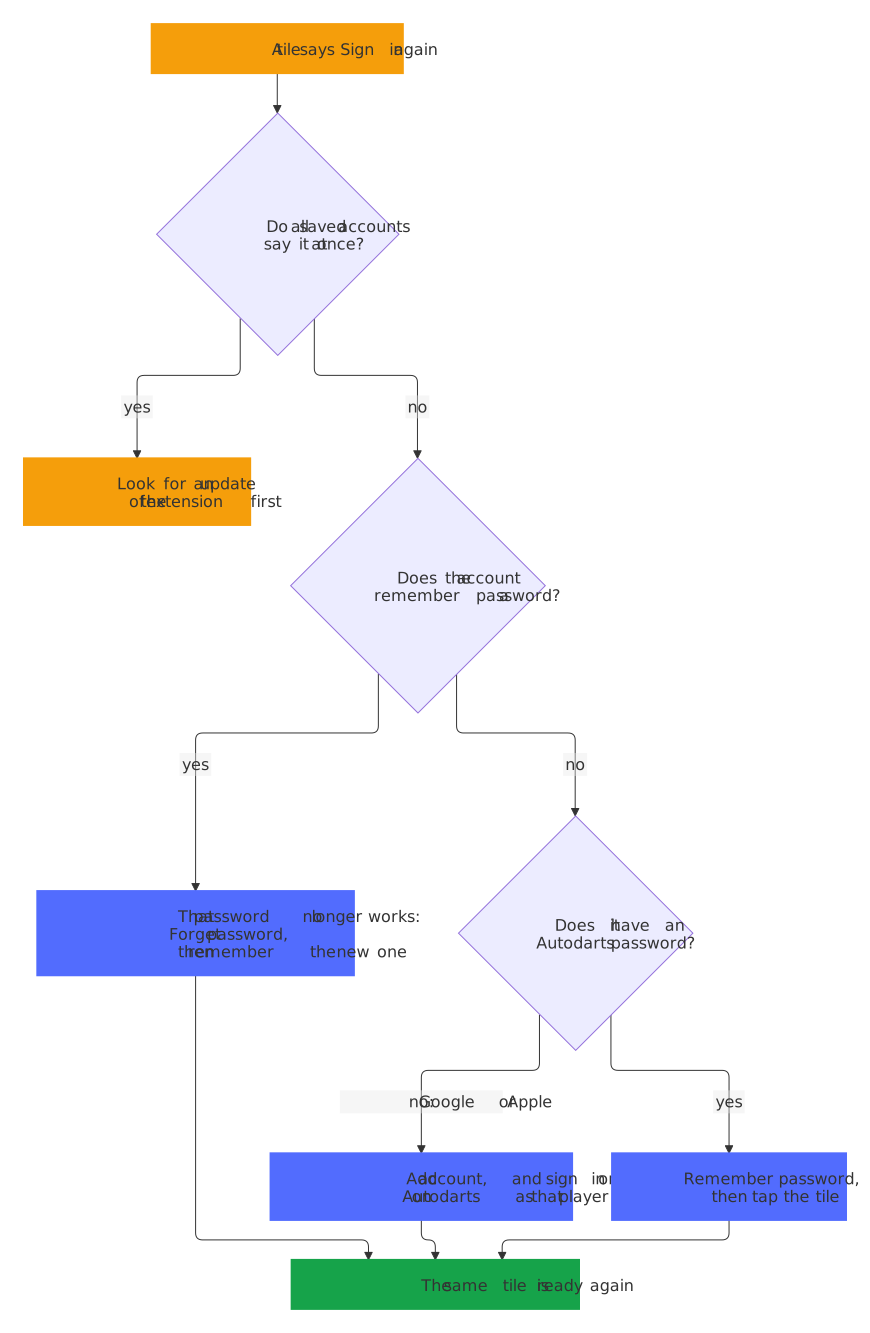
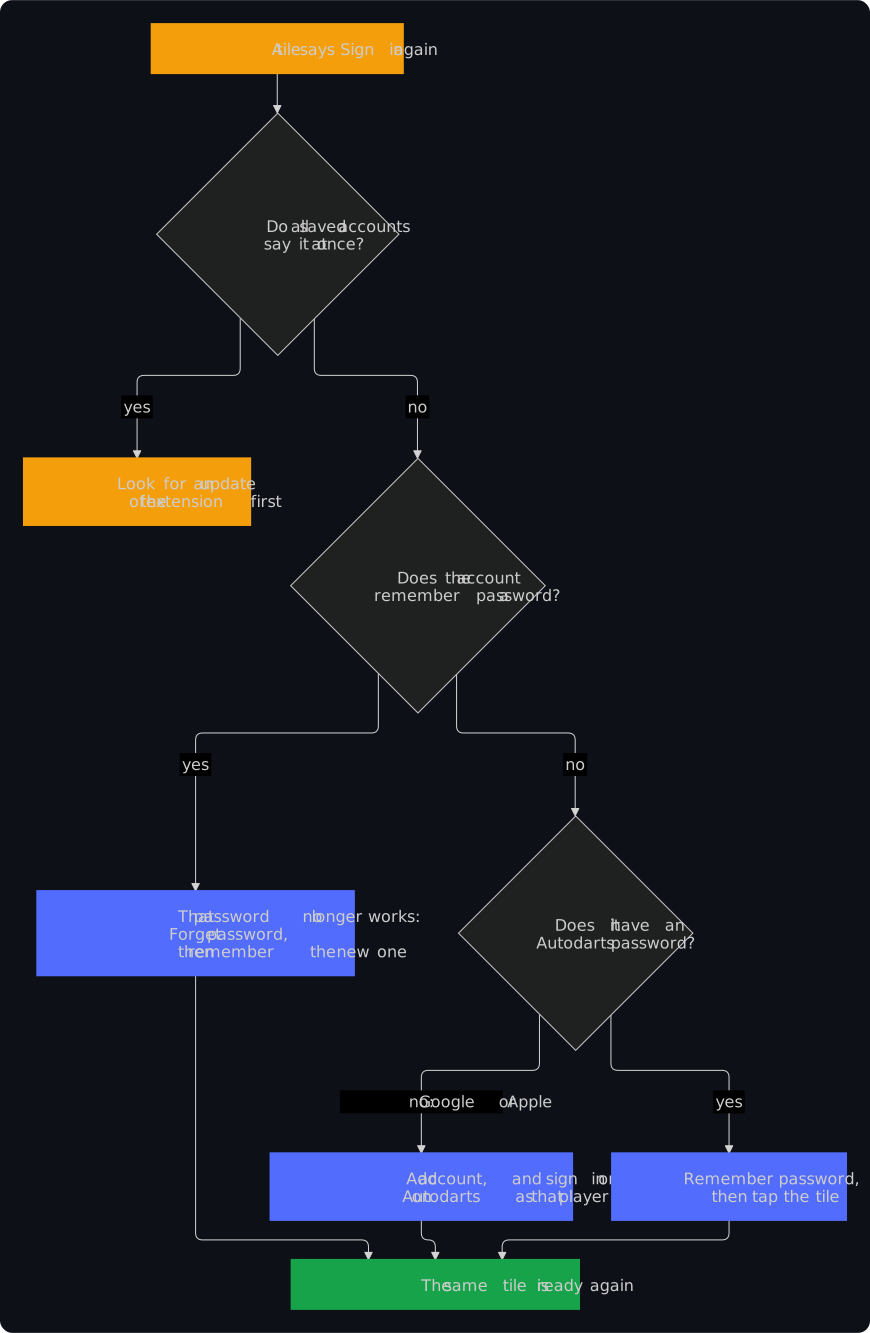
What it means: Autodarts no longer accepts the saved session of this account, in a renewal or at a tap, and no remembered password could sign it in. A session also ends for good when the player signs out on the Autodarts page: to change players, tap a tile instead.
What to do, in one of two ways:
- Choose Add account, in the popup or in the players on the Autodarts page, and sign in on Autodarts as that player, with a password, Google or Apple. The extension knows the account again: the same tile is ready, and a remembered password stays.
- For an account with an Autodarts password: under Manage accounts, choose Remember password for it, then tap its tile. The extension signs it in by itself, now and whenever its session ends again.
A tap on such a tile says the same:
Bob has to sign in again: use Add account to sign in once on Autodarts, or remember the password.
An account that remembers its password and still has to sign in again has a password that Autodarts no longer takes, such as after a change of the password: choose Forget password, then Remember password with the new one. Do all saved accounts have to sign in again at once? Then read Autodarts may have changed how it signs in first.
A + on the icon
The tooltip of the icon says:
Player Switch for Autodarts – an account on Autodarts isn't saved yet
and the popup and the players on the Autodarts page say:
Someone is signed in on Autodarts who isn't saved here yet.
What it means: someone signed in on Autodarts, and the extension doesn't keep that account. It saves a new sign-in by itself only in the ten minutes after Add account or the install, only once, and only while no saved account plays; any other sign-in waits for a tap, so nobody is saved by surprise.
What to do: Save account saves it, and a tile for that player appears. Someone who shouldn't be saved: leave it, and nothing is stored. The + goes once the Autodarts tab closes or that person signs out on the page.
Autodarts can't be reached right now
Autodarts can't be reached right now. Try again in a moment.
What it means: the extension couldn't ask Autodarts for the session of this account: the computer has no connection to the internet, or Autodarts has a problem. Nothing changed: the page stays as it was, and no session is lost.
What to do: check that play.autodarts.com loads, then tap the tile again. The renewal in the background tries again by itself after 15 minutes.
Autodarts didn't answer in a tab
Autodarts didn't answer in a tab. Open Autodarts, then try again.
What it means: the extension moves a session into and out of the Autodarts page, so a switch needs an Autodarts tab, and none answered in time: none is open, or the one that is hadn't finished loading.
What to do: choose Open Autodarts in the popup, wait until the page has loaded, and tap the tile again. When an Autodarts tab is open already, reload it first.
Something went wrong
Something went wrong. Please try again.
What it means: something failed that the extension didn't expect. Under Settings, the same message says that a setting wasn't saved.
What to do: try again, and reload the Autodarts page when it comes back. When it stays, choose Report a problem at the bottom of the popup: it opens the bug form with the versions of the extension and the browser filled in, and nothing else.
A match is running
A match is running
Switching ends it on this display.
What it means: the Autodarts page shows a match that runs, and a switch reloads the page. The extension asks before it changes anything.
What to do: Keep playing changes nothing. Switch anyway switches, and the match ends on this display.
Player Switch was updated
Player Switch was updated. Reload the page to use it? A running match ends on this display.
What it means: the extension was updated, and this tab still has the button of the version before, because the new version couldn't take it over. As a rule, the new version takes over the open Autodarts tabs by itself; this question comes only where that didn't work. Only a reload brings the new version, and on a match page that ends the match, so the page asks first; on a page without a match, a tap on the button reloads it straight away.
What to do: OK reloads the page with the new version. Cancel keeps the page as it is, to finish the match first; tap the button again afterwards.
Autodarts may have changed how it signs in
Autodarts may have changed how it signs in. Check for an update of Player Switch.
What it means: in one renewal, Autodarts turned away every parked account at once, at least two of them. One account can lose its session on its own; all of them at the same time more likely means that Autodarts changed how it signs in, and the extension needs an update for that.
What to do: don't sign everybody in again yet. Known problems and updates opens the list of known problems. Chrome brings a new version of an extension by itself within a few hours; to fetch it now, turn on Developer mode under chrome://extensions and choose Update. Installed unpacked, from the source? Then Chrome fetches nothing by itself: get the latest source (git pull), run npm run build, and choose the reload arrow of Player Switch under chrome://extensions, as in the quick start. Once the new version is there, sign in again only the accounts that still say so.
Renewed 3 hours ago
Renewed 3 hours ago
What it means: under Manage accounts, when the extension last renewed the parked session of an account. The account that plays shows no time, because the Autodarts page renews its session itself.
What to do: nothing. The extension renews every parked account every 12 hours while the browser runs. A time much longer ago means that the computer was off or asleep: the renewal catches up as the browser starts again or the computer wakes. Keep it ready says what that means for a display that is off for days.
Renewal failing since
Renewal failing since Oct 22, 2026, 9:15 PM; it keeps trying.
What it means: under Manage accounts, the extension could not reach Autodarts to renew the parked session of this account, every time since that moment. The session itself is still kept; it has not been turned away.
What to do: check that the computer is online and that Autodarts opens. The extension tries again every 15 minutes, and the line goes away with the first renewal that works. Should Autodarts turn the session away later, the tile says Sign in again; see Sign in again.
Saved accounts from a newer version
Your saved accounts come from a newer version of Player Switch. Update the extension to use them; this version leaves them untouched.
What it means: a newer version of the extension saved the accounts in a format that this older version can't read, for example after going back to an older version or after installing an older copy from the source. This version neither changes nor wipes them: it keeps them as they are, plus a copy, and shows no account until a version that reads them is back.
What to do: update the extension, as under Autodarts may have changed how it signs in. Once the newer version runs, every account is there again. Don't remove the extension to get rid of the message: that deletes the saved accounts too, and every player has to sign in again.
No accounts yet
No accounts yet. Choose Add account and sign in on Autodarts: each account is saved by itself.
What it means: the extension keeps no account yet, in this browser profile.
What to do: choose Add account and sign in on Autodarts as the first player. The account is saved by itself, and the icon shows ✓ for a moment. Add the next players the same way.
Remove a player
Remove Bob from this display? Sign in again to add the account back.
What it means: Remove account under Manage accounts asks this before it deletes the account from the extension: its saved session and a remembered password. Nothing changes at Autodarts.
What to do: confirm to remove it. A player who plays on the page right now stays signed in there until they sign out on Autodarts or someone switches.
Not set
Under Settings, a shortcut says:
Not set
What it means: the shortcut has no keys, because another extension had them first or they were removed.
What to do: Change shortcuts opens chrome://extensions/shortcuts; give it keys that no other extension uses. The button on the Autodarts page works without a shortcut.
Questions
Does a switch sign the other player out?
No. The account that steps aside keeps its session, parked in the extension and still valid at Autodarts, and a tap brings it straight back. Only a sign-out on the Autodarts page ends a session, so a tile is the way to change players.
Does anyone have to type a password?
Once per player, to sign in on Autodarts, the way they always do: with a password, Google or Apple. After that a tap switches, without a password. Remember password is optional: the extension then signs that account in by itself, should its saved session ever stop working.
Accounts that sign in with Google or Apple
They work like every other account: after Add account, sign in on Autodarts with Google or Apple, and the session is saved. Such an account can't use Remember password, because it has no Autodarts password to remember; when it has to sign in again, it signs in once more with Add account.
A sign-in with Google or Apple on a shared display may leave that person signed in to Google or Apple in this browser. Sign out of it there afterwards, so that the next person at the display doesn't get into it; the saved Autodarts session doesn't need it. And when Chrome offers to save a password on the display, choose Never.
How long does a saved account stay ready?
As long as Autodarts keeps its session valid, which is up to Autodarts. The extension renews every parked account every 12 hours while the browser runs, so on a display that runs daily, a saved account still works weeks later. Manage accounts shows when each was renewed last.
A new sign-in wasn't saved by itself
The extension saves a sign-in by itself only in the ten minutes after Add account or the install, only once, and only while no saved account plays. Any other sign-in shows a + on the icon, and Save account in the popup saves it. Cancel while it waits stops the waiting.
The button on the Autodarts page is missing
Settings in the popup, or Details → Extension options under chrome://extensions, turns the button on and picks its corner. Is it on and still missing? Reload the Autodarts page. The keyboard shortcut Alt+Shift+O opens the players with the button off as well.
Who can play under my account?
Anyone at that display can switch to any account saved on it: it is made for a display that the people of a household, a club or a venue share and trust. Leave a club, or play elsewhere from now on? Remove your account from the display, under Manage accounts. The security design lists what is kept and which risks remain.
Several displays
Each browser profile on each computer keeps accounts of its own, and nothing is synchronized between them. Sign in each player once on each display; each display then keeps a session of its own for them.
Which browsers does it work in?
It is made for Google Chrome 140 or newer, on Windows, macOS, Linux and ChromeOS. Browsers built on Chromium install it from the Chrome Web Store as well, such as Chromium on a Raspberry Pi or Microsoft Edge. Use a normal window of a browser profile: Chrome runs no extension in a guest window, and one in an incognito window only when you allow it.
Remove everything
- One account: Manage accounts, the account, Remove account. That deletes its saved session and any remembered password.
- Only a password: Forget password deletes it, and the account stays.
- Everything: remove the extension under
chrome://extensions, and Chrome deletes everything that it kept. Whoever played last stays signed in on the Autodarts page, until they sign out there.
The privacy policy lists everything that the extension keeps.
Still stuck?
Report a problem at the bottom of the popup opens the bug form, filled in with the versions of the extension and the browser. Questions go to the discussions, and a vulnerability is reported privately, as SECURITY.md describes.