Guide
How to install and set up Paperless Sync, what it does, how to use it, and what each part of its configuration means.
How it works
flowchart LR
    documents["Paperless-ngx<br>finished documents"] -->|read through the REST API| export(["Paperless Sync"])
    trash["Paperless-ngx<br>trash"] -->|read| export
    export -->|write, rename, move| archive["📁 Archiv<br>correspondent / type / year"]
    export -->|mirror the trash| deleted["📁 Archiv/_Gelöscht"]
    inbox["📁 Eingang"] -->|pick up| import(["Paperless Sync"])
    import -->|upload through the REST API| consume["Paperless-ngx<br>new documents"]
    import -->|failed imports| errors["📁 Fehler"]
    classDef paperless fill:#17541f,stroke:#17541f,color:#fff
    classDef nextcloud fill:#0082c9,stroke:#0082c9,color:#fff
    class documents,trash,consume paperless
    class archive,deleted,inbox,errors nextcloud
At the configured interval, Nextcloud's cron starts a run of the app inside Nextcloud. It reads the finished documents of Paperless and writes each one into the archive of the Nextcloud user who owns it, at the path that the path template builds from its metadata. When the metadata changes in Paperless, the file moves; when a document goes to the Paperless trash, its copy goes to _Gelöscht. Files that someone puts into Eingang go the other way, to Paperless.
Quick start
- Install Paperless Sync from the Nextcloud App Store under Apps, or with
occ app:install paperless_sync. Nextcloud's system cron must run. - In Paperless-ngx, create a dedicated account with view and download access to the documents to mirror, and an API token for it.
- In Nextcloud, open Administration settings → Paperless Sync. Enter the Paperless URL, the token and the Nextcloud user who owns the archive, leave synchronization disabled, and save; saving tests the connection to Paperless and the folder in Nextcloud.
- Start a dry run and read its summary: it lists what a run would change, without changing anything.
- Enable synchronization and save. Nextcloud's cron runs it at the configured interval, and the documents appear in
Dokumente/Paperless/Archivof that user.
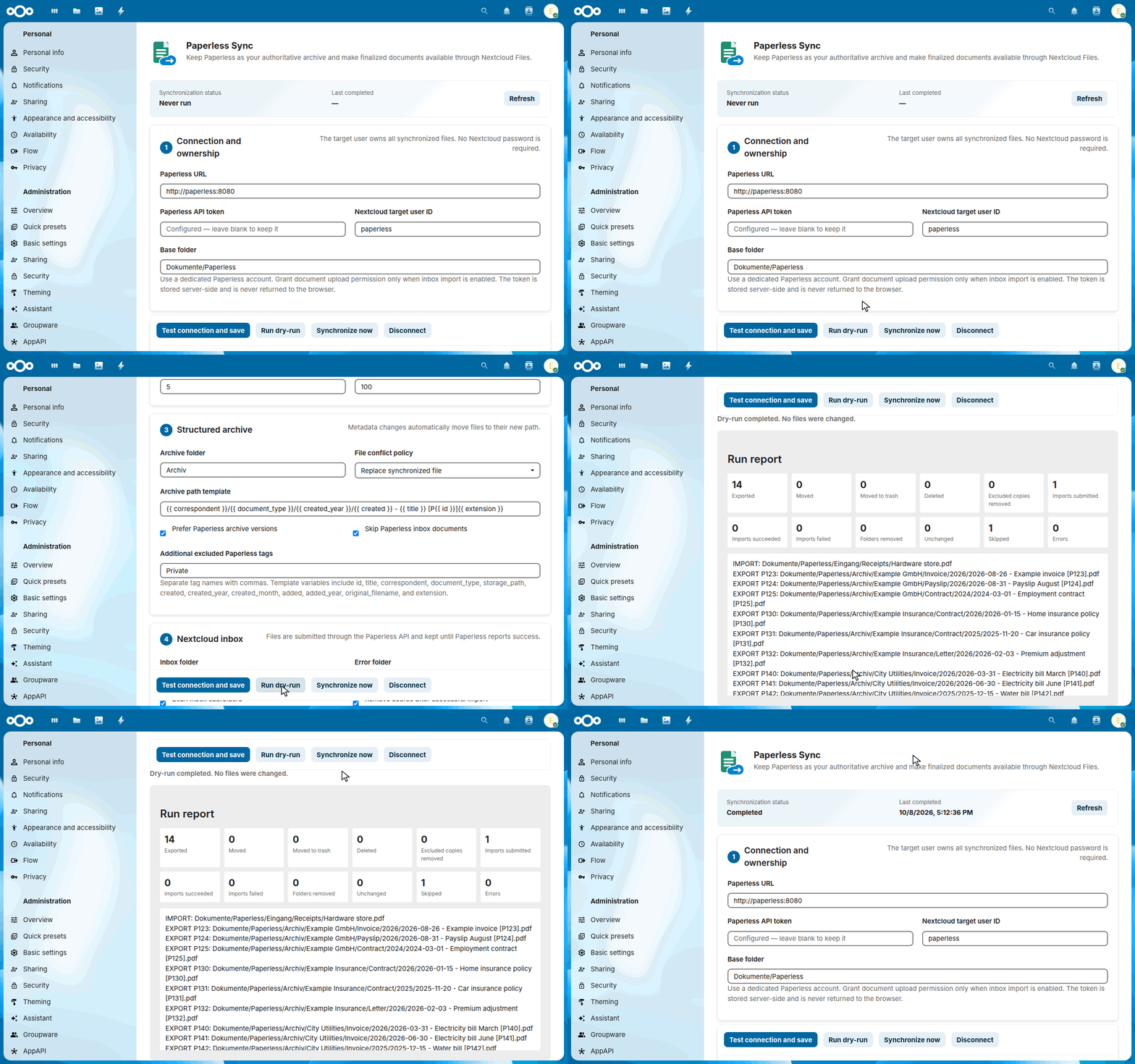
The dry-run and the first synchronization of the quick start:
Features
- Native Nextcloud filesystem operations without WebDAV credentials
- Configurable target user and base, archive, inbox, error, and deleted folders
- Configurable archive path template
- Correspondent-first folder hierarchy by default
- Archive PDF or original-file export
- Metadata-aware renames and moves
- Paperless inbox detection and configurable excluded tags, including removal of previously mirrored copies
- Recursive Nextcloud inbox import with Paperless task tracking
- Paperless trash mirroring and optional permanent deletion
- Configurable missing-document confirmation runs
- Empty-folder pruning
- Conflict policy, batch size, and interval controls
- Dry-run, manual execution, status, and error summaries
- Server-side token storage through Nextcloud's credentials manager
- Automated semantic releases and signed App Store packages
Usage
After installation, open Administration settings → Paperless Sync. Configure and test the connection while synchronization remains disabled. Run a dry-run, review the summary, and only then enable scheduled synchronization.
The default archive path template is:
{{ correspondent }}/{{ document_type }}/{{ created_year }}/{{ created }} - {{ title }} [P{{ id }}]{{ extension }}
This produces paths such as:
Dokumente/Paperless/Archiv/Example GmbH/Invoice/2026/2026-08-26 - Example invoice [P123].pdf
Each part of the template becomes a folder, and the base folder holds the folders of the inbox and of failed imports next to the archive:
flowchart TD
    base["📁 Dokumente/Paperless<br><i>base folder</i>"] --> archive["📁 Archiv<br><i>archive folder</i>"]
    base --> inbox["📁 Eingang<br><i>inbox folder: files for Paperless</i>"]
    base --> errors["📁 Fehler<br><i>error folder: failed imports</i>"]
    archive --> correspondent["📁 Example GmbH<br><i>{{ correspondent }}</i>"]
    archive --> deleted["📁 _Gelöscht<br><i>deleted folder: the Paperless trash</i>"]
    correspondent --> type["📁 Invoice<br><i>{{ document_type }}</i>"]
    type --> year["📁 2026<br><i>{{ created_year }}</i>"]
    year --> file["📄 2026-08-26 - Example invoice [P123].pdf<br><i>{{ created }} - {{ title }} [P{{ id }}]{{ extension }}</i>"]
Stable markers such as [P123] are compatible with the independent Paperless Unified Search app.
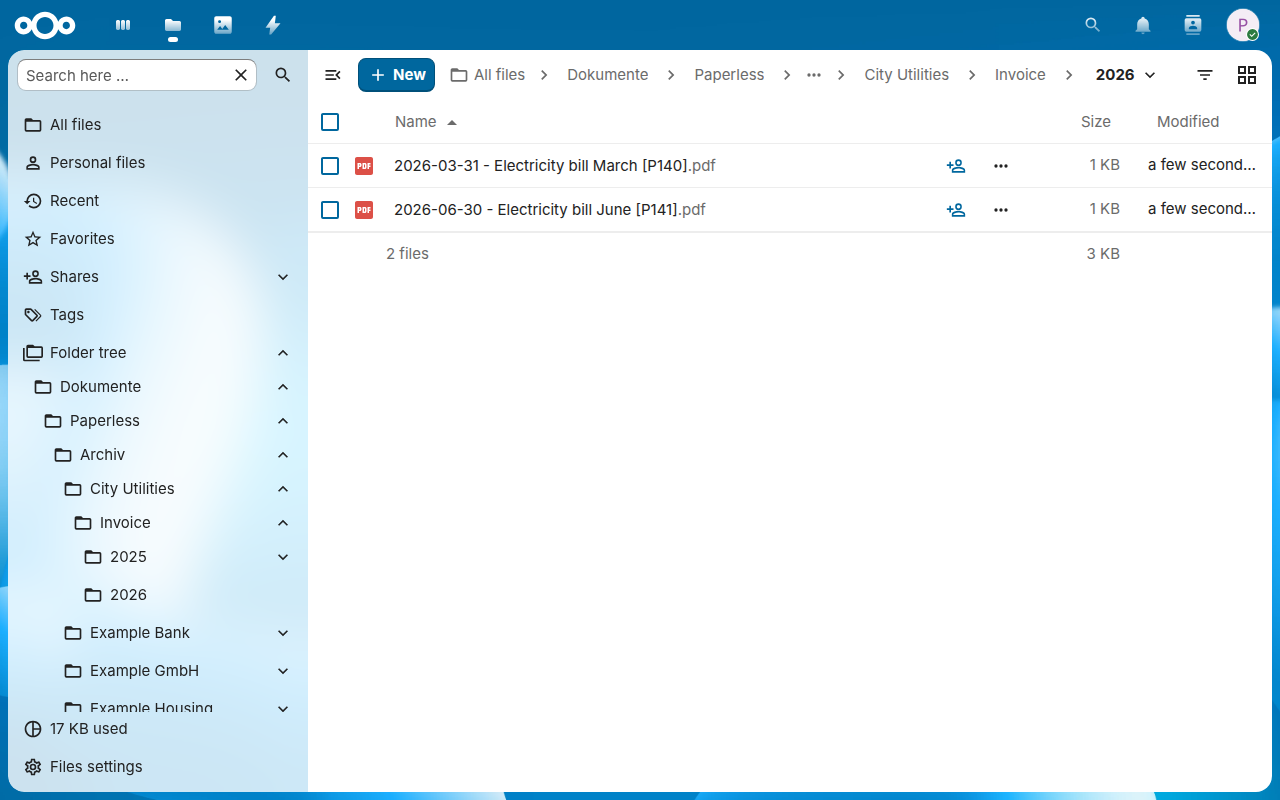
The archive in Files, one folder per correspondent, document type and year:

Configuration
Paperless connection
Use a dedicated Paperless service account. It needs view and download access to every document that should be exported. Enable documents.add_document only when Nextcloud inbox import is used. Trash synchronization requires visibility of the corresponding trashed documents.
The API token is stored in Nextcloud's credentials manager and never returned to the browser.
Folder ownership
The configured Nextcloud target user owns the synchronized folders. The app operates through Nextcloud's internal filesystem API and therefore does not need that user's password or an app password.
Path template variables
{{ id }}{{ title }}{{ correspondent }}{{ document_type }}{{ storage_path }}{{ created }},{{ created_year }},{{ created_month }}{{ added }},{{ added_year }}{{ original_filename }}{{ extension }}
The template must contain {{ id }}. Path components are normalized and sanitized for Nextcloud, macOS, and Windows clients.
Nextcloud inbox
Files in the inbox folder, and in its subfolders when Scan inbox subfolders is on, go to Paperless, at most as many in one run as the batch size allows. A file stays in the inbox until its Paperless task reports success:
flowchart LR
    file["📄 A file in 📁 Eingang"] -->|next run| upload{"Upload to<br>Paperless"}
    upload -->|accepted| task{"Its Paperless task,<br>in the next runs"}
    upload -->|"refused, such as an<br>unsupported file type"| refused["Stays in Eingang,<br>skipped until it changes"]
    upload -->|"Paperless unreachable<br>or overloaded"| retry["Waits 15 minutes, then<br>twice as long each time,<br>up to a day"]
    retry --> upload
    refused -->|"saved anew, renamed<br>or replaced"| upload
    task -->|still running| task
    task -->|success| done["Removed from Eingang,<br>or kept, as configured"]
    task -->|failure| failed["Moved to 📁 Fehler, next to<br>a .error.txt with the reason"]
A failed file keeps its subfolder below the error folder.
Paperless may refuse a file right away: one of a type it doesn't take, an empty one, or one too large for a proxy in front of it, such as the 100 MB of the free plan of Cloudflare. The report of that run lists the file once as IMPORT REJECTED, with the reason that Paperless gave, and the Nextcloud log records it as a warning. The runs after it leave the file in the inbox and skip it until it changes; save it anew, rename or replace it to submit it again.
When Paperless can't be reached, or fails with a server error such as 502 Bad Gateway, the run uploads no further files and tries this one again later: after 15 minutes, then after twice as long each time, at most once a day. The other files follow in the next runs.
Deletion safety
Moving Paperless documents to its trash can be mirrored into the configured _Gelöscht folder; when the trash behavior keeps archive files in place, the copy stays where it is. Permanent Nextcloud deletion is disabled by default. When enabled, a document must be absent from both the active Paperless API and its trash for the configured number of consecutive complete scans.
stateDiagram-v2
    direction LR
    state "In the archive" as archive
    state "In _Gelöscht" as deleted
    state "Deleted in Nextcloud" as gone
    [*] --> archive: exported
    archive --> deleted: moved to the trash in Paperless
    deleted --> archive: restored in Paperless
    deleted --> gone: deleted for good in Paperless,<br>after N complete scans,<br>with permanent deletion on
    archive --> deleted: gone from Paperless without the trash,<br>after N complete scans
    archive --> gone: the same, with permanent<br>and direct deletion on
N is the number of Required consecutive missing scans, three by default. With the trash behavior Keep archive file in place, the copy stays in the archive instead of moving to _Gelöscht, and it is deleted from there when the rules allow it.
The copy of a document that disappears from Paperless without passing through its trash moves to the deleted folder after the same number of scans. It stays in place when the trash behavior keeps archive files in place, and it is deleted when direct deletion is allowed as well.
Only a copy that is still there is moved or deleted: a document whose copy is already gone, or that was never exported, is only marked as trashed or missing. Moves to the deleted folder and deletions count against the batch size like every other change: what does not fit into a run waits for the next one. A copy that cannot be moved or deleted is reported as an error of its document, and the run carries on with the others.
Background jobs
The app uses Nextcloud's native cron scheduler. System cron must run reliably. The configured interval is enforced by the app; each run limits modifications to the configured batch size.
The settings, section by section
The settings are in Administration settings → Paperless Sync. Above the sections, the status shows the state and the end of the last run; below them, the buttons save the settings after a test of the connection, start a dry-run or a run, and disconnect Paperless.
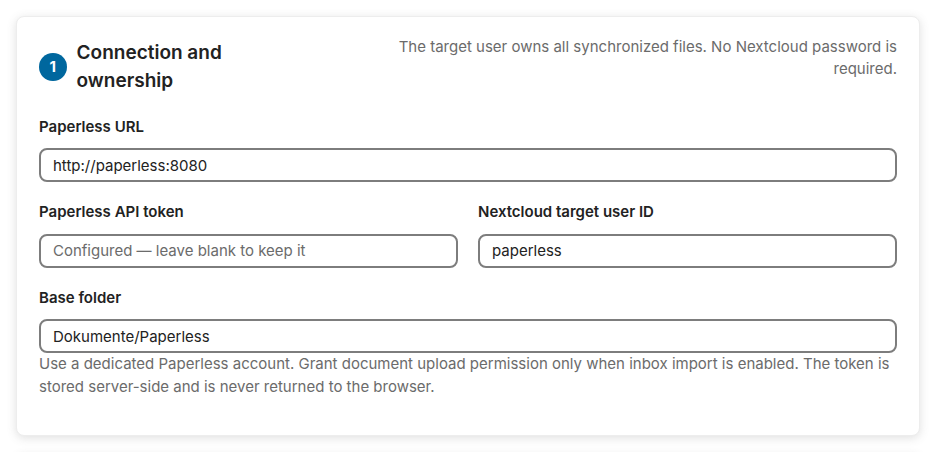
1 · Connection and ownership: the address of Paperless, its API token, the Nextcloud user who owns the archive, and the base folder in the files of that user.

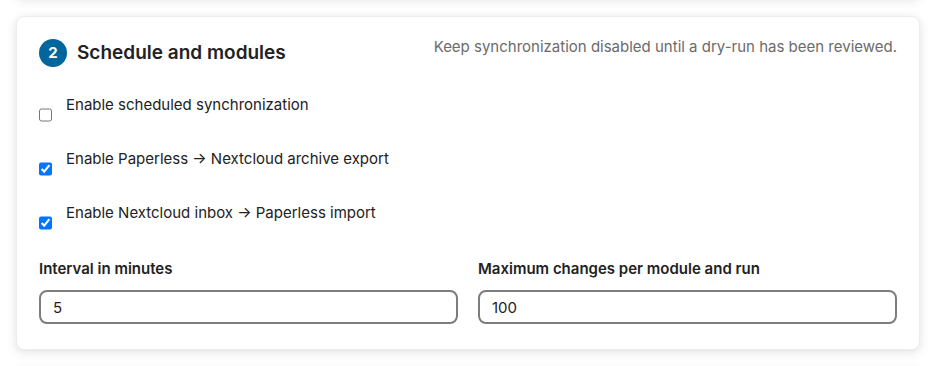
2 · Schedule and modules: the scheduled synchronization, the export to Nextcloud and the import from the inbox, each on its own, the interval, and the most changes of one run.

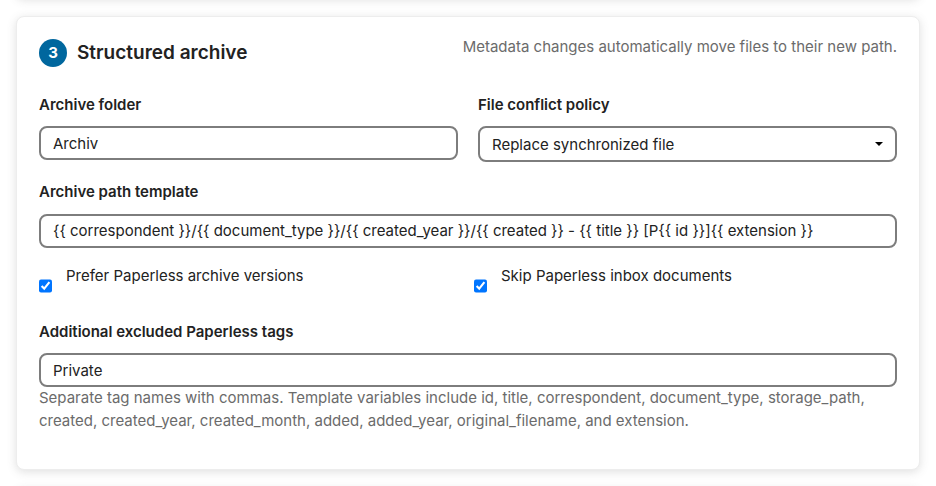
3 · Structured archive: the archive folder, what happens when a file is in the way, the path template, the archive version or the original, and which documents stay out.

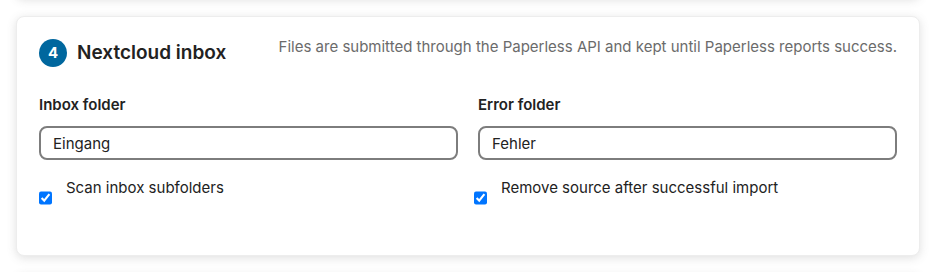
4 · Nextcloud inbox: the inbox folder, the error folder, the subfolders of the inbox, and whether an imported file leaves the inbox.

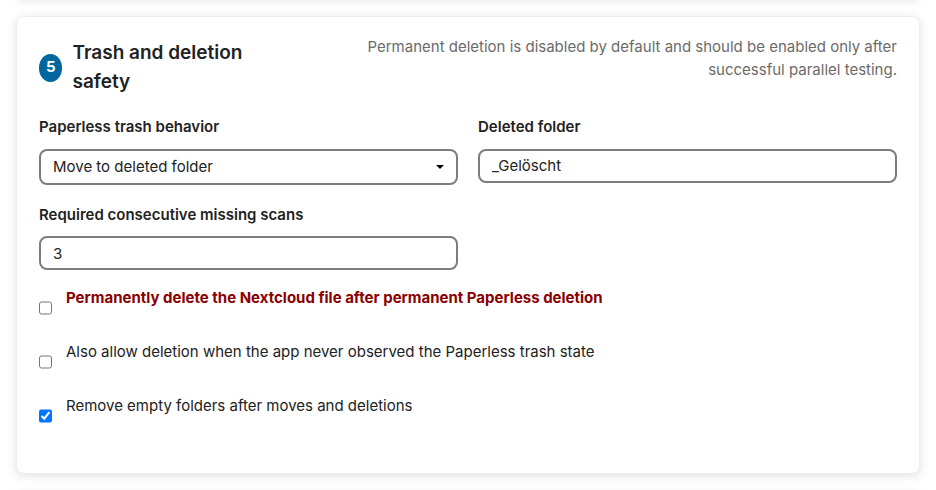
5 · Trash and deletion safety: what a document in the Paperless trash does to its copy, the deleted folder, the scans before a missing document counts as gone, and the switches of permanent deletion.

The report of a run
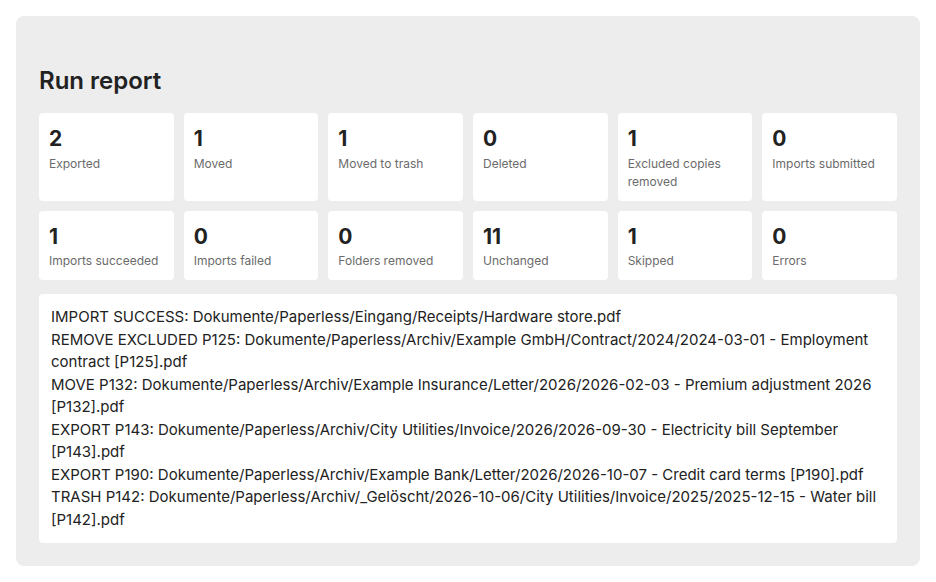
A dry-run or a run by hand ends with its report: how many documents each kind of change concerned, and for a dry-run a line for every file that a run would write, move or delete. A file of the inbox that Paperless refuses appears once, as IMPORT REJECTED with the reason of Paperless, and counts as a failed import; until it changes, the runs after it count it as skipped. This dry-run comes a few days after the first synchronization, when Paperless has two new documents, a new title, a document in its trash, one with the excluded tag Private and a finished import: