Issue assistant
Safe AI issue triage for GitHub. A read-only AI writes a first analysis of every new issue, and a job without AI checks it before anything is posted. Labels, duplicates, reminders and the closing of fixed issues with the release come with it.
Get started See it live Latest release

What it does
-
A first analysis of every new issue
An AI that only reads writes a summary, the likely cause with links to the code and the documentation involved, what the reporter can try and what is still missing, in the reporter's language.
-
Labels
Labels from the issue forms and from the analysis, each with its reason. The labels themselves are code, in
.github/labels.toml. -
Duplicates
A sure duplicate of an issue that a maintainer opened or triaged gets a notice and closes three days later, linked to the original, unless someone objects. Other ones become suggestions for the maintainer.
-
Unanswered questions
Open questions mark an issue
needs-info. After 15 days the reporter gets a reminder that names the day the issue closes, and after 30 days it closes on that day. An answer, in a comment or by an edit, ends the waiting, and a comment reopens a closed issue. -
From the fix to the release
A merged pull request with
Fixes #12marks the issuefixed-in-next-release. The issue closes with a link to the release that ships the fix, and reopens if the problem persists. -
Slash commands
A comment such as
/assistant again,/assistant askand a question,/assistant duplicate #12or/assistant mutesteers the assistant on its issue. Maintainers give every command; the reporter can ask once for a new analysis. -
Findings of code scanning
The findings that
.github/findings.tomlaccepts are dismissed with their reason. Any other open finding fails a daily run, without a public issue.
The maintainer reads every issue and has the last word.
Used by ha-autodarts, Paperless Unified Search, Paperless Sync, the repository blueprint, the website dennis-otto.github.io and the issue assistant itself. See it live: the first analysis of a feature request in Paperless Sync, posted 2 minutes 39 seconds after the issue was opened.
Careful by design
What the assistant does on its own, so that an answer never makes matters worse:
-
Spam gets no answer
An issue that the AI takes for advertising or nonsense gets the label
invalidand no comment, so its author gets no reply. Closing or deleting it stays with the maintainer. -
Secrets and personal data
A token, a key or a password in an issue gets a warning to remove it, also from the edit history, and to replace it. Personal data, such as an e-mail address, gets a note on how to remove it. The AI never repeats either.
-
Vulnerabilities stay private
A possible security report gets only a pointer to the private reporting of the security policy: no analysis, no questions, no duplicates, and a fixed reason for its labels.
-
A maintainer's issue gets labels only
Issues that the owner, a member or a collaborator opens get the labels of their form, but no analysis. A run by hand gives one anyway.
-
The conversation stays the maintainer's
When the reporter answers its questions, the assistant follows up at most twice, and never once the maintainer has joined the conversation.
-
Nothing twice, nothing on closed issues
An analysis is not posted on an issue that was closed or locked in the meantime, and a task that already has its comment gets no second one, unless a maintainer runs it by hand.
Quick start
-
Install the latest release in the root of your repository, with Python 3.12 or newer, PyYAML (
pip install pyyaml) oryqto read YAML, git and the GitHub CLI:tag="$(gh release view --repo Dennis-Otto/issue-assistant --json tagName --jq .tagName)" dir="$(mktemp -d)" git clone --quiet --depth 1 --branch "$tag" https://github.com/Dennis-Otto/issue-assistant "$dir" && python3 "$dir/issue_assistant.py" install --setupinstallpins the workflows to the commit and the tag of its checkout, and writes the settings and the starters that the repository lacks.--setupcreates the environmentissue-assistant, which only the default branch may use, and asks for the engine's secret. For Claude,claude setup-tokencreates the token of a Claude subscription,CLAUDE_CODE_OAUTH_TOKEN; an API key goes intoANTHROPIC_API_KEYinstead. Each step looks first, so running it again changes nothing but the workflows. -
Describe the project in
.github/issue-assistant/project.md: what it does, where the code, documentation, troubleshooting guide and changelog are, which versions and logs matter in a bug report, and how to address reporters if not as the catalogs of the languages do, such as with Sie in German. The AI reads it before every task. Then adapt the starters to the project, its labels and its issue forms, until the check passes:python3 "$dir/issue_assistant.py" check -
Let the release close fixed issues: under Settings → General → Issues, clear Auto-close issues with merged linked pull requests, so that a fixed issue stays open until the release that ships the fix. GitHub has no API for this setting. A repository without releases sets
close_with_release = falseinconfig.tomlinstead. -
Try it: commit the set-up, push it to the default branch, and under Actions → Issue assistant → Run workflow, enter the number of an existing issue. A run by hand starts as a dry run, which writes nothing; the summary of its
applyjob shows the labels and the comment that it would post: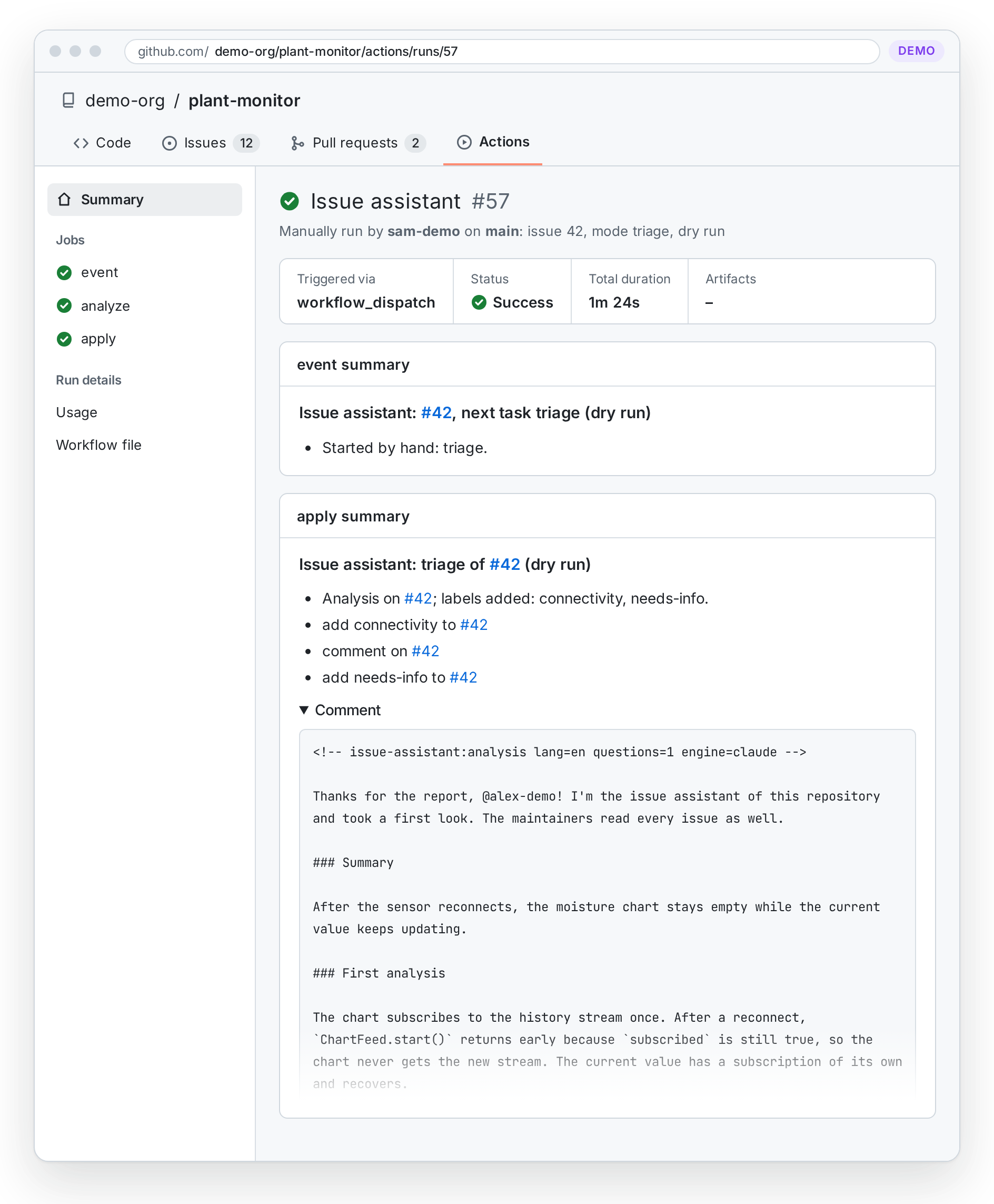
Get started has the requirements of a repository, every step in detail and how to check that it works; Configuration has every setting.
Learn more
-
Get started
What a repository needs, the set-up step by step, and how to check that it works before the first reporter comes.
-
How it works
The four workflows, the life of an issue from its first analysis to the release that ships its fix, and what keeps the AI in check.
-
Configuration and reference
Every key of the labels, the settings and the accepted findings, the commands, and every input and output of the action.
-
What reporters see
Every comment that the assistant posts, from the first analysis to the release that ships the fix, in English and in German.
-
Questions and troubleshooting
What it costs, which data leaves GitHub, and what to do when an issue gets no comment.
-
Compared with other tools
The Claude Code action's examples, GitHub Agentic Workflows, actions/stale, Dosu and GitHub's duplicate detection, cell by cell with sources.
-
Architecture
The action, its commands and the four workflows that call it in a repository.
-
Security design
What the assistant protects, what it trusts, the threats with their countermeasures, and the risks that remain.
-
Roadmap and decisions
What the assistant intends to do in the next twelve months and what it will not do, and the decisions that shape it, each with its reasons.
-
Releases and changelog
Every release with its notes on GitHub, and the changes of each version.